 Inverity
The LCP Image Playbook: Fix Your Largest Contentful Paint
Date Published
TL;DR >- Images are the LCP element on 76% of mobile pages and 85.3% of desktop pages (Web Almanac 2025), so fixing LCP almost always means fixing one image.- The adoption gap is the opportunity: only 16-17% of pages putfetchpriority="high"on their LCP, only ~2% preload it, and ~16-17% actively lazy-load it (Web Almanac 2025).- Correctly applied,fetchpriorityalone has delivered 20-30% LCP improvements in lab tests (Addy Osmani, 2023) and cut Google Flights' LCP from 2.6s to 1.9s (web.dev).- Work the four LCP sub-parts in order of effort-to-impact: kill lazy-loading on the LCP, addfetchpriority, then fix format and sizing, then TTFB. Full table below.
Largest Contentful Paint has a strange status in 2026: the metric is stable, the fixes are documented, most of them are one-line changes, and almost nobody applies them. Only 62% of mobile sites hit the "good" LCP threshold (Web Almanac 2025), not because the remaining 38% face hard problems, but because the easy fixes have single-digit-to-low-double-digit adoption.
That gap is this post's organizing idea. Rather than another generic "optimize your images" checklist, this playbook walks the four sub-parts of LCP, pairs each fix with how many pages actually use it and what gain the documented cases produced, and orders the work by effort-to-impact. It's a map of what the majority is leaving on the table, and it sits within the broader picture we sketched in page speed is still broken in 2026.
What counts as a good LCP in 2026?
2.5 seconds or less at the 75th percentile, unchanged into 2026 (web.dev LCP reference). Currently 62% of mobile sites and 74% of desktop sites achieve it, while only 48% of mobile sites pass all Core Web Vitals (Web Almanac 2025, CrUX data).
If you've been braced for goalpost moves, relax: there haven't been any. No new Core Web Vital has shipped since INP replaced FID in March 2024, and the thresholds remain LCP 2.5s, INP 200ms, CLS 0.1 (Chrome/web.dev via corewebvitals.io, 2025-2026). The only notable movement is at the measurement edge: soft-navigation measurement for single-page apps has been in origin trial since Chrome 139 in August 2025 (Chrome/web.dev via corewebvitals.io, 2025-2026). If you run an SPA, watch that trial; everyone else can treat 2026 as a stable target year.
Stability cuts both ways, though. A stable metric means the sites still failing it aren't failing because the rules changed. They're failing on execution, and mostly on one element.
Why is your LCP element almost always an image?
Because on most pages, the largest above-the-fold element is a hero image, product photo, or banner: images are the LCP element on 76% of mobile pages and 85.3% of desktop pages (Web Almanac 2025). Fixing LCP is, for four pages out of five, an image delivery problem.
Now hold that against how those LCP images are actually treated in the wild, all from the same Web Almanac 2025 Performance chapter:
- Only 16-17% of pages set
fetchpriority="high"on their LCP element. - Only about 2.1-2.2% preload their LCP image.
- Roughly 16-17% of pages lazy-load their own LCP image (10.4% via native
loading="lazy", ~5.9% via custom lazy-loading on mobile), actively delaying their most important resource. - 0.3% ship
fetchpriority="low"on the LCP element, presumably by accident. - LCP images are still 57% JPEG and 26% PNG, with 11% WebP and just 0.7% AVIF.
Read as a population, this is remarkable: the single highest-leverage element on the page gets no special treatment on ~83% of sites, and outright sabotage on ~16%. The playbook below is largely a tour of that neglect.
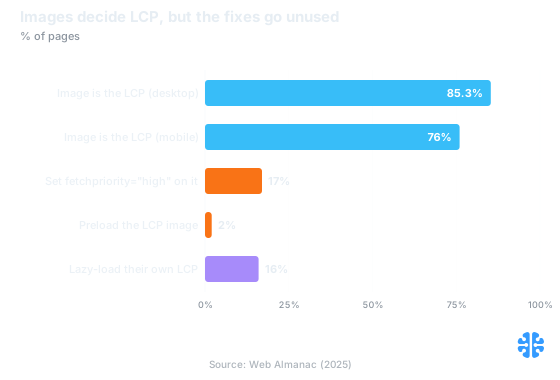
Images dominate LCP while the one-line fixes sit at minority adoption. Source: Web Almanac 2025.
The four sub-parts of LCP
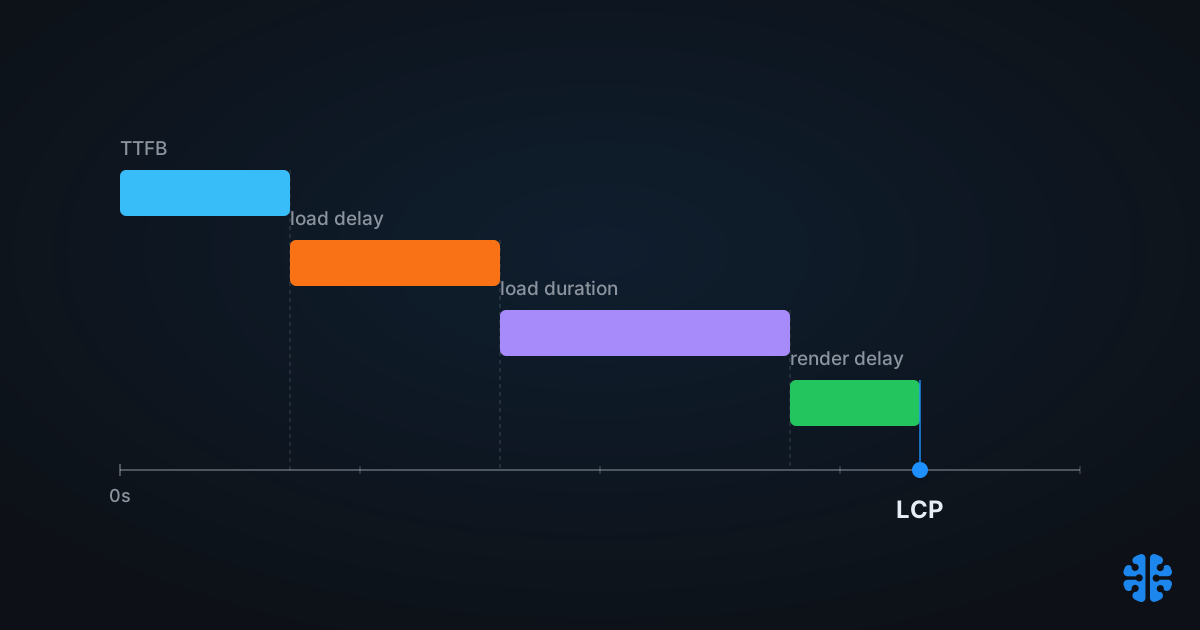
The web.dev model divides LCP into four sequential sub-parts, and every fix targets exactly one of them (web.dev LCP reference): time to first byte, resource load delay, resource load duration, and render delay. Diagnose which sub-part dominates your waterfall before touching anything, or you'll optimize a segment that wasn't the problem.
In plain terms:
- TTFB: how long until the HTML starts arriving.
- Resource load delay: the gap between TTFB and the browser starting to fetch the LCP image. Late discovery, lazy-loading, and low priority all inflate this.
- Resource load duration: how long the image takes to download. Format, compression, and sizing live here.
- Render delay: the gap between the image finishing and it actually painting, usually caused by render-blocking scripts or CSS.
The costly, common failures cluster in the middle two, which is convenient: those are also the two you can fix without replatforming.
How do you cut resource load delay?
With markup, mostly. Three changes, all cheap: never lazy-load the LCP image, set fetchpriority="high" on it, and make sure it's discoverable in the server HTML as a real <img> rather than a CSS background or client-rendered element. Each targets the delay before the browser even starts fetching, and each has minority adoption (Web Almanac 2025).
First, stop the self-sabotage. The ~16-17% of pages lazy-loading their own LCP image (Web Almanac 2025) are telling the browser to defer their most urgent resource until layout confirms it's visible. Lazy-loading is excellent policy below the fold and pure loss above it. Audit templates, and audit plugins especially: blanket lazy-loading injected by a CMS plugin is one of the most common LCP regressions we see in CMS ecosystems, alongside the image-weight issues covered in our Core Web Vitals playbook for CMS images.
Second, raise the priority. Browsers initially fetch images at Low priority; fetchpriority="high" tells Chromium to fetch the LCP image immediately at High. Correct implementation has shown 20-30% LCP improvements in lab tests (Addy Osmani, Chrome team, 2023). In production, Fetch Priority cut Google Flights' LCP from 2.6s to 1.9s, about 27%, and Etsy measured around 4% in production (web.dev Fetch Priority article). Real-world gains land between those poles depending on how bad your baseline priority queue was. Only 16-17% of pages do this (Web Almanac 2025); it is one attribute.
Third, preload only when discovery is the problem. If your LCP image is set via CSS background or injected client-side, the preload scanner can't see it, and a <link rel="preload" as="image"> restores early fetch. About 2.1-2.2% of pages do this (Web Almanac 2025). But note the widely misunderstood gotcha: preload alone is not enough. A preloaded image still fetches at Low priority unless you also put fetchpriority="high" on the preload link itself (web.dev Fetch Priority article). Teams add the preload, see the image fetched early-ish but still queued behind higher-priority resources, and conclude preloading "doesn't work." The pair is:
```html
<link rel="preload" as="image" href="hero.avif" fetchpriority="high">
```
Better yet, make the image server-discoverable in the first place and skip the preload entirely.
Cutting resource load duration
Ship fewer bytes: modern format, honest dimensions, sane compression. The population headroom here is enormous, since LCP images are still 57% JPEG and 26% PNG against 0.7% AVIF (Web Almanac 2025), while AVIF typically runs about 50% smaller than JPEG and WebP 25-35% smaller at comparable quality (Cloudinary codec research).
Three levers, in order of typical payoff:
- Format. Content-negotiate WebP/AVIF with a JPEG fallback. For the 57% of sites whose LCP is a JPEG, this alone can roughly halve the LCP image's transfer size at comparable visual quality (Cloudinary codec research).
- Dimensions. A responsive
srcsetwith an accuratesizesattribute stops mobile devices downloading desktop-sized heroes. Wrongsizessilently wastes every byte the format migration saved. - Compression level. Set per-image, not globally. The hero that determines LCP also determines the first visual impression, so this is the one image where crushing quality to chase bytes backfires; the trade-off logic is the subject of why blanket compression hurts your CMS.
Note the interaction with sub-part 2: halving load duration only halves the segment after the fetch starts. A perfectly compressed AVIF that starts downloading 1.5 seconds late still loses to a mediocre JPEG fetched at High priority from the first packet. Fix delay first; it's cheaper.
What about TTFB and render delay?
They're the bookends: fix TTFB with edge caching and fix render delay by keeping render-blocking work off the critical path. TTFB caps everything downstream, since the "good" LCP budget is only 2.5 seconds total at p75 (web.dev LCP reference); a 1.2s TTFB spends half of it before a single image byte moves.
For TTFB, the standard prescription holds: CDN edge caching for the HTML document where possible, and origin work off the critical path. One caution from experience: a CDN in front of a slow origin mostly caches the slowness for repeat visits and does nothing for the long-tail pages that miss cache. We've written about that gap in why your CDN isn't solving your image problem; the same logic applies to document TTFB.
Render delay is rarer for image LCP but real: the image has arrived and paint is blocked, typically by synchronous scripts or late-arriving CSS. If your waterfall shows the LCP resource finishing well before the LCP timestamp fires, look at the render-blocking budget, not the image.
The playbook, ordered by effort-to-impact
Do the one-line markup fixes first; they target load delay, cost minutes, and carry the best-documented gains. Then invest in format and sizing, then infrastructure. Adoption numbers below are what the rest of the web is leaving on the table (Web Almanac 2025).
# | Fix | Sub-part | Pages doing it | Documented gain | Effort |
|---|---|---|---|---|---|
1 | Remove | Load delay | ~16-17% do the opposite; 0.3% ship | Removes a self-inflicted delay | Minutes |
2 | | Load delay | 16-17% | 20-30% lab (Osmani, 2023); Flights 2.6s to 1.9s, Etsy ~4% (web.dev) | Minutes |
3 | Server-discoverable | Load delay | ~2.1-2.2% preload | Restores early fetch for late-discovered LCP | Hours |
4 | Modern format via negotiation (AVIF/WebP, JPEG fallback) | Load duration | 11% WebP, 0.7% AVIF LCP images | ~25-50% smaller transfers (Cloudinary) | Days (pipeline) |
5 | Accurate | Load duration | n/a | Eliminates oversized downloads on mobile | Hours-days |
6 | Edge-cache HTML and cut origin time | TTFB | n/a | Raises the ceiling for everything downstream | Weeks |
7 | Unblock rendering (defer scripts, prune critical CSS) | Render delay | n/a | Case-dependent; check waterfall first | Days |
A note on how we handle step 4 at Inverity: format and compression choices for the LCP image are exactly where automated pipelines are most tempted to overreach, because the byte savings are so visible and the quality cost so easy to ignore. Whatever tooling you use, insist that its quality claims are measurable and reversible; the LCP hero is the worst possible image to discover an artifact on.
Steps 1 and 2 are the whole thesis in miniature. Two attributes, adopted by fewer than one page in five, with production-documented gains up to 27%. The 2.5-second bar hasn't moved. The ladder to clear it is mostly lying on the ground.
FAQ
What is a good LCP score in 2026?
2.5 seconds or less at the 75th percentile of real-user loads, unchanged since the metric launched (web.dev LCP reference). Currently 62% of mobile sites and 74% of desktop sites achieve it, but only 48% of mobile sites pass all three Core Web Vitals (Web Almanac 2025, CrUX).
Why is my LCP image loading slowly even though it's above the fold?
Usually load delay, not download speed: the browser started fetching it late. Common causes are lazy-loading the LCP image, an anti-pattern on ~16-17% of pages (Web Almanac 2025), default Low fetch priority, or late discovery because the image lives in CSS or client-rendered markup.
Should I preload my LCP image or use fetchpriority?
Use fetchpriority="high" on the <img> first; it's sufficient whenever the image is in the server HTML. Preload only for late-discovered images, and put fetchpriority="high" on the preload link too, because preloaded images otherwise still fetch at Low priority (web.dev Fetch Priority article).
Does lazy loading hurt LCP?
For the LCP image, yes, directly: it delays the fetch of your most important resource. Yet 10.4% of pages natively lazy-load their LCP image and roughly 5.9% more do it with custom JavaScript on mobile (Web Almanac 2025). Lazy-load below the fold, never the hero.
Did Google change Core Web Vitals thresholds in 2025 or 2026?
No. Thresholds remain LCP 2.5s, INP 200ms, CLS 0.1, and no new metric has shipped since INP replaced FID in March 2024 (Chrome/web.dev via corewebvitals.io, 2025-2026). The only development is soft-navigation measurement for SPAs, in origin trial since Chrome 139 (August 2025).