 Inverity
How to Migrate a Media Library Without Breaking Your Site
Date Published
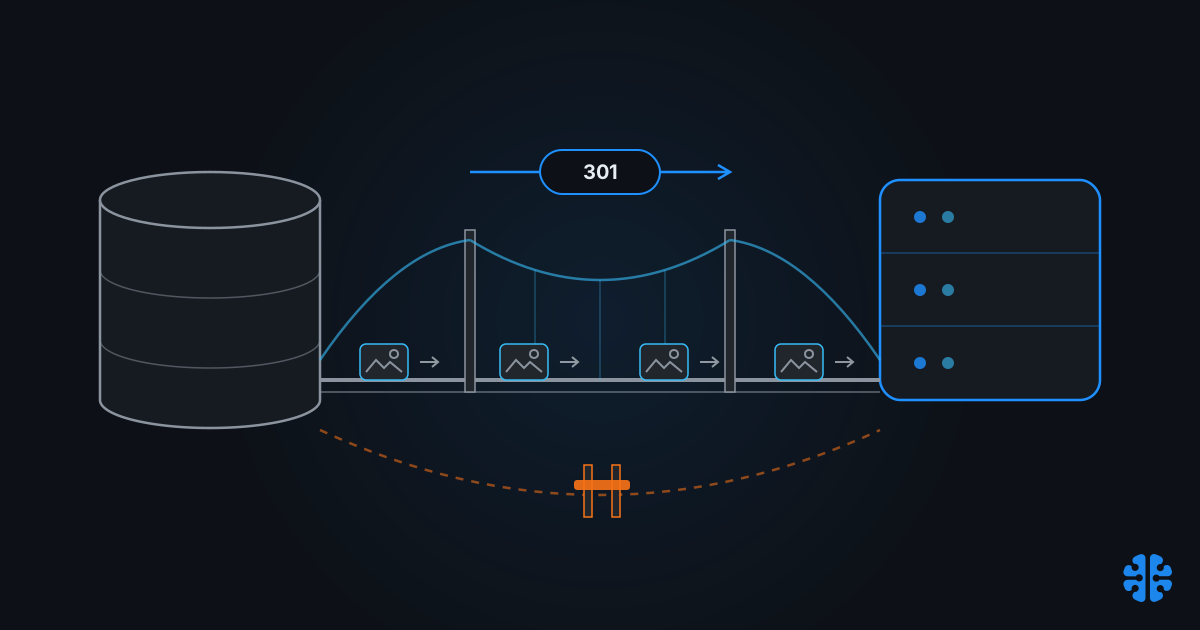
Migration guides have a blind spot the width of your entire media library. SEO consultants write about page redirects. CMS vendors write about content mapping. CDN providers write about DNS cutover. Nobody writes about the layer where these three meet, which is exactly where migrations break: the tens of thousands of image URLs embedded in your database, indexed by Google Images, and cached in a CDN you're about to switch off.
Google settled any doubt about whether this layer matters. Its February 2025 image SEO update tells you to reference the same image with a consistent, stable URL site-wide, because changed image URLs force recrawling and reindexing and waste crawl budget (Google Search Central, 2025). Image URLs are first-class SEO objects. This guide treats them that way, through every layer of the stack.
TL;DR >- Google's February 2025 guidance: keep image URLs consistent and stable; changing them forces recrawl and reindex and wastes crawl budget (Google Search Central, 2025).- Images can and should be 301-redirected like pages. Keep redirects live at least 180 days, ideally a year or more (Google Search Central).- One documented replatform mis-redirected 15,000+ URLs and organic clicks collapsed to near zero within two months (Totally Digital, 2024).- Well-executed migrations stabilize in 2-8 weeks; typical recovery runs 4-12 weeks depending on scale (Digital Applied, 2026).- The safe sequence: inventory → URL mapping → serialization-aware database rewrite → image 301s → phased dual-CDN cutover → two weeks of recovery monitoring.
Why do image URLs matter as much as page URLs?
Because Google Images maintains its own index, and your images hold rankings in it that die with their URLs. Google's February 2025 documentation update is explicit: reference the same image with a consistent, stable URL, since changed URLs force Google to recrawl and reindex every affected image, wasting crawl budget (Google Search Central, 2025).
The update drew immediate industry attention precisely because most teams had never treated image URLs as rank-carrying assets (Search Engine Land, 2025). If your products get traffic from Google Images, a migration that changes every image URL without redirects is a visibility reset, and one you'll wait weeks to recover from even if you fix it.
The good news: images can be 301-redirected exactly like pages, and Google applies no penalty for permanent redirects (Google Search Central). The whole discipline of this migration reduces to one principle. Either an image URL stays stable, or it 301s in one hop to its successor. Every URL that does neither is a small, silent leak of accumulated equity.
Start with the asset inventory
Everything that can reference an image, not just the media library listing. Your DAM or uploads folder is the easy part. The hard part is the reference graph: database fields, serialized page-builder data, CSS, templates, sitemaps, and third-party embeds. A migration plan built from the media library alone will miss the references that break.
Build the inventory from three sources and diff them against each other:
- Storage: every object in
/wp-content/uploads/, your S3 bucket, or your DAM, with checksums so you can detect duplicates and verify integrity after transfer. - References: a full crawl (Screaming Frog or similar) capturing every
src,srcset,poster, and CSSurl()on the live site, plus a database scan for image paths in content and metadata fields. - Demand: CDN and server logs plus Google Search Console, telling you which images actually receive traffic. These get priority mapping and priority verification.
The diff is where migrations are won. Assets in storage but never referenced are candidates to leave behind rather than migrate. References with no matching asset are already broken, and you don't want to spend redirect effort preserving 404s. If your library runs to seven figures, the batching and verification discipline is the same one we described in optimizing 1 million images without breaking your site.
The output is a single mapping table: old URL → new URL, one row per asset, with a traffic-priority column. Every later phase consumes this table. It's also worth understanding where each URL sits in your delivery chain before you remap it, which is the territory of our media pipeline from upload to delivery explainer.
What breaks inside the CMS database during migration?
Serialized data. WordPress page builders and plugins store absolute image URLs inside serialized PHP arrays, where string length is encoded alongside the string itself. A plain find-and-replace changes the URL but not the recorded length, and PHP then discards the entire corrupted structure. Layouts vanish, widgets reset, and the damage surfaces gradually rather than at once.
The fix is to only ever rewrite URLs with serialization-aware tooling: WP-CLI's search-replace or Better Search Replace, both of which unserialize, replace, recount, and reserialize. Run against a staging copy first, and diff row counts and spot-check page-builder pages before promoting. Raw SQL REPLACE() against a WordPress database with builder content is how migrations produce sites that look fine on the homepage and broken everywhere else.
Two more database-layer failures dominate WordPress-to-headless moves. Featured-image associations are stored as attachment IDs, not URLs, so migrating files without migrating the ID mapping silently orphans every featured image. Gallery shortcodes embed ID lists with the same problem. rtCamp's migration work identifies broken featured-image associations and gallery ID mismatches as top post-migration failures in WordPress-Contentful moves (rtCamp).
Headless targets add ingestion constraints of their own. Sanity asset uploads scripted through the CLI or API must be concurrency-limited (with a tool like p-limit) or you'll hit rate limits mid-run and land in a half-migrated state (Sanity Learn). Contentful requires mapping loose upload directories into its structured asset model, which means your mapping table needs asset metadata, not just paths, before ingestion starts.
How should you handle image redirects?
One hop, 301 or 308, one-to-one, kept alive for at least 180 days and ideally a year or more (Google Search Central). Those four properties are the entire discipline. Every common redirect shortcut violates one of them, and each violation has a specific, documented cost.
Practice | Do / Don't | Why |
|---|---|---|
301/308 per image, old URL → exact new URL | Do | Transfers signals to the precise successor; no penalty for permanent redirects (Google) |
Single-hop redirects only | Do | Chains slow crawls and dilute consolidation; collapse any chain to one hop |
Keep redirects live ≥180 days, ideally ≥1 year | Do | Google's stated minimum for signal transfer (Google) |
Update canonicals, internal links, and sitemaps to new URLs | Do | Don't make your own pages depend on redirects; submit old and new sitemaps during transition |
Blanket redirect old images to the homepage | Don't | Google treats irrelevant mass redirects as soft 404s; consolidation is lost |
302 temporary redirects for a permanent move | Don't | Wrong signal type for a permanent change; use 301/308 |
Regex "close enough" mapping without verification | Don't | This is how 15,000 URLs get mis-redirected (Totally Digital) |
Dropping redirects at 90 days to simplify config | Don't | Below Google's 180-day minimum; signals not yet fully transferred |
The mis-mapping row deserves its own paragraph, because it's the most instructive documented failure in this space. A replatforming project shipped with more than 15,000 mis-redirected URLs, pointing old addresses at wrong or irrelevant destinations. Organic clicks collapsed to near zero within two months (Totally Digital, 2024). The redirects existed. They were simply wrong, which search engines treat as worse than absent, because wrong redirects actively teach the index that your content is gone.
The lesson: redirect mapping is data work, not config work. Generate the map from your inventory table, then verify it by crawling the old URL list and asserting that every response is a single 301 landing on a 200 whose content matches the mapped asset. Automate the assertion. At tens of thousands of URLs, sampling by hand is how the 15,000-URL failure happens.
Cutting over CDNs without downtime
Run both CDNs simultaneously and shift traffic in weighted stages, with DNS TTLs lowered in advance so every stage is quickly reversible. The zero-downtime pattern documented by CDN operators: drop TTLs to 60-120 seconds 24-48 hours before cutover, then shift 1% → 10% → 50% → 100% (BlazingCDN, 2024; Vercel).
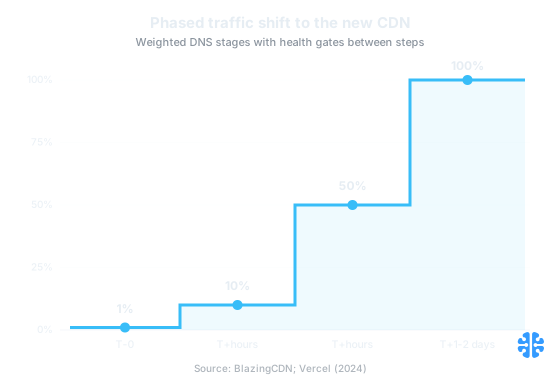
Weighted DNS shifting moves traffic in reversible stages, 1% to 10% to 50% to 100%, with health gates between steps (BlazingCDN, 2024; Vercel).
The phased sequence, end to end:
Phase | Action | Gate to proceed |
|---|---|---|
T-48h | Lower DNS TTLs to 60-120s; confirm propagation | Resolvers honoring new TTL |
T-24h | Dual-run: new CDN serving same origin; redirects deployed and crawl-verified | Old-URL crawl: 100% single-hop 301 → 200 |
T-0 | Weighted DNS shift to 1% (Route 53/NS1 weighted records) | Error rate and cache-hit ratio nominal at 1% |
T+hours | 10%, then 50% | No 404 spike in image logs; latency parity |
T+1-2 days | 100% to new CDN | Clean logs at 50% sustained |
T+weeks | Retire old origin only when its logs show ~zero requests | Old CNAME kept warm as rollback until then |
Two details separate calm cutovers from incident retrospectives. First, keep the old origin returning 200s until its logs flatline; long-TTL resolvers and embedded hotlinks will keep hitting it for longer than you expect. Second, your rollback is the old CNAME, kept warm and tested, not a plan to rebuild under pressure. Reversibility is the property that makes each stage safe, the same argument we make about optimization itself in rollback: the most critical media optimization feature.
A note on expectations: a new CDN inherits your URL and redirect hygiene, it doesn't substitute for it. Cutover mechanics are the easiest layer of this migration to get right, and the one vendors most oversell, a pattern we've examined in why your CDN isn't solving your image problem.
How do you know the migration worked?
You measure recovery instead of assuming it. Google's guidance, aggregated from John Mueller's statements, puts ranking stabilization at 4-12 weeks depending on site scale, with well-executed moves recovering in 2-8 weeks (Digital Applied, 2026). Your monitoring window should cover at least that range, with image-specific instrumentation, since Google Images typically recovers on its own timeline.
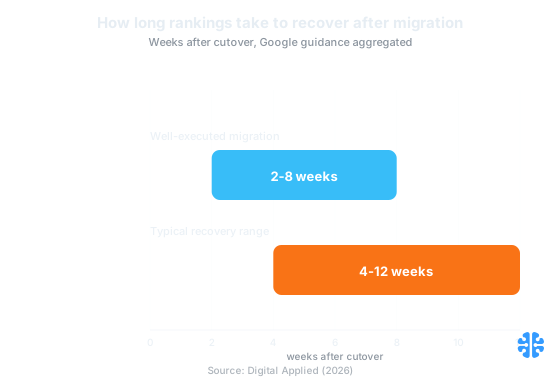
Well-executed migrations stabilize in 2-8 weeks; the typical range runs 4-12 weeks depending on scale (Digital Applied, 2026).
The verification loop has three instruments:
- Diff crawl. Screaming Frog against the old URL list and the new site: every old URL must 301 once to a 200, and new-site image references must contain zero legacy hostnames.
- CDN log watch. A dedicated 404 monitor on image paths in the new CDN's logs. Image 404s after cutover are mapping bugs surfacing; triage them daily against the inventory table.
- Search Console. Crawl stats checked daily for two weeks, watching for a 404 spike or crawl-rate collapse, plus Google Images impressions in performance reports segmented by search type.
Expect the recrawl churn Google's February 2025 guidance describes: even perfect redirects force reindexing, so image impressions commonly dip before recovering. The signal that distinguishes a healthy dip from a failing migration is the error curve. Clean redirects with a temporary impressions dip is recovery in progress. Rising 404s with falling impressions is the 15,000-URL failure mode, and every day it runs compounds the damage.
How we think about this at Inverity: a migration is an experiment you should be able to verify and reverse, so we treat before/after evidence, per-asset, as a deliverable of the migration itself, not an optional audit. If you can't produce the mapping table, the crawl results, and the recovery curve, you don't know the migration worked. You're hoping it did.
FAQ
Will I lose SEO traffic if my image URLs change during a migration?
Without redirects, yes, especially in Google Images, which indexes image URLs directly. Google's February 2025 guidance says stable image URLs matter because changes force recrawling and reindexing and waste crawl budget (Google Search Central, 2025). With correct one-hop 301s, signals transfer and a temporary dip typically recovers.
Do images need 301 redirects too, or only pages?
Images too. Image files can be 301-redirected exactly like pages, and Google applies no penalty for permanent redirects (Google Search Central). Skipping image redirects abandons your Google Images visibility even when every page redirect is perfect, because the image index tracks the image URLs themselves.
How long should redirects stay in place after a media migration?
At least 180 days, and Google says a year or longer is better (Google Search Central). Since permanent redirects carry no penalty, the pragmatic answer for high-traffic images is indefinitely. Removing redirects early is pure downside: any untransferred signal and any remaining external link equity is simply lost.
How do I migrate wp-content/uploads to a headless CMS without breaking embedded references?
Rewrite URLs only with serialization-aware tools (WP-CLI search-replace or Better Search Replace); plain find-and-replace corrupts serialized page-builder data. Then remap attachment IDs, since featured-image and gallery references break by ID, not URL (rtCamp). Concurrency-limit scripted uploads to targets like Sanity to avoid rate limits (Sanity Learn).
How long does it take Google to recover image rankings after a migration?
Plan for 4-12 weeks depending on scale; well-executed migrations typically stabilize in 2-8 weeks (Digital Applied, 2026). Google Images often lags page recovery because images are recrawled less frequently. Monitor image-type impressions in Search Console separately, and treat rising 404s, not the initial dip, as the alarm signal.