 Inverity
Video Optimization for Marketing Sites: Loops, Not Films
Date Published
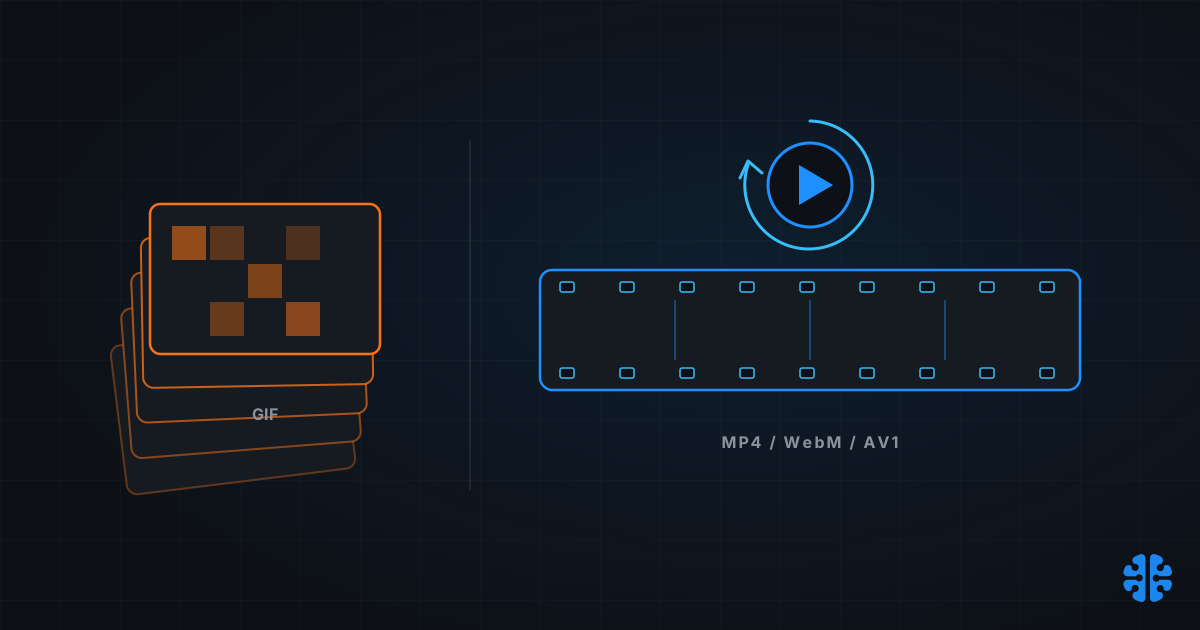
The video-optimization advice you'll find for marketing sites is mostly written for the wrong medium. It assumes you're Netflix: long content, adaptive bitrate ladders, per-title encoding. The data says otherwise. On the actual web, 58% of videos run under 30 seconds and only 9% exceed two minutes (Web Almanac 2024, Media, 2024). Marketing sites ship loops, not films, and loops have different physics.
That distinction decides nearly every choice that follows: progressive versus adaptive, codec stack, autoplay settings, and what to do with the GIFs still haunting your CMS.
TL;DR
- 58% of web videos are under 30 seconds; only 9% exceed 2 minutes (Web Almanac 2024, 2024). Short autoplay loops have quietly replaced GIFs.
- Delivery split: 68% progressive MP4, 23% adaptive (HLS/DASH), 1% WebM (Web Almanac 2024, 2024). For sub-30-second loops, progressive is usually the correct choice, not a legacy one.
- AV1 is production-ready with a catch: Apple decodes it only in hardware (Safari 17+ on M3/A17 Pro and later), so always ship an H.264 fallback (Bitmovin).
- AV2's spec landed at the end of 2025 with ~28.6-32.6% bitrate savings over AV1 (AOMedia figures via CNX Software, 2025), but it's a 2027-28 delivery story.
- The canonical GIF conversion: 3.7 MB GIF → 551 KB MP4 → 341 KB WebM, an 85-91% reduction (web.dev).
What kind of video does the web actually serve?
Short, silent, and inline. Among pages with video, 23% use autoplay, 16% preload, 14% playsinline, and 8% muted, a fingerprint the Web Almanac reads as "short inline videos playing the same role as GIFs" (Web Almanac 2024, Media, 2024). Video now appears on 6.7% of mobile pages and 7.7% of desktop pages, up 32% in relative terms since 2022.
Zoom out and the stakes get larger. Video accounted for roughly 75% of all mobile data traffic at the end of 2025 (Ericsson Mobility Report, 2026), against images at roughly 37% of median page weight. Per byte, video is the biggest thing your visitors' networks carry, which makes each encoding decision on a hero loop worth more than most image decisions on the same page.
But duration is the variable that should drive your architecture. A 15-second muted hero loop and a 40-minute webinar are different products that happen to share a file extension. The rest of this guide splits on exactly that line.
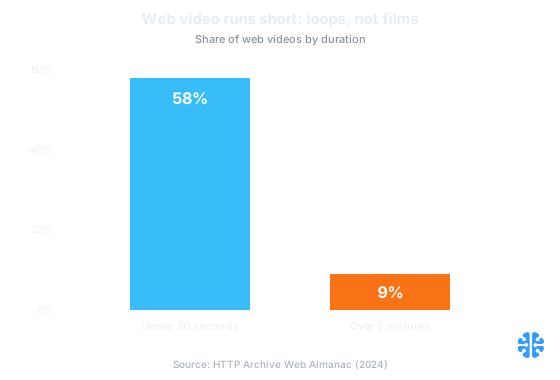
Web video duration distribution: 58% of videos run under 30 seconds and only 9% exceed two minutes (Web Almanac 2024, Media, 2024).
When should a marketing site use HLS or DASH instead of plain MP4?
Above roughly 30-60 seconds of content, on variable networks, with multiple renditions: that's where adaptive streaming pays its complexity tax. Below that, for the sub-30-second muted loops that make up 58% of web video, a well-compressed progressive MP4 or WebM at 720p reaches first frame faster than an HLS manifest round-trip, and it's simpler to cache (Web Almanac 2024, 2024).
The ecosystem already behaves this way, whatever the conference talks say. Progressive MP4 carries 68% of web video delivery, adaptive HLS/DASH 23%, WebM just 1% (Web Almanac 2024, 2024). That 68% is frequently framed as technical debt. For short loops, it's the correct engineering call: an HLS session must fetch a manifest, then a media playlist, then segments, and each round-trip delays your first frame for content too short to ever benefit from a bitrate switch.
Factor | Progressive MP4/WebM | Adaptive (HLS/DASH) |
|---|---|---|
Content length | Under ~30-60s | Over ~60s |
Audio | Muted loops | Narrated/sound-on content |
Renditions | One good 720p encode | Multi-bitrate ladder |
Time to first frame | Fastest (single request) | Manifest + playlist + segment round-trips |
Network adaptation | None (rarely needed for loops) | Mid-stream bitrate switching |
Caching/CDN | Trivial (one file) | Many segments, more moving parts |
Typical use | Hero loop, product demo teaser | Webinar, keynote, long testimonial |
If your longest asset is a 20-second loop and your vendor is selling you a streaming ladder, you're paying complexity for a switch that will never trigger. That's a specific instance of a general rule we keep returning to: file size, and infrastructure sophistication, are the wrong metrics when they're disconnected from what the viewer experiences.
Should you ship AV1 in 2026, and what breaks on iPhones?
Yes, with an H.264 fallback, always. Every major browser now decodes AV1, and platform adoption is decisive: roughly 95% of Netflix's catalog is available in AV1, more than 50% of YouTube watch-time, and over 70% of Meta Reels watch-time on iOS (AOMedia AV1 Adoption Showcase, 2024).
The catch is Apple's decode policy. Apple ships no software AV1 decoder: Safari plays AV1 only where the silicon can, meaning Safari 17+ on M3 or A17 Pro and later, and iPad on M4 and later (Bitmovin). Older iPhones and Macs don't error; they silently skip your AV1 source. Miss the fallback and a large slice of your highest-value mobile audience gets a poster frame and nothing else.
The stack that handles this is old, boring, and correct: source-order selection in the video element, where the first playable source wins.
```html
<video autoplay muted loop playsinline poster="hero.avif">
<source src="hero-av1.mp4" type='video/mp4; codecs="av01.0.05M.08"'>
<source src="hero-h264.mp4" type='video/mp4; codecs="avc1.4d002a"'>
</video>
```
AV1 for the majority who can decode it, H.264 for everyone else, optionally an HEVC rung between them for older Apple hardware. Note that this is the same lesson learned codecs are teaching on the image side: newer isn't a strategy, newer-with-verified-fallback is.
Is AV2 worth waiting for?
No. Ship AV1 ladders now and put AV2 on your 2027-28 roadmap. AOMedia released the AV2 specification at the end of 2025 (AOMedia, 2025), with measured bitrate reductions of ~28.6% versus AV1 on PSNR-YUV and ~32.6% on VMAF, and coverage citing "up to ~40%" in some configurations (CNX Software, 2025).
Those are real gains, honestly measured. But a spec is not a decoder in your visitor's pocket. AV1's own gap between specification and meaningful hardware decode ran roughly four to six years, and Apple's AV1 support arrived only with M3-class silicon. There's no reason to expect AV2's curve to run faster. Anyone selling "AV2-ready delivery" for your 2026 marketing site is selling a slide, not a pipeline.
The 2026 action item is unglamorous: get your AV1-plus-H.264 encodes right, measure them with metrics that track perception rather than raw error, and let the AV2 hardware cycle come to you.
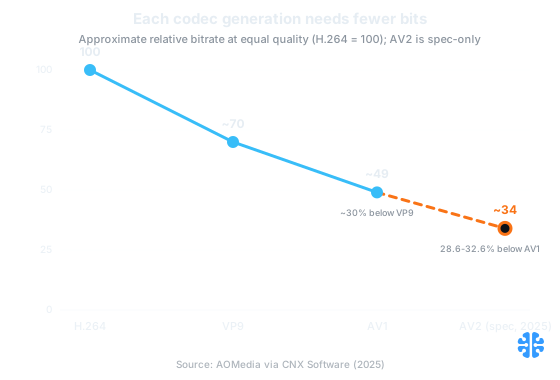
Each codec generation cuts bitrate roughly 30% at equal quality; AV2's 28.6-32.6% gain over AV1 exists only as a spec today (AOMedia via CNX Software, 2025).
Killing your GIFs, step by step
With a five-attribute video tag and an encoder, for an 80-95% size reduction. The canonical web.dev example converts a 3.7 MB animated GIF to a 551 KB MP4 (85% smaller) or a 341 KB WebM (91% smaller) with no visible change in behavior (web.dev, "Replace animated GIFs with video").
This is the largest untapped savings pool on most marketing sites, because GIF refuses to die: it still accounts for 16.8% of image-format usage (Web Almanac 2024, 2024). Lighthouse flags this directly with its "Use video formats for animated content" audit (Chrome Developers).
The recipe:
- Encode both WebM and MP4 versions of the animation (ffmpeg defaults are fine to start).
- Reproduce GIF behavior exactly with
<video autoplay muted loop playsinline>. Muted is required for autoplay policy; playsinline stops iOS from going fullscreen. - Order the WebM source before MP4: browsers take the first playable source, and WebM is typically the smaller file.
- Keep the loop honest: no audio track at all (dropping it saves bytes and satisfies autoplay policies), around 720p, 24-30 fps, 10-20 seconds.
Format | Size | Reduction |
|---|---|---|
Animated GIF | 3.7 MB | baseline |
MP4 (H.264) | 551 KB | 85% |
WebM (VP9) | 341 KB | 91% |
Source: web.dev, maintained.
Does hero video wreck Core Web Vitals?
Only if you let the video, rather than its poster, own your Largest Contentful Paint. The hero video or its poster image is frequently the LCP element, and for LCP the delivery details matter more than the codec: set preload="metadata", ship an explicit optimized poster, and put fetchpriority="high" on that poster.
The logic is the loop logic again. Your visitor needs a great first frame in the first few hundred milliseconds; the moving pixels can arrive after. A 40 KB AVIF poster that paints instantly beats a technically superior video stream that leaves the hero slot empty while it negotiates. Then cap the loop itself: roughly 720p, 24-30 fps, 10-20 seconds, no audio track. If your vitals are already shaky, fix the image side of the page first; video sits on top of whatever LCP budget your images leave behind, and in 2026 that budget is usually already broken.
FAQ
Should I use AV1 for my hero video in 2026, and what fallback do iPhones need?
Yes, ship AV1 first in your source list, but always include H.264. Apple decodes AV1 only in hardware: Safari 17+ on M3/A17 Pro and later (Bitmovin). Older iPhones silently skip AV1 sources rather than erroring, so without the H.264 rung, those users get nothing.
Is AV2 ready to use? When will browsers and phones support it?
The spec is final (AOMedia, end of 2025) with ~28.6-32.6% bitrate savings over AV1 (AOMedia, 2025), but no meaningful browser or hardware decode exists yet. AV1's spec-to-hardware gap ran roughly 4-6 years. Treat AV2 as a 2027-28 delivery story; encode AV1 + H.264 today.
When should a marketing site use HLS/DASH instead of a plain MP4?
When content exceeds roughly 30-60 seconds, carries audio, or needs multiple bitrates for variable networks. For sub-30-second muted loops (58% of web video), progressive MP4/WebM reaches first frame faster than HLS's manifest round-trips (Web Almanac 2024, 2024). The 68% progressive share reflects sound engineering, not laziness.
How do I replace an animated GIF without losing autoplay and loop behavior?
Use <video autoplay muted loop playsinline> with a WebM source listed before an MP4 source; the first playable source wins. This reproduces GIF behavior exactly, at 80-95% smaller sizes: web.dev's canonical example drops 3.7 MB to 551 KB (MP4) or 341 KB (WebM) (web.dev).
Does a background video hurt Core Web Vitals?
It can, because the video or its poster is often the LCP element. Protect LCP with an explicit optimized poster image, fetchpriority="high" on that poster, and preload="metadata" on the video. Cap loops at ~720p, 24-30 fps, 10-20 seconds, no audio track. Poster delivery matters more than codec choice for LCP.
Loops, not films
The through-line is that marketing video is its own medium with its own optimum: short, muted, progressive, aggressively encoded, poster-protected. The Netflix playbook of ladders and manifests solves problems you mostly don't have, at a latency cost you definitely do.
At Inverity we'd add one discipline to that stack: verify the encode, don't trust it. A 720p loop at the wrong quality level either wastes half its bytes or visibly smears your product, and "looks fine on my monitor" is not a measurement. Pick the codec with the fallback, pick progressive until duration forces your hand, convert the GIFs this quarter, and hold every encode to a perceptual quality bar you can actually check.