 Inverity
Compressing Transparency: Alpha Channel Pitfalls to Avoid
Date Published
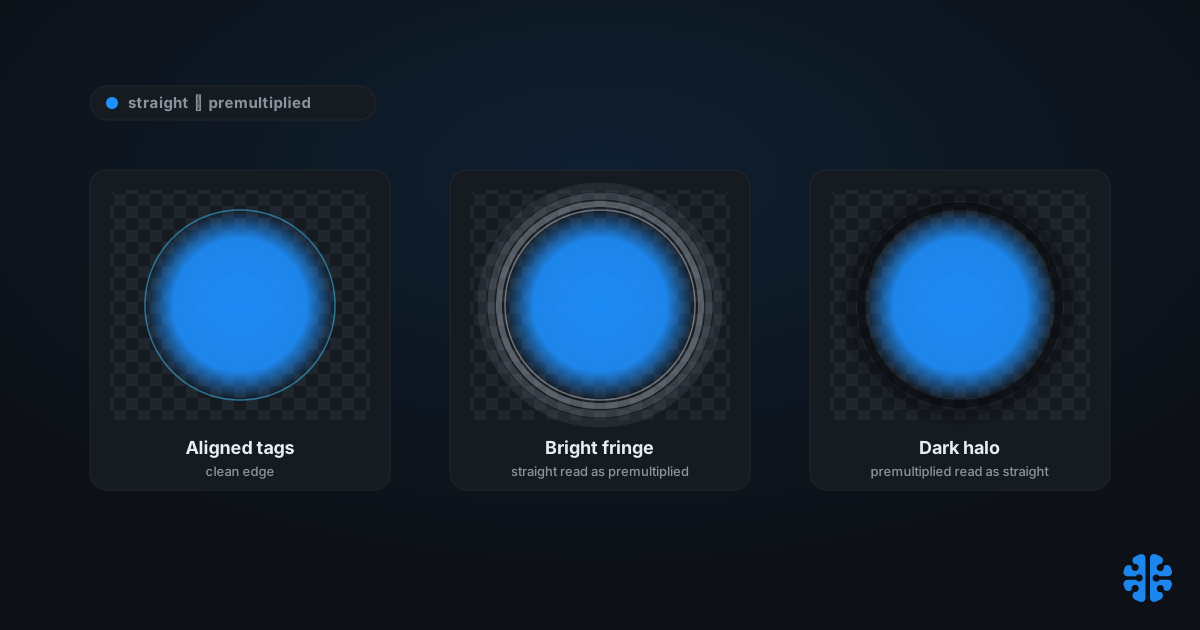
TL;DR >- PNG uses straight (unassociated) alpha and never premultiplies color, a deliberate choice to stay lossless and re-editable (W3C PNG Specification, 3rd Ed.).- WebP stores alpha losslessly only, even when its RGB is lossy VP8, so you cannot compress the mask itself lossily (Google WebP RIFF Container Spec).- WebP lossless compressed a set of 12,000 translucent PNGs 23% smaller than ZopfliPNG and 42% smaller than libpng, denser on more than 99% of images (Google WebP lossless and transparency study).- Halos and fringes are almost never a "bad alpha" problem. They are an encode/decode mismatch: premultiplied data read as straight, or the reverse (ProVideo Coalition).- AVIF supports both models, signaling premultiplied alpha with anirefbox of typeprem(AOMedia AVIF v1.2.0).
Most transparency guides treat the alpha channel as a solved detail: add a mask, export a PNG, move on. Then a designer drops the "clean" cutout onto a dark hero section and a pale halo appears around every edge. The mask was fine. The math was fine. What broke was an agreement between two programs about what the color values under a transparent pixel actually mean. That agreement has a name, straight versus premultiplied alpha, and getting it wrong is the single most common transparency bug in production pipelines.
This post is about how transparency survives compression, and where it quietly does not. We will separate the two alpha models, walk the exact mechanism that produces halos, explain why some formats preserve color in fully transparent pixels while others destroy it, and map which formats can even store what. There is a format-by-capability table you can keep.
What is the difference between straight and premultiplied alpha?
Straight and premultiplied alpha differ in whether color is stored pre-blended against its own opacity. Straight, also called unassociated, keeps raw RGB alongside a separate alpha sample. Premultiplied, or associated, stores R·a, G·a, B·a, so the color is already faded by its transparency. PNG uses straight alpha with 8-bit or 16-bit samples, chosen because it stays lossless and re-editable (W3C PNG Specification, 3rd Ed.).
The difference sounds academic until a decoder has to reverse it. A premultiplied decoder recovers straight color by dividing: R divided by a. As alpha approaches zero, that division becomes undefined and numerically noisy, which is a real source of edge error, not a rounding footnote. Straight alpha never divides, so it avoids that failure mode, at the cost of needing an explicit multiply at composite time.
Neither model is "correct." They are two encodings of the same picture, and each is fine as long as every stage agrees which one is in the file. PNG picked straight to keep the original color recoverable. Compositing and film pipelines often prefer premultiplied because blending math is cheaper and filtering behaves better. The bug is never the model. The bug is disagreement.
Citation capsule: PNG stores straight (unassociated) alpha, keeping raw RGB separate from an 8-bit or 16-bit alpha sample rather than premultiplying color by opacity. The W3C PNG Specification describes this as a deliberate design choice made to keep the format lossless and the original color values re-editable (W3C PNG Specification, 3rd Ed.).
For the wider lossless-versus-lossy tradeoff behind all of this, see our complete guide to image compression.
Why does my transparent PNG show a white or dark halo?
A halo means the file and the renderer disagree about premultiplication, or the transparent pixels carry the wrong hidden color. When premultiplied data is interpreted as straight, the multiply is applied twice and edges darken into a dark halo. When straight data is read as premultiplied, the multiply is skipped and edges brighten into a pale, gray fringe. The root cause is an encode/decode mismatch, not either method being defective (ProVideo Coalition).
There is a second, sneakier cause: filtering. Bilinear scaling and mipmap generation blend neighboring pixels, including the RGB values hiding under fully transparent ones. If those hidden pixels hold a default matte, often white or black, straight-alpha assets bleed that matte into visible edges as the image is minified. This is the classic game-texture halo, and the fix is to "bleed" real edge color outward into the transparent region before export so filtering has something sane to average.
The useful diagnostic is the halo's color, not its presence. A bright or gray fringe says straight data was read as premultiplied, or your transparent pixels are white. A dark ring says the opposite. Premultiplied assets avoid the filter-bleed halo because the matte is already baked in, but they pay for it by destroying recoverable color, which is the subject of the next section.
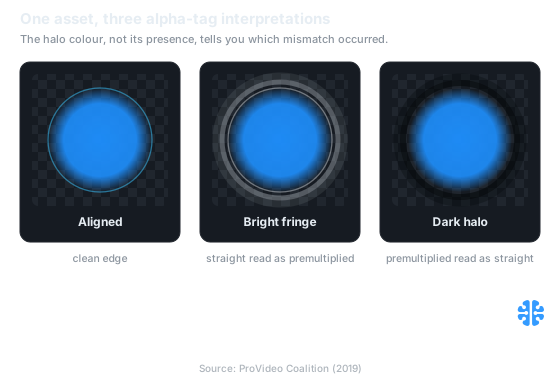
The halo's colour, not its presence, tells you which mismatch occurred (Source: ProVideo Coalition).
The same edge-versus-flat physics drives our sibling guide on compressing synthetic images, charts, and UI, where hard edges also dominate the outcome.
Does color survive in fully transparent pixels?
Only under straight alpha. Where alpha equals zero, straight encoding preserves whatever RGB was there, because color and opacity are stored independently. Premultiplied encoding destroys it: multiplying any color by an alpha of zero forces RGB to zero, so a fully transparent pixel becomes pure black with no memory of its original color. That single property is why PNG chose straight alpha, to stay lossless and re-mattable (W3C PNG Specification, 3rd Ed.).
This matters more than it looks. Re-matting a cutout onto a new background, generating mipmaps, or feeding an asset through any filter that samples neighbors all depend on the color hidden under transparent pixels. Straight alpha keeps that information available. Premultiplied throws it away permanently, which is a genuine, if often acceptable, loss.
Property | Straight (unassociated) | Premultiplied (associated) |
|---|---|---|
Stored color | Raw R, G, B | R·a, G·a, B·a |
Recover other model | Multiply by a (exact) | Divide by a (noisy as a to 0) |
Color at a=0 | Preserved | Destroyed (forced to 0) |
Filter/mipmap bleed | Can show matte halo | Matte baked in, no bleed |
Re-matting friendly | Yes | Lossy |
Used by | PNG, GIF | Many compositing/film pipelines |
Sources: W3C PNG Specification, 3rd Ed.; ProVideo Coalition.
In pipeline work, the most expensive transparency mistake we see is premultiplying a master asset "to fix a halo." It hides today's fringe and destroys tomorrow's re-matte. Keep masters straight and lossless; premultiply late, at composite time, if a specific renderer needs it. Treat premultiplication as a delivery decision, not an archival one.
How WebP and AVIF compress alpha
WebP and AVIF take opposite approaches, and one of them constrains you hard. WebP stores alpha losslessly only, never lossily, even when the RGB is lossy VP8. Its ALPH chunk carries three 2-bit control fields: pre-processing, filtering (none, horizontal, vertical, or gradient), and compression (none or WebP-lossless) (Google WebP RIFF Container Spec). So you can compress the color aggressively while the mask stays exact.
That lossless-alpha guarantee is not a limitation to route around; it is often the point. On a set of 12,000 translucent PNGs, WebP lossless ran 23% smaller than ZopfliPNG and 42% smaller than libpng, and it was denser on more than 99% of the images (Google WebP lossless and transparency study). You get PNG-beating size with a bit-exact mask. The caveat: because VP8 RGB is lossy, hard edges can show RGB bleed under transparent regions even when the mask itself is crisp.
AVIF is more flexible. It stores alpha as a separate monochrome, single-component auxiliary AV1 image item with aux_type alpha, encodable independently of the color image at 8, 10, or 12-bit depth (AOMedia AVIF v1.2.0; MDN image types). Because the alpha plane is its own AV1 image, an encoder can compress it lossily, which saves bytes but can soften or ring a mask edge. AVIF also supports both alpha models, signaling premultiplied ("associated") alpha with an iref box of type prem (AOMedia AVIF v1.2.0).
Citation capsule: WebP always stores its alpha channel losslessly, even when RGB uses lossy VP8 encoding, via an ALPH chunk with pre-processing, filtering, and compression control fields. On 12,000 translucent PNGs, WebP lossless compressed 23% smaller than ZopfliPNG and 42% smaller than libpng, denser on over 99% of images (Google WebP lossless and transparency study).
Which formats support what: the alpha capability matrix
Format choice constrains your alpha options before you touch an encoder setting. JPEG has no alpha channel at all, storing only YCbCr with no alpha component, while GIF offers just 1-bit binary transparency, a pixel is fully on or fully off, with no soft edges (MDN image types). Everything nuanced, straight versus premultiplied, lossy versus lossless masks, higher bit depth, lives in PNG, WebP, AVIF, and JPEG XL.
Format | Alpha support | Straight | Premultiplied | Lossy alpha | Alpha bit depth |
|---|---|---|---|---|---|
PNG | Full 8/16-bit | Yes | No | No (lossless) | 8 or 16 |
GIF | 1-bit binary only | n/a | n/a | No | 1 |
JPEG | None | No | No | No | none |
WebP | Full | Yes | No | No (lossless only) | 8 |
AVIF | Full, separate AV1 item | Yes | Yes ( | Yes (independent plane) | 8/10/12 |
JPEG XL | Full | Yes | Yes ( | Yes | up to spec depth |
Sources: W3C PNG Specification, 3rd Ed.; Google WebP RIFF Container Spec; AOMedia AVIF v1.2.0; MDN image types.
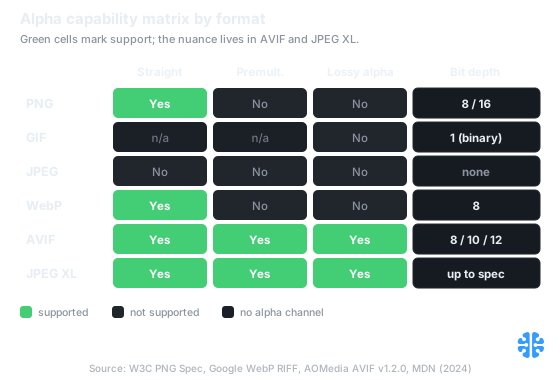
Only AVIF and JPEG XL carry the full nuance of premultiplied and lossy alpha (Source: W3C PNG Spec, Google WebP RIFF, AOMedia AVIF v1.2.0, MDN).
Two practical reads fall out of this table. If you need premultiplied alpha in a still image, AVIF or JPEG XL are your only real options; PNG and WebP simply cannot carry the flag. And if you need a guaranteed bit-exact mask, WebP is attractive precisely because it refuses to compress alpha lossily, which we contrast with the other lossless formats in lossless image compression formats compared.
Practical pitfalls when compressing transparency
The failures cluster into a short, avoidable list. Chroma subsampling on colored edges, mismatched alpha tags between tools, and lossy AVIF alpha on a crisp mask cause most of the visible damage. None of them show up on a checkerboard preview at 100%, which is exactly why they ship. Subsampling in particular smears color across edges, an effect we cover in depth in chroma subsampling explained.
Watch for these specifically:
- Un-bled straight-alpha textures. Transparent pixels holding white or black will halo under mipmapping or bilinear scaling. Bleed edge color outward before export.
- Cross-tool alpha mismatch. An asset exported premultiplied and imported as straight (or the reverse) produces the fringe you cannot design away. Confirm the tag on both ends.
- Lossy AVIF alpha on precise masks. The independent alpha plane can be compressed lossily; on hard cutout edges that softens or rings the mask. Keep alpha lossless when edge precision matters.
- WebP RGB bleed under transparency. WebP alpha is lossless, but lossy VP8 RGB under transparent regions can bleed at hard edges. Prefer WebP-lossless for crisp translucent art.
- Expecting alpha from JPEG. JPEG cannot store transparency; a "transparent JPEG" is a myth. Use PNG, WebP, AVIF, or JPEG XL instead.
At Inverity, we treat straight-versus-premultiplied as a property to verify per asset, not assume, because a mis-tagged master is an error no downstream encoder can detect for you. That verification mindset is the same one behind what invertibility is and how it is used in image optimization and compressing images without losing brand integrity.
FAQ
What is premultiplied versus straight (unassociated) alpha?
Straight alpha stores raw RGB next to a separate opacity value; premultiplied stores color already multiplied by that opacity, as R·a, G·a, B·a. PNG uses straight to stay lossless and re-editable (W3C PNG Specification). Premultiplied blends faster but destroys color where alpha is zero, since anything times zero is zero.
Why does my transparent PNG show a white or dark halo on a colored background?
The renderer and the file disagree about premultiplication, or your transparent pixels hide a white or black matte that filtering bleeds outward. Premultiplied data read as straight brightens edges into a pale fringe; the reverse darkens them. The cause is an encode/decode mismatch, not a defective alpha channel (ProVideo Coalition).
Does WebP compress alpha lossily or only losslessly?
Only losslessly. WebP always stores its alpha channel lossless, even when the RGB is lossy VP8, through an ALPH chunk carrying pre-processing, filtering, and compression fields (Google WebP RIFF Container Spec). On 12,000 translucent PNGs, WebP lossless ran 23% smaller than ZopfliPNG (Google WebP study). The mask stays exact.
Can AVIF store premultiplied alpha, and how is it signaled?
Yes. AVIF supports both straight and premultiplied alpha, storing the channel as a separate monochrome AV1 image item and signaling the premultiplied ("associated") case with an iref box of type prem (AOMedia AVIF v1.2.0). The alpha plane also supports 8, 10, or 12-bit depth, matching AV1.
Why does JPEG not support transparency, and what should I use instead?
JPEG stores only YCbCr color with no alpha component, so it physically cannot hold transparency; GIF offers just 1-bit on/off transparency with no soft edges (MDN image types). For soft, anti-aliased transparency use PNG for masters, or WebP and AVIF for compressed delivery. See lossless image compression formats compared for the tradeoffs.