 Inverity
Lossless Image Compression Formats Compared: PNG to JXL
Date Published
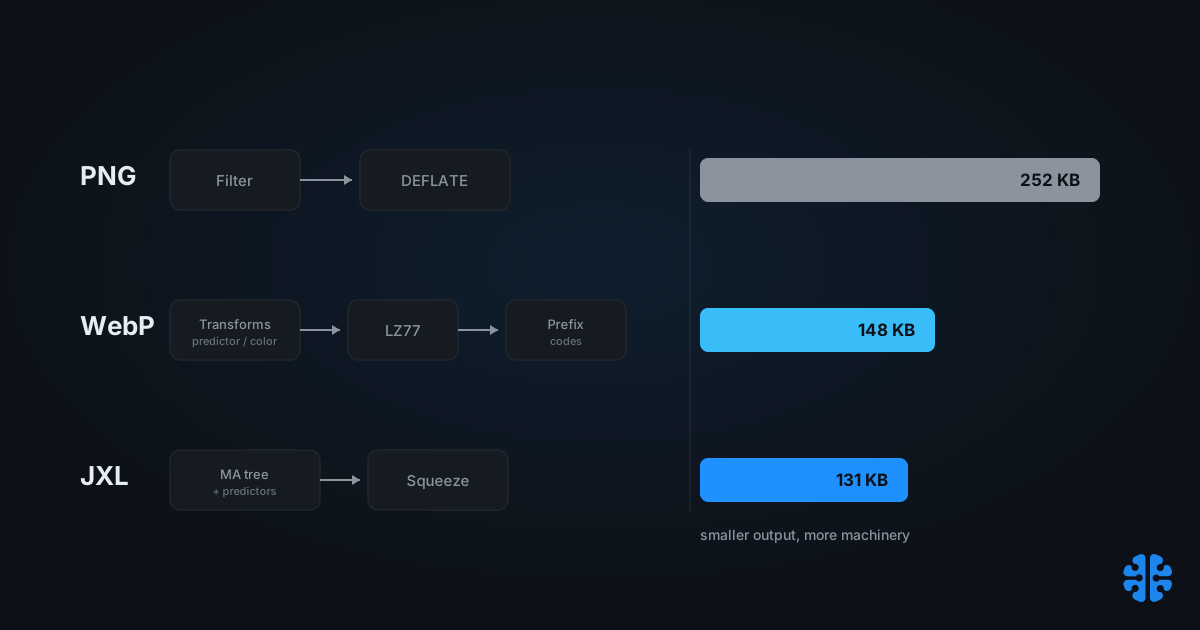
TL;DR >- On a 94-image graphics corpus, medians ran PNG 252 KB, OxiPNG 223 KB, lossless WebP 148 KB, lossless AVIF 203 KB, and lossless JPEG XL 131 KB, so JXL landed about 48% under PNG (siipo.la, 2024).- WebP lossless is specified as roughly 25% denser than PNG and decodes faster (Google WebP Lossless Bitstream Specification).- The ranking is content-dependent: on one photographic test image JXL lossless was 15% larger than WebP but 46% smaller than PNG (jpegxl.info).- Speed inverts the size story. On the same corpus, OxiPNG encoded in about 0.7s per file against roughly 25s for JXL and 30s for AVIF (siipo.la, 2024).- Lossless is the wrong default for photographs and the right one for flat, synthetic, and pixel-exact work.
Most "best lossless format" roundups quietly test the wrong images. They run a corpus of logos, screenshots, and UI mockups, publish a ranking, and imply it holds for your photo library. It does not. Lossless compression exploits exact repetition, not perceptual slack, so the entire ranking can invert the moment you swap flat graphics for a photograph. The format that wins by 48% on synthetic art can lose to plain lossy encoding on a portrait.
So the useful question is not "which lossless format is smallest." It is "smallest on what, and at what encode cost." This post walks the three real pipelines, PNG, WebP lossless, and JPEG XL Modular, shows where their ratios cross, and gives a concrete list of the jobs where lossless is genuinely required rather than merely comforting.
What separates lossless from lossy compression?
Lossless compression reconstructs every original byte exactly, so it can only remove statistical redundancy, not perceptual redundancy. That ceiling matters. Lossy codecs discard detail the eye ignores and routinely hit 10:1 or better on photos, while lossless formats stay bound to what actually repeats in the data (Google WebP Lossless Bitstream Specification).
The distinction is not a quality slider. It is a guarantee. A lossless decode returns the input bit-for-bit, which is why the format matters for masters, alpha masks, and anything headed for pixel-exact review. A lossy decode returns something that looks right within a tolerance, which is fine for delivery and wrong for archival.
Flat and synthetic images carry huge amounts of exact repetition: solid fills, hard edges, repeated glyphs, limited palettes. Photographs carry almost none. Every pixel of a photo differs slightly from its neighbor because of sensor noise and continuous tone. That single fact predicts most of what follows.
Citation capsule: Lossless image formats reconstruct the input bit-for-bit and can only remove statistical redundancy, not the perceptual redundancy lossy codecs exploit. WebP's lossless mode, per Google's bitstream specification, is defined as producing files roughly 25% denser than PNG while decoding faster, a purely statistical gain (Google, WebP Lossless Bitstream Specification).
For the wider tradeoff between the two modes, see our complete guide to image compression.
How the three lossless pipelines actually differ
The three formats reach lossless through visibly different machinery, and the sophistication roughly tracks the compression. PNG runs one prediction pass then a general-purpose deflate; WebP adds image-specific transforms before its entropy stage; JPEG XL's Modular mode learns a per-image model. That escalation is why JXL led a graphics benchmark at 48% under PNG while PNG optimizers managed 12% (siipo.la, 2024).
PNG: per-scanline filtering plus DEFLATE
PNG applies exactly five filter types per scanline, numbered 0 through 4 (None, Sub, Up, Average, Paeth), then compresses the filtered stream with DEFLATE using a sliding window capped at 32,768 bytes (W3C PNG Specification). A subtle but important detail: those filters operate on bytes, not pixels. The filter step makes the byte stream more repetitive so DEFLATE finds longer matches. Optimizers like OxiPNG search filter combinations and re-deflate harder, which is where PNG's remaining gains come from.
WebP lossless: image transforms plus LZ77
WebP lossless runs a real toolkit before entropy coding: a predictor transform with 14 modes, a color transform, a subtract-green transform, and color indexing for palette images of 256 colors or fewer, with pixel bundling for images of 16 colors or fewer (Google WebP Lossless Bitstream Specification). It then applies LZ77 backward references, canonical prefix codes, and a small color cache. More prediction context than PNG, plus a purpose-built entropy stage, buys the roughly 25% density gain.
JPEG XL Modular: an MA decision tree plus Squeeze
JPEG XL's Modular mode, its lossless and non-photographic path, replaces fixed filters with a learned meta-adaptive (MA) decision-tree context model, self-signaled predictors, and an optional Squeeze transform, unifying the lineages of FLIF, FUIF, PIK, and Brotli (JPEG XL system paper, arXiv 2506.05987, 2025). Instead of one prediction rule, the encoder builds a small tree that picks context per region. It also handles up to 32 bits per channel losslessly. Note that cjxl defaults to VarDCT; you force this path with --modular.
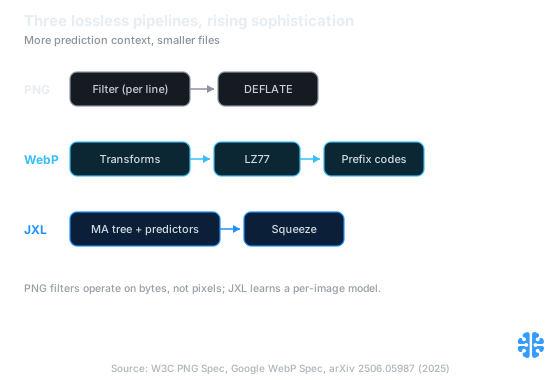
The three lossless pipelines side by side, from PNG's single filter pass to JPEG XL's learned per-image model. Source: W3C PNG Spec, Google WebP Spec, arXiv 2506.05987 (2025).
For the entropy stage these pipelines share conceptually, our sibling piece on compressing screenshots and PNGs covers the PNG optimizer toolchain in depth.
Which lossless format produces the smallest files?
On flat, synthetic content, JPEG XL usually wins on size and PNG optimizers win on speed. The clearest single data point: across 94 graphic images, median sizes ran PNG 252 KB, OxiPNG 223 KB, lossless WebP 148 KB, lossless AVIF 203 KB, and lossless JXL 131 KB, putting JXL about 48% under PNG and WebP about 41% under (siipo.la, 2024).
Format | Median size (94 graphics) | Reduction vs PNG | Median encode time/file |
|---|---|---|---|
PNG (baseline) | 252 KB | ||
OxiPNG | 223 KB | 12% | 0.7s |
Lossless AVIF | 203 KB | 20% | 30s |
Lossless WebP | 148 KB | 41% | 3s |
Lossless JPEG XL | 131 KB | 48% | 25s |
Source: siipo.la, 2024. Corpus is 94 Dribbble graphics at 1000px or smaller, not photographs. OxiPNG with Zopfli reached smaller sizes but at roughly 208s per file.
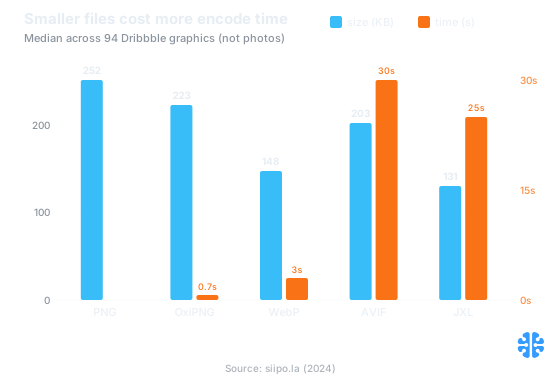
Size falls as machinery grows, but encode time climbs sharply: JXL is smallest at 131 KB yet takes about 25 seconds per file. Source: siipo.la (2024).
Two caveats keep this honest. First, this corpus is graphics, not photos, and the author explicitly cautions that lossless is ineffective on photographs. Second, that 48% figure comes from one tier-3 benchmark; treat it as indicative of the ordering, not a promise for your assets. WebP's roughly 8x faster encode versus JXL is often the deciding factor in a build pipeline.
Citation capsule: On a 94-image graphics corpus, lossless JPEG XL produced a median 131 KB versus 252 KB for PNG, a 48% reduction, with lossless WebP at 148 KB (41%) and lossless AVIF at 203 KB (20%); PNG optimizer OxiPNG managed 12% but encoded far faster than JXL, roughly 35x (about 0.7 seconds per file versus 25) (siipo.la, 2024).
Why do the ratios invert on photos versus synthetic images?
The ranking flips because lossless has nothing to exploit in a photograph. On flat graphics, exact-repetition machinery wins big; on continuous-tone photos, every pixel is slightly unique, so lossless output stays large regardless of format. One photographic test image showed JXL lossless 15% larger than WebP but still 46% smaller than PNG, and 63% smaller than lossless AVIF, so even the head-to-head order shifts by content (jpegxl.info).
The practical takeaway that most format comparisons miss: benchmark ranking is a property of the corpus, not the codec. A "JXL wins lossless" headline built on a Dribbble graphics set tells you nothing about your product photography. The honest split looks like this.
Content type | Redundancy available | Lossless behavior | Recommended path |
|---|---|---|---|
Screenshots, UI, logos, line art | High (flat fills, hard edges, small palette) | Large wins, ratios spread wide | Lossless WebP or JXL Modular |
Charts, diagrams, synthetic renders | High to moderate | Strong wins, format order stable | Lossless WebP or JXL Modular |
Photographs, continuous tone | Very low | Files stay large, order can invert | Lossy WebP/AVIF/JXL, not lossless |
Mixed (photo plus text overlay) | Moderate | Format-dependent, test both | Per-region or lossy with care |
Sources: siipo.la, 2024; jpegxl.info; JPEG XL system paper, arXiv 2506.05987, 2025.
Even JXL's Modular mode, tuned for non-photographic content, only runs modestly under PNG on a normal photograph, on the order of roughly a third smaller in the FLIF/FUIF lineage benchmarks, and that figure varies enough by image that it is worth measuring rather than quoting (arXiv 2404.19755, 2024). If your PNG photo is huge, the fix is not a better lossless format. It is admitting the image should be lossy. Our guide to compressing synthetic images, charts, and UI covers the flat-content side of this split in detail.
When is lossless actually required?
Lossless is required whenever a downstream check compares pixels for exact equality, or a policy forbids alteration. It is not required for most web delivery, where perceptual equivalence is the real standard. The distinction is worth money: teams routinely ship lossless PNG masters to browsers that would happily accept a lossy file a fraction of the size (Google WebP Lossless Bitstream Specification).
Use lossless when the job genuinely needs bit-exact output:
- Source and master assets. The original you re-derive everything else from should never carry generation loss. Store lossless, deliver lossy.
- Alpha masks and transparency data. Quantized edges in a mask become visible compositing errors downstream.
- Text-heavy screenshots and documentation. Anti-aliased glyphs degrade fast under lossy quantization; keep them crisp.
- Pixel-exact QA and visual regression tests. Any diff that asserts exact equality demands a lossless pipeline end to end.
- Medical-adjacent and records imagery. Where a policy or regulation forbids alteration, lossless is the only defensible choice.
In our own pipeline work, the most common lossless mistake is not choosing the wrong lossless format. It is applying lossless where perceptual equivalence was the actual requirement, then paying for the bytes on every page load. Reserve the bit-exact guarantee for the cases that consume it. For brand assets specifically, we cover the tradeoff in compressing images without losing brand integrity.
Shipping JPEG XL lossless in browsers today
Not reliably, as of September 2026. JPEG XL's native browser support remains limited and inconsistent, so a lossless JXL delivered directly to browsers needs a fallback and careful content negotiation. WebP lossless, by contrast, enjoys near-universal support and remains the safe lossless-on-the-web default (Google WebP Lossless Bitstream Specification).
Check caniuse before assuming JXL support in any target browser matrix; the picture has shifted repeatedly and varies by engine and version. For build-time and archival use, where you control the decoder, JXL Modular is already a strong lossless choice. For public delivery, treat it as an enhancement behind negotiation, not a baseline. The one place JXL is unambiguously ready is reversible JPEG transcoding, which we cover in lossless JPEG transcoding with JPEG XL.
FAQ
Is WebP lossless always smaller than PNG?
Usually, not always. Google specifies WebP lossless as roughly 25% denser than PNG on average (Google WebP Lossless Bitstream Specification). But on very small or very flat images, a PNG run through OxiPNG can close most of the gap, and occasionally match it. The advantage grows with image complexity and palette size.
Does JPEG XL beat WebP for lossless?
It depends on content. On a 94-image graphics corpus, lossless JXL led at 48% under PNG versus WebP's 41% (siipo.la, 2024). On one photographic test image, JXL ran 15% larger than WebP (jpegxl.info). WebP also encodes roughly 8x faster, which often decides the choice.
Why are my photographs still huge as lossless PNG or WebP?
Because lossless compression can only remove exact repetition, and photographs have almost none. Every pixel differs slightly due to sensor noise and continuous tone, so there is nothing to fold away (Google WebP Lossless Bitstream Specification). The fix is a lossy format, which removes detail the eye ignores. Reserve lossless for flat, synthetic, or master imagery.
How much smaller is lossless JPEG XL than PNG on a photo?
Less than on graphics. In the FLIF and FUIF lineage that JXL Modular inherits, a normal photograph compresses on the order of roughly a third smaller than PNG, but the exact figure varies enough by image that you should measure your own (arXiv 2404.19755, 2024). For photos, lossy encoding almost always wins on size.
Can I use lossless JPEG XL in production browsers now?
Only with a fallback. JPEG XL browser support is limited and inconsistent as of 2026, so verify your targets on caniuse and serve WebP lossless or PNG as the negotiated fallback. For build-time and archival pipelines where you control the decoder, JXL Modular is already a capable lossless format.