 Inverity
The Complete Guide to Image Compression: Formats to ROI
Date Published
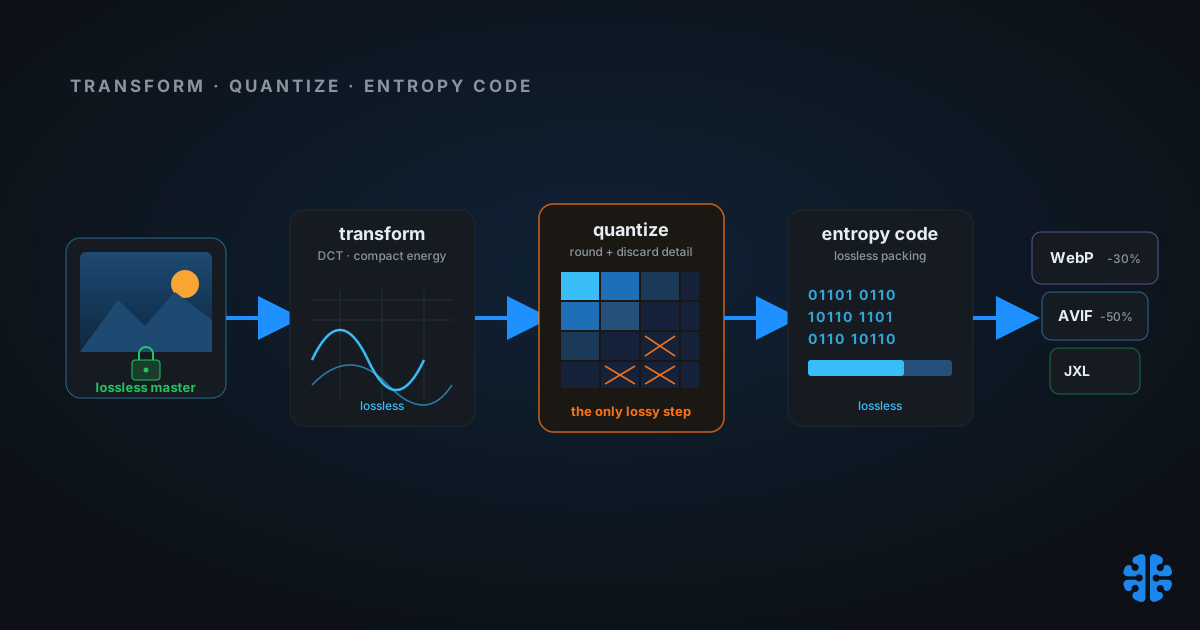
Most image-compression advice starts in the wrong place. It opens with a format war, argues that one codec beats the others, and hands you a winner. But the format is the last decision, not the first. Before it matters whether you ship AVIF or WebP, two things decide whether your images survive: whether the step is lossy or lossless, and where in your pipeline it runs. Get those right and the format is almost an implementation detail. Get them wrong and no codec saves you.
This guide is the hub for our compression cluster. It walks the whole chain, from what compression actually removes, through the 2026 format landscape, quality measurement, encoder tuning, and domain-specific rules, to the economics of where compression should live. Each section links to a deeper article. If you read one thing, read the golden rule at the end.
TL;DR >- Images are the heaviest resource on the web: about 1,054 KB at the median desktop homepage, roughly 39-40% of total page weight (Web Almanac 2024, 2024).- AVIF runs about 50% smaller than JPEG and 20-30% smaller than WebP at equal quality; WebP lands 25-35% below JPEG (SpeedVitals, 2024).- Only lossy compression accumulates generation loss. Lossless formats are perfectly reversible (Wikipedia, 2026).- A 0.1s speed improvement moved retail conversions about 8% and travel about 10%, and images are the biggest speed lever you control (Deloitte / Think with Google, 2020).- The golden rule: keep a lossless master, apply exactly one lossy delivery step, and pick where that step runs per the matrix below.
Before we go further, it helps to see compression as one lever inside a larger system. We cover that system end to end in the complete guide to perceptual media optimization. This page zooms into the compression half of it.
Lossy or lossless: which kind of compression are you doing?
Every compression decision forks here first. Lossless formats like PNG and lossless WebP or JPEG XL reconstruct the original bytes exactly, so they are perfectly reversible. Lossy formats like JPEG, WebP, and AVIF discard perceptual detail at the quantization step to hit far smaller sizes. Crucially, only lossy compression accumulates error across repeated saves (Wikipedia, 2026).
That difference is the root of most compression regret. A lossless save can be repeated a thousand times with zero degradation, because nothing is thrown away. A lossy save is a one-way door. Decode, re-quantize, re-encode, and you lose a little more each pass, even when you re-save at a higher quality setting than the original (Cloudinary, 2024). PetaPixel's canonical demo of re-saving a JPEG 500 times collapses the image into visible mush (PetaPixel, 2016).
Here is the part teams miss. Generation loss is not just about you saving twice. Your CMS makes a derivative, your CDN auto-converts formats, and social platforms silently re-encode on upload at low quality (Cloudinary, 2024). Each is a hidden lossy pass. Stack three or four and the image degrades even though no human ever "recompressed" anything. We map every silent re-encode point in recompression and generation loss.
So which do you reach for? Use lossless when the image must round-trip: masters, archives, medical source data, and anything a later stage will re-edit. Use lossy only at the final delivery edge. If you want a survey of which lossless formats actually win on size, we compare them in lossless image compression formats. And if you sit on a large JPEG archive, JPEG XL can transcode those files losslessly and reversibly, roughly 20% smaller (jpegxl.info, 2026), which we detail in lossless JPEG transcoding to JPEG XL.
How does image compression actually work?
Under the hood, almost every image codec runs the same three-stage recipe: transform, quantize, entropy-code. The classic JPEG pipeline applies a color transform, downsamples chroma, runs an 8x8 discrete cosine transform, quantizes the coefficients, then entropy-codes the result (arXiv 2102.06968, 2021). Modern codecs refine each stage, but the shape holds. Knowing it tells you exactly where quality goes to die.
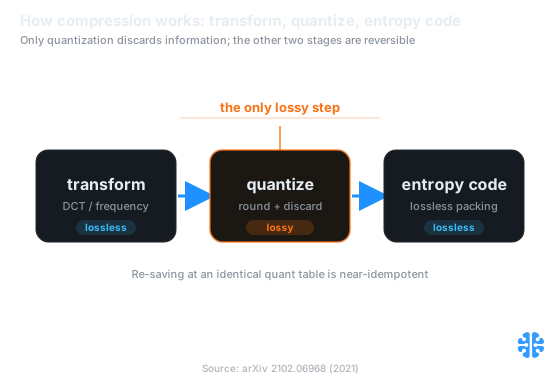
Transform and entropy coding are reversible; only quantization discards information. Source: arXiv 2102.06968 (2021).
Step 1: transform
The transform stage rearranges pixels into a representation where redundancy is easy to see. First a color transform separates brightness from color, because human eyes track luminance far more sharply than chroma. That asymmetry lets codecs downsample the color channels, a trick called chroma subsampling that shrinks data before any quality is nominally "lost." We unpack the exact ratios and their visible cost in chroma subsampling explained. Then a frequency transform, the DCT in JPEG, concentrates most of the image's energy into a few low-frequency coefficients. The full mechanics live in how JPEG compression works.
Step 2: quantize
Quantization is the lossy step, the only one that discards information. It divides the transform coefficients by a quality-controlled table and rounds, deliberately zeroing the high-frequency detail your eye is least likely to miss. Everything you call a "compression artifact" is born here. What the encoder chooses to throw away, and how it decides, is the whole game, which is why we devote a full piece to how lossy compression decides what to discard.
Step 3: entropy-code
The final stage is lossless. Entropy coding packs the quantized numbers into the smallest bit-string possible using their statistical frequency, and it never loses data. Decoding reverses it exactly. That is why re-saving at an identical quantization table is nearly idempotent: the entropy stage is reversible, and only re-quantization compounds loss. We cover the arithmetic and range coders behind it in entropy coding explained.
One modern addition changes the picture. AVIF, WebP, and JPEG XL add prediction before the transform, guessing each block from its neighbors and coding only the error. That intra-frame prediction is a big reason next-gen codecs beat JPEG so decisively, and we break it down in intra-frame prediction explained. The physics underneath all of it, why images are compressible at all, is covered in the physics of image redundancy.
The 2026 image format landscape
No single format wins every job in 2026, and anyone who tells you otherwise is selling something. The practical hierarchy for photographs is AVIF first, WebP as the broad-support default, JPEG as the universal fallback. AVIF runs about 50% smaller than JPEG at equal quality, and WebP about 25-35% smaller (SpeedVitals, 2024). Netflix moved to AVIF for next-generation image coding back in February 2020, citing better efficiency and features (Netflix TechBlog, 2020).
Here is the sourced comparison. Treat the browser-support percentages as approximate; verify them against caniuse at publish time, because they drift and JPEG XL's Chrome status is actively in flux.
Format | Type | vs JPEG (equal quality) | Lossless | Alpha | Animation | Browser support 2026 (approx, verify caniuse) | Steward |
|---|---|---|---|---|---|---|---|
JPEG | Lossy | 1.0x baseline | No | No | No | ~100% | JPEG / ISO-IEC |
PNG | Lossless | Larger on photos | Yes | Yes | APNG | ~100% | W3C |
WebP | Lossy + lossless | ~0.65-0.75x lossy; ~26% under PNG lossless | Yes | Yes | Yes | ~97% (verify) | |
AVIF | Lossy + lossless | ~0.50x lossy | Yes | Yes | Yes | ~93-95% (verify) | AOMedia |
JPEG XL | Lossy + lossless | ~0.50-0.65x lossy; ~0.80x as JPEG transcode | Yes | Yes | Yes | Safari yes; Chrome pending | JPEG / libjxl |
Sizes: SpeedVitals, 2024, and Google WebP, 2024. Transcode: jpegxl.info, 2026. Support figures are ballpark, check caniuse at publish.
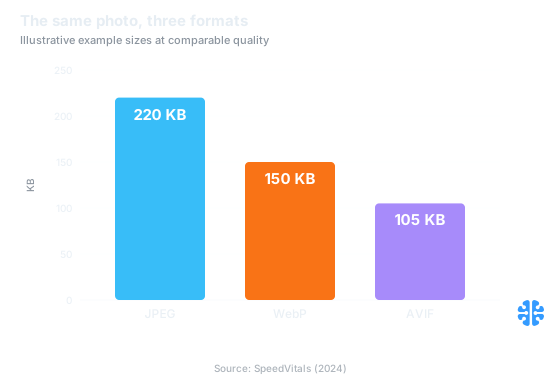
The same photo shrinks from 220 KB to 105 KB moving JPEG to AVIF, an illustrative example. Source: SpeedVitals (2024).
JPEG XL deserves a note because its status keeps moving. It is royalty-free under the BSD-licensed libjxl, and it uniquely transcodes existing JPEGs losslessly and reversibly at roughly 20% smaller (jpegxl.info, 2026). Safari has shipped JXL since iOS 17 and Sonoma, and Chrome is set to restore support once a memory-safe Rust decoder lands (WinBuzzer, 2025). That reversal is real but unsettled, so scope any JXL rollout to still images and keep a fallback. For a fuller side-by-side of the modern contenders, see AVIF vs WebP vs JPEG XL in 2026.
Flat graphics, screenshots, and transparency
Photographs are not the only content type, and the format logic flips for synthetic imagery. Screenshots, UI captures, charts, and line art have hard edges and flat color regions that lossy DCT codecs handle badly, smearing text and ringing edges. Reach for PNG or lossless WebP here, and often lossless AVIF or JXL. We cover the specifics in compressing screenshots and PNGs and compressing synthetic images, charts, and UI. When your image needs transparency, the alpha channel has its own compression trade-offs, which we work through in compressing transparency and alpha channels.
How do you measure quality after compression?
You cannot manage compression you cannot measure, and file size alone tells you nothing about whether it still looks right. The standard objective proxies are PSNR and SSIM; codec studies report results in PSNR against bitrate (arXiv 2312.02705, 2023). But both are proxies for human perception, not perception itself, and they disagree with the eye often enough that relying on either alone will burn you.
Start with the metric that names the problem. A quality setting of "95" is not a quality guarantee; it is an encoder parameter that means different things across codecs and content. We explain why in why quality 95 means nothing. The better mental model is the just-noticeable difference, the point below which a human cannot tell the compressed image from the master, covered in the just-noticeable difference in image quality.
For metrics that track perception more faithfully, the field has moved past PSNR and SSIM. VMAF, originally built by Netflix for video, blends multiple signals into a perceptual score, explained in VMAF explained. Butteraugli and SSIMULACRA2 model the human visual system more directly and are the current best-in-class for still images, which we cover in Butteraugli and SSIMULACRA2 perceptual metrics. None of them fully replaces a human, so we also run controlled A/B perception tests, described in compression A/B testing and perception.
The honest position is that no single number is enough. That is exactly the argument in why PSNR, SSIM, and "looks good to humans" all matter, and it is why we publish how we benchmark rather than asking anyone to trust a headline ratio. Unverifiable quality claims are the norm in this space, and a claim you cannot check is not a measurement.
Tuning the encoder: presets, rate control, and adaptive quality
Two teams can ship the same format at wildly different quality and size, because the encoder settings do most of the work. The biggest levers are rate control, effort preset, and per-image quality selection. Squoosh proved that the heavy encoders behind these settings, MozJPEG, WebP, AVIF, and JXL, all run browser-native through WebAssembly (web.dev, 2021), so tuning them is no longer an infrastructure privilege.
Rate control decides how the encoder spends bits. Constant-quality modes target a visual result, while bitrate modes target a file size, and the two behave very differently across a catalog. We compare them in CRF vs bitrate vs constrained quality. Whether you run one pass or two changes how accurately the encoder hits its target, covered in two-pass vs single-pass encoding. And the effort or "speed preset" trades encode CPU for compression efficiency, sometimes dramatically, which we quantify in encoder speed and preset trade-offs.
The advanced move is to stop using one setting for every image. Different images need different quality to reach the same perceived result, so a flat quality number over-compresses some and wastes bytes on others. Content-adaptive per-image quality fixes that, and we walk through it in content-adaptive per-image quality. For hands-on flags across the three major open encoders, see tuning MozJPEG, libjxl, and libaom. This is also where the frontier lives: learned codecs push past hand-tuned encoders on some content, which we compare in neural compression vs traditional codecs.
Compression by domain: medical, e-commerce, UGC, maps, and email
Compression rules are not universal, because the cost of an artifact depends entirely on what the image is for. A smudged pixel on a lifestyle banner costs nothing. The same smudge on a diagnostic scan is a liability. So the right settings, formats, and even the lossy-versus-lossless decision shift by domain, and treating them all the same is how blanket compression hurts your CMS.
Medical imaging is the strict end of the spectrum. DICOM workflows often demand lossless or carefully validated near-lossless compression, because clinical detail and legal defensibility outrank file size. We cover the constraints in medical image compression and DICOM. E-commerce sits at the opposite extreme of scale, where millions of near-identical product shots need consistent, automated quality, detailed in e-commerce catalog compression at scale.
User-generated content is its own beast: unpredictable input, every device, every format, arriving continuously. That pipeline needs defensive normalization before anything else, which we lay out in UGC pipeline compression. Map tiles and geospatial imagery bring extreme volume plus strict visual continuity across tile boundaries, covered in map tiles and geospatial compression. And email, still stuck decades behind the web on format support, has its own narrow rules in compressing images for email.
Where should compression happen, and what does it save?
Location is as important as format, and most stacks get it wrong by compressing in too many places. You have three homes for a compression step: the client's browser, your server or CDN on the fly, or your build. Each trades compute, cache behavior, and determinism differently. There is no universal winner, only a fit for your content pattern.
Where | Compute cost | Cache | Freshness | Determinism | Best for |
|---|---|---|---|---|---|
Client (browser WASM) | User's CPU, free to you; slow on low-end devices | Pre-upload | High | Varies per device | UGC, pre-upload shrink, privacy |
Server / on-the-fly (CDN, sharp) | Paid per transform; first-hit latency | High after warm | Highest, any size or format from one URL | Deterministic given params and codec version | Many variants, unknown crops |
Build-time (static export + sharp) | Paid once in CI; zero at request time | Perfect, static and immutable | Low, rebuild to change | Fully deterministic | Known finite set, static sites |
Adapted from libSquoosh, Next.js, and CDN transform documentation (web.dev, 2021; Next.js, 2024).
The heuristic is simple. Finite and known set, compress at build time. Unbounded or user-cropped, compress on the fly. Privacy-sensitive or cost-offloading, compress client-side in the browser, where full native codecs already run via WebAssembly (web.dev, 2021). Most mature stacks combine them: a client pre-shrink on upload, a stored lossless master, and a single delivery transform at build or edge. We rank all three head to head in client vs server vs build-time compression.
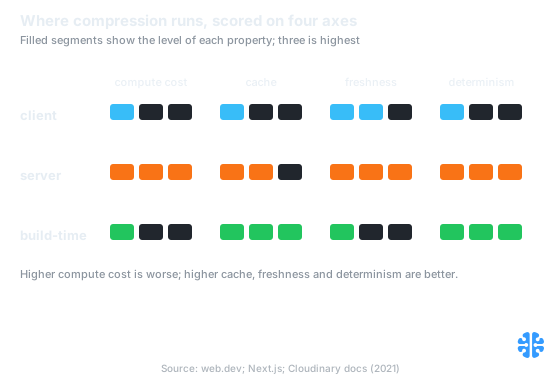
Client is cheap but device-variable, server is fresh but paid per transform, build-time is deterministic but low on freshness. Source: web.dev; Next.js; Cloudinary docs (2021).
What compression actually saves
The payoff runs on four axes, and "we saved 40% of bytes" is only the input, never the return. Those saved bytes flow into bandwidth cost, storage cost, conversion lift, and carbon. Getting all four onto one page is the strongest case you can make to a budget owner, and we build that model in measuring compression ROI.
Bandwidth and storage are the direct line. CDN egress runs roughly $0.085 per GB on AWS CloudFront in North America, tiering down at extreme volume (AWS / EgressCost, 2025), while some providers charge zero egress, like Cloudflare R2 at $0.015 per GB-month storage and $0.00 egress (R2 pricing, 2025). On a zero-egress plan the ROI shifts to storage and performance instead of bandwidth. Conversion is the upside: a 0.1s speed gain moved retail conversions about 8% and travel about 10% (Deloitte / Think with Google, 2020), and since images are about 39-40% of page weight (Web Almanac 2024, 2024), they are the biggest lever on that speed. Treat the conversion figure as directional, not causal for compression alone; measure it with a real A/B, and connect it to Core Web Vitals for images.
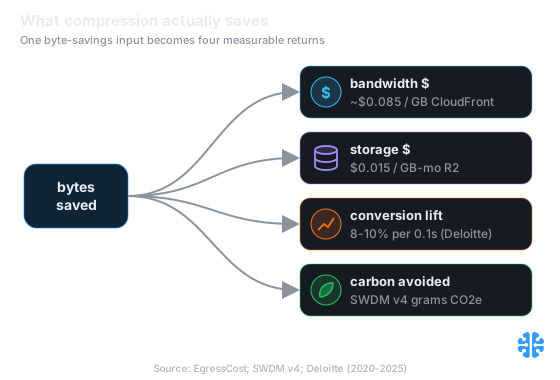
One byte-savings input becomes four returns: bandwidth, storage, conversion, and carbon. Source: EgressCost; SWDM v4; Deloitte (2020-2025).
Carbon is the fourth axis and the easiest to report. The Sustainable Web Design Model V4, published July 2025, puts operational energy at 0.055, 0.059, and 0.080 kWh per GB across data centers, networks, and devices, at a grid intensity of 494 g CO2 per kWh (Sustainable Web Design V4, 2025). Fewer bytes shipped equals fewer grams emitted, a clean ESG line item. Just remember the whole point of budgets: savings only count if they survive contact with the next deploy, which is why we insist on compression budgets that hold and warn about the true cost of over-compression, where chasing bytes past the just-noticeable difference quietly wrecks the product.
The one rule that ties it all together
If you remember nothing else, remember this. Keep a lossless master. Apply exactly one lossy delivery step. Choose where that step runs using the matrix above. That single discipline prevents the most expensive failure in image pipelines, the silent stacking of lossy passes across CMS, CDN, and social, which degrades images no one ever meant to touch (Cloudinary, 2024).
Everything in this guide serves that rule. Lossy versus lossless tells you which steps are safe to repeat. The transform-quantize-entropy pipeline tells you where quality is lost. The format table and encoder settings tell you how to spend your one lossy step well. Quality metrics tell you whether you spent it wisely, and the where-to-compress matrix tells you the single place to spend it. This is the frame we build on at Inverity, where every delivery decision has to be measurable and reversible, because a claim about quality that you cannot verify is just an advertisement.
FAQ
What is the difference between lossy and lossless compression?
Lossless compression reconstructs the original bytes exactly, so it is perfectly reversible and can be re-saved endlessly without harm. Lossy compression discards perceptual detail at the quantization step to reach far smaller sizes, and it accumulates error across repeated saves (Wikipedia, 2026). Use lossless for masters, lossy only for final delivery.
Which image format should I use in 2026?
For photographs, prefer AVIF, fall back to WebP, keep JPEG as the universal safety net. AVIF runs about 50% smaller than JPEG at equal quality (SpeedVitals, 2024). For screenshots, charts, and transparency, use PNG or lossless WebP. JPEG XL is promising and Safari ships it, but Chrome support is still pending (WinBuzzer, 2025).
How much smaller is AVIF or WebP than JPEG?
At equal visual quality, AVIF is typically about 50% smaller than JPEG and 20-30% smaller than WebP, while WebP lands roughly 25-35% below JPEG (SpeedVitals, 2024). WebP is also about 26% smaller than PNG for lossless images (Google WebP, 2024). Actual ratios vary with content and quality target.
Does compressing an image noticeably reduce quality?
Not if you stay above the just-noticeable difference and apply only one lossy step. Trouble starts when lossy passes stack. Decode-and-re-encode cycles compound error every generation, and a JPEG re-saved 500 times degrades into visible mush (PetaPixel, 2016). Keep a lossless master and compress once, at delivery.
How do I measure quality after compression?
Start with objective proxies. PSNR and SSIM are the standard baselines that codec studies report (arXiv 2312.02705, 2023), but they miss perceptual errors the eye catches. Perceptual metrics like VMAF, Butteraugli, and SSIMULACRA2 track human vision more faithfully. For decisions that matter, combine a perceptual metric with a controlled human A/B test.
Where should compression happen: browser, server, or build?
It depends on your content pattern. Finite and known assets compress best at build time, deterministic and free at request time. Unbounded or user-cropped images fit on-the-fly transforms. Privacy-sensitive or cost-offloading work suits client-side browser encoding, which runs full native codecs via WebAssembly (web.dev, 2021). Most stacks combine all three.