 Inverity
Compressing Synthetic Images: Charts, UI, Line Art
Date Published
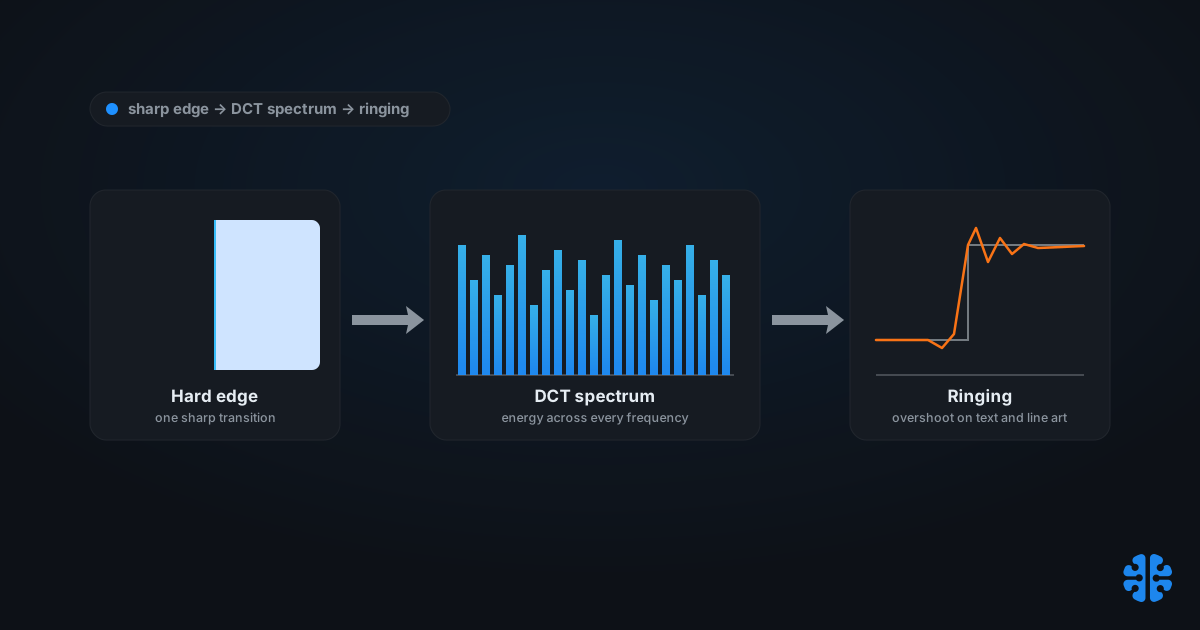
TL;DR >- A sharp edge spreads energy across nearly the entire frequency spectrum, so discarding high-frequency DCT coefficients produces Gibbs-phenomenon ringing that is worst on text and graphics (kornel.ski deringing).- Ringing is usually hidden by natural noise in photographs but conspicuous near text edges on uniform backgrounds, the core reason synthetic content wants lossless or near-lossless (document-image de-ringing literature).- WebP lossless compressed 12,000 web images 23% smaller than ZopfliPNG and 42% smaller than libpng, a strong result for UI, screenshots, and graphics (Google WebP lossless study).- JPEG XL splits into VarDCT (lossy, photographic) and Modular (integer, lossless), with Modular carrying dedicated tools for line art and large flat patches (Cloudinary, JPEG XL Modular explained).- Content-type routing works because synthetic images suffer far higher distortion than natural images under a DCT encoder, a difference measurable enough to use as a classifier signal (USPTO 8,903,186).
Most compression advice for graphics stops at four words: "use PNG for logos." True, but useless, because it never says why, and the why is what lets you make the call on the images the rule does not cover. A dashboard export, a colored-on-colored UI capture, a chart with anti-aliased gridlines: none of these are "logos," yet all of them fail the same way under JPEG. The failure is not a bug in the encoder. It is physics, and once you see the mechanism you can route any image correctly.
This post explains why the discrete cosine transform at the heart of JPEG and, to a lesser degree, AVIF, is structurally hostile to synthetic content. Then it turns that theory into something you can ship: a content-type detection recipe that routes photographs to lossy codecs and charts, UI, and line art to lossless or near-lossless paths.
Why does synthetic content break DCT compression?
Because a hard edge has no compact frequency representation. A single sharp transition, a black letter on white, spreads its energy across nearly the whole spectrum. JPEG's lossy step discards high-frequency DCT coefficients, and removing them from an edge produces overshoot and oscillation around it, the Gibbs phenomenon, which is worst on text and graphics rather than natural images (kornel.ski deringing). The blocking and ringing both trace back to coarse quantization of those coefficients (document-image de-ringing literature).
Continuous-tone photographs are the opposite case. Their energy concentrates in low frequencies, so quantizing the high end removes detail the eye barely misses. A photograph is mostly gentle gradients; a screenshot is mostly cliffs. The DCT was tuned for the former, which is exactly why it mishandles the latter.
Chroma subsampling compounds the damage. JPEG typically stores color at 4:2:0, averaging chroma over 2x2 blocks, which smears colored text and thin colored lines before the DCT even runs. Colored-on-colored UI text is close to a worst case. We unpack that specific mechanism in chroma subsampling explained.
Citation capsule: A sharp edge spreads its energy across nearly the entire frequency spectrum, so when a DCT-based codec like JPEG discards high-frequency coefficients through quantization, it produces Gibbs-phenomenon ringing around the edge. This ringing is worst on text and graphics rather than natural images, which have little high-frequency structure to lose (kornel.ski deringing).
For where this fits the broader lossy pipeline, see our complete guide to image compression and how lossy compression decides what to discard.
Why is JPEG ringing invisible in photos but obvious on UI?
Because photographic noise camouflages the same artifact that a flat background exposes. Ringing is usually subdued or hidden by the natural texture and noise in a photograph, but it becomes conspicuous near text edges sitting on uniform backgrounds. That contrast is the core reason synthetic content wants lossless or near-lossless encoding (document-image de-ringing literature).
Think about where the artifact lands. Overshoot around an edge on a busy photographic region blends into detail that was already irregular. The same overshoot around a black glyph on a solid white panel has nothing to hide behind, so the eye reads it instantly as a gray halo or mosquito noise. The distortion energy is comparable; the visibility is not.
This is why "just raise the JPEG quality" fails as a strategy for graphics. Cranking quality reduces how much high-frequency energy you discard, but it does not change the fact that a synthetic image needs almost all of that energy to look right. You end up at q95 or higher, paying nearly lossless bytes for a still-imperfect result, when a genuinely lossless format would be both smaller and exact. Deringing filters like overshoot-and-clip are a repair, not a cure; they cannot restore coefficients already thrown away.
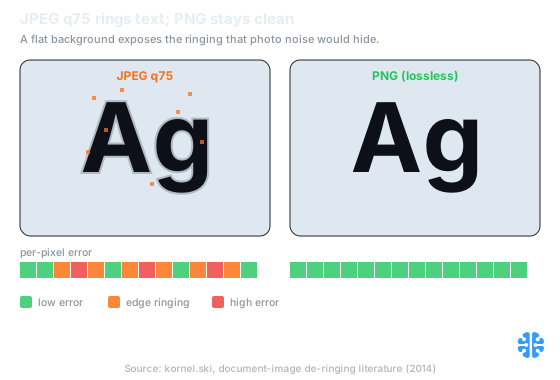
A flat background exposes the ringing that photographic noise would otherwise hide (Source: kornel.ski, document-image de-ringing literature).
Which format wins for charts, UI, and line art?
For flat synthetic content, a lossless or near-lossless path almost always wins on both fidelity and often size. PNG's lossless DEFLATE-plus-filters pipeline introduces no generational loss on sharp edges or text, making it a safe default for screenshots and line art (W3C PNG Specification). WebP lossless goes further, compressing 12,000 web images 23% smaller than ZopfliPNG and 42% smaller than libpng (Google WebP lossless study).
The right tool tracks content type, not file extension. Line art, flat UI, and charts want a lossless format. Mixed photo-plus-text screenshots want JPEG XL or AVIF near-lossless, or region splitting. Photographic gradients want an ordinary lossy codec. Near-lossless offers a middle path by bounding per-pixel error to a preset maximum, useful when strict lossless is too large (MDPI Entropy near-lossless study).
Content type | Frequency profile | DCT-lossy result | Recommended path |
|---|---|---|---|
Line art, logos, flat UI | Hard edges, few colors | Ringing on every edge | PNG, WebP lossless, or JXL Modular |
Charts, diagrams, synthetic renders | Sharp lines, flat fills | Visible mosquito noise | WebP lossless or JXL Modular |
Colored text on colored UI | Edges plus chroma detail | Worst case (subsampling smear) | Lossless, never 4:2:0 lossy |
Mixed photo plus text | Both regimes present | Text rings, photo fine | JXL, AVIF near-lossless, or split |
Photographic gradients | Low-frequency energy | Artifacts hidden by noise | Lossy WebP/AVIF/JXL VarDCT |
Sources: W3C PNG Specification; Google WebP lossless study; Cloudinary, JPEG XL Modular explained; MDPI Entropy near-lossless study.
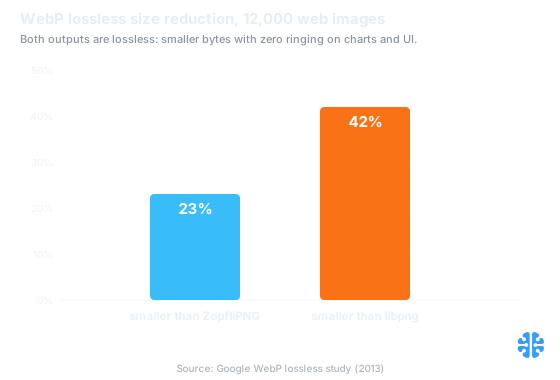
Lossless output means smaller bytes with zero ringing on charts and UI (Source: Google WebP lossless study).
The sibling piece on compressing screenshots and PNGs covers the palette-reduction toolchain for the flattest of these cases, and lossless image compression formats compared benchmarks the formats head to head.
What JPEG XL Modular mode actually does
JPEG XL is really two codecs in one container, and the second is built for exactly this content. VarDCT is the lossy, photographic mode; Modular is an integer, lossless mode with dedicated tools for synthetic imagery, including handling for line art and large flat "patches" of uniform color (Cloudinary, JPEG XL Modular explained). Where VarDCT would ring a chart, Modular models its flat regions and hard edges directly.
Modular is not a bolt-on side mode. VarDCT itself relies on Modular sub-bitstreams to carry the low-frequency image, a 1:8 downscaled base, along with adaptive-quantization weights (libjxl format_overview). So the same integer, lossless machinery that compresses your line art is foundational to how JPEG XL compresses photographs. That architectural reuse is part of why the format handles mixed content gracefully.
The practical implication: for charts, UI, and diagrams, force JPEG XL into Modular mode rather than accepting the VarDCT default. You get lossless output with tools tuned for flat fills and edges, and no ringing to design around. For photographic regions in the same image, VarDCT remains the better choice, which is why mixed screenshots sometimes justify splitting regions.
A content-type routing recipe engineers can implement
Automatic routing is viable because the distortion gap between synthetic and natural content is measurable. Synthetic images suffer far higher distortion than natural ones under a natural-image DCT encoder, a difference reliable enough to serve as a classifier signal (USPTO 8,903,186). You can detect content type from cheap image statistics, then send each class down the right codec path.
A workable heuristic stack, cheapest checks first:
- Color and palette count. Few distinct colors strongly implies synthetic. Route low-count images toward lossless.
- Edge density. A high ratio of hard edges to smooth area signals line art or UI, which rings under DCT.
- Flat-region area ratio. Large uniform patches favor Modular or palette-based lossless.
- FFT high-frequency energy. Concentrated high-frequency structure on flat backgrounds marks text and graphics.
- Encode-and-measure. When heuristics are ambiguous, encode once with a DCT codec, measure per-pixel distortion, and route by the result. Costlier, but definitive.
In our own routing work, the encode-and-measure fallback earns its cost only on genuinely mixed content. Pure heuristics settle the large majority of images correctly and cheaply; the expensive measurement pass is worth reserving for the ambiguous middle, screenshots that mix a photo thumbnail with UI chrome. Routing every image through a full encode-and-measure loop is a common over-engineering trap.
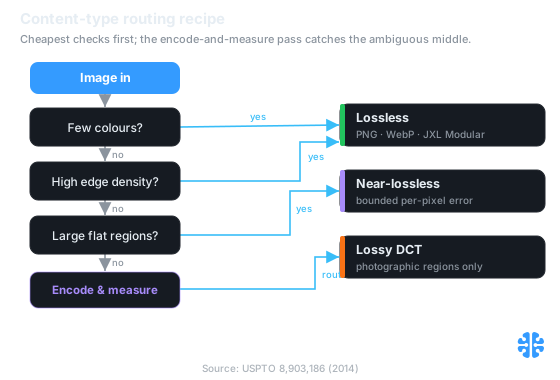
Cheap checks settle most images; the encode-and-measure pass is reserved for the ambiguous middle (Source: USPTO 8,903,186).
At Inverity we treat this classify-then-route decision as measured per image rather than fixed per folder, because a "graphics" directory reliably contains a few photographs and a "photos" directory a few charts. That per-image discipline is the same principle behind why blanket compression hurts your CMS.
Where do AVIF and near-lossless fit?
AVIF sits in between, better than JPEG on synthetic content but still transform-based. Because it is also a DCT-family codec, AVIF-lossy can ring similarly to JPEG, though its larger adaptive block sizes and stronger entropy coding reduce the effect. For crisp UI and text it is not a free pass; a hard edge is still a hard edge, and lossy AVIF still spends its budget approximating one (kornel.ski deringing).
Near-lossless is the pragmatic compromise when strict lossless files are too large. It bounds per-pixel error to a preset maximum, so edges stay visually clean while the encoder recovers some of the size advantage of lossy coding (MDPI Entropy near-lossless study). For a chart that must ship small but must not ring, a tight near-lossless bound is often the sweet spot.
The honest default hierarchy for synthetic content: try lossless first, drop to near-lossless if size demands it, and reserve lossy DCT for the photographic regions only. Deringing an already-lossy graphic is repair work; avoiding the lossy DCT in the first place is cheaper and exact. For long-lived assets that get re-encoded, watch the accumulation problem in recompression and generation loss, and for the transparency side of synthetic assets, see compressing transparency and alpha channels.
FAQ
Why do screenshots and text look blurry or haloed after JPEG?
Because JPEG discards high-frequency DCT coefficients, and a sharp edge stores its energy across nearly the whole spectrum. Removing the high end produces Gibbs-phenomenon ringing, worst on text and graphics (kornel.ski deringing). Photographic noise hides the same artifact, but a flat background exposes it as a gray halo around each glyph.
Should I use PNG, WebP lossless, or JXL for charts and line art?
All three avoid ringing; choose by size and support. PNG is the safe lossless baseline with no generational loss (W3C PNG Specification). WebP lossless compressed 12,000 web images 23% smaller than ZopfliPNG (Google WebP lossless study). JPEG XL Modular adds dedicated line-art and flat-patch tools (Cloudinary).
What is JPEG XL Modular mode, and when is it better than VarDCT?
Modular is JPEG XL's integer, lossless mode, with tools for line art and large flat patches; VarDCT is its lossy photographic mode (Cloudinary). Use Modular for charts, UI, and diagrams, where lossless output and edge fidelity matter. VarDCT wins on continuous-tone photographs, where discarding high-frequency detail is imperceptible.
Is AVIF good for screenshots and non-photographic content?
Partly. AVIF is a transform-based codec, so lossy AVIF can ring on hard edges much like JPEG, though larger adaptive blocks and better entropy coding soften the effect (kornel.ski deringing). For crisp text and UI, prefer a lossless path or AVIF near-lossless with a tight error bound rather than ordinary lossy AVIF.
How do I auto-detect photographic versus synthetic images to pick compression?
Route on cheap statistics. Synthetic images suffer far higher DCT distortion than natural ones, a signal reliable enough to classify on (USPTO 8,903,186). Combine color count, edge density, flat-region ratio, and high-frequency energy, then fall back to encode-and-measure for ambiguous images. See why blanket compression hurts your CMS.