 Inverity
CRF vs Bitrate vs Constrained Quality, Finally Settled
Date Published
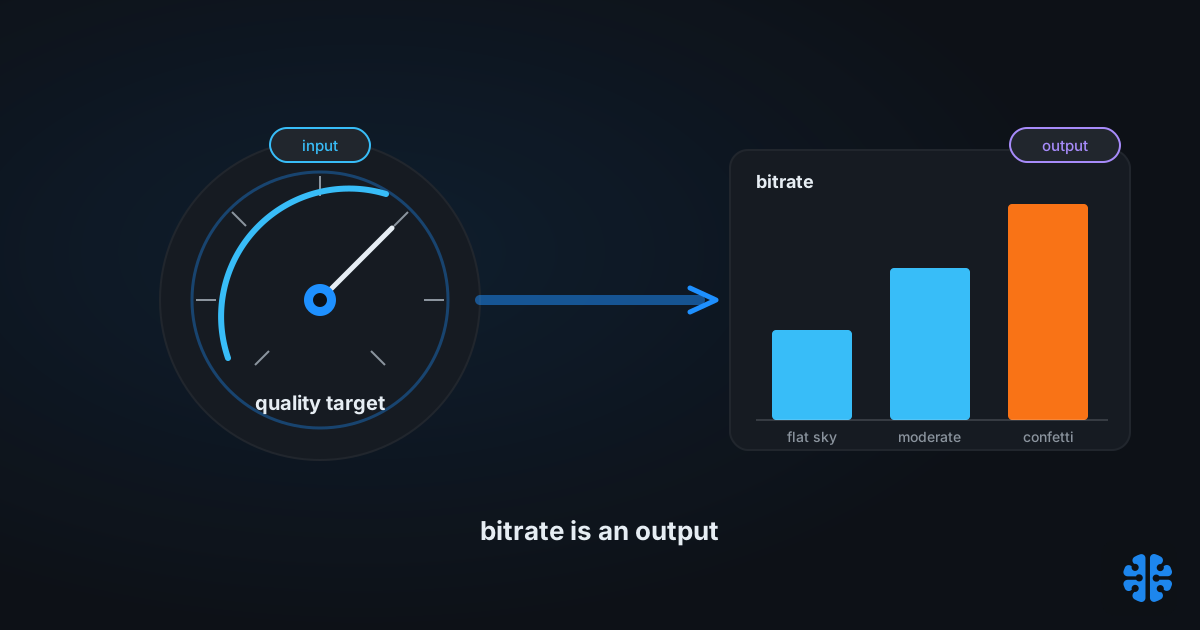
TL;DR >- CRF fixes a perceptual quality target and lets the bitrate move, so bitrate is an output, not an input (Fora Soft, 2026).- A change of about 6 in CRF roughly doubles or halves the file size (slhck CRF Guide, 2017).- Sensible starting points: x264 CRF 23, x265 CRF 28, SVT-AV1 CRF 35, libvpx (VP9) 31, cjxl distance 1.0 (slhck, 2017; x265 docs; SVT-AV1 rate-control docs).- Capped CRF saves roughly 20 to 40% bandwidth versus fixed CBR at matching quality on average titles (Streaming Learning Center).
Ask an engineer for a target bitrate and you have already lost. The question smuggles in a false model: that you set a number of kilobits and the encoder delivers a picture. That is backwards. Modern rate control works the other way around. You set a quality target, and the bitrate is whatever the content happens to need to reach it. A flat blue sky needs few bits. A confetti explosion needs many. Demanding a single bitrate for both means overspending on one and starving the other.
This confusion is not limited to video. Still-image tools carry the same false input, dressed as a "quality" slider from 1 to 100. The fix is identical: target a perceptual quality, let the byte size fall out. Below, we teach the one rule that unifies video and stills, the plus-or-minus 6 arithmetic that makes CRF intuitive, the per-encoder starting points in one place, and the single case where you should cap the quality target with a hard bitrate ceiling.
Why bitrate is an output, not an input
Because the encoder cannot know the right bitrate until it sees the content. CRF fixes a perceptual quality target and lets the bitrate move to match the source complexity, which is why bitrate is an output, not an input (Fora Soft, 2026). You choose how good it should look. The file size is the encoder's answer, not your instruction.
Constant Rate Factor is the default rate-control mode for exactly this reason. It targets a uniform quality across a clip, and the resulting size is determined by source complexity rather than fixed in advance (x265 documentation). Simple scenes get few bits, hard scenes get many, and the perceived quality stays roughly flat throughout. That is what a quality target buys you: consistency where it counts, in the picture.
Targeting a bitrate directly does the opposite of what people expect. A fixed bitrate holds the size constant and lets the quality swing, so easy scenes look pristine and hard scenes fall apart, precisely inverting what a viewer wants. The only reasons to fix a bitrate are external: a hard bandwidth cap or a streaming ladder that must be predictable. Absent those constraints, fixing size instead of quality is a self-inflicted wound.
Citation capsule: CRF fixes a perceptual quality target and lets the bitrate move to match source complexity, which is why "bitrate is an output, not an input." A fixed bitrate instead holds size constant and lets quality swing, degrading exactly the hard scenes a viewer notices most (Fora Soft, 2026).
We build on this framing in our complete guide to image compression, and it is the same reason file size is the wrong metric to target on its own.
What is CRF, and how does the plus-or-minus 6 rule work?
CRF is a quality dial where lower means higher quality, and moving it by about 6 roughly doubles or halves the file size. A change of 6 in CRF corresponds to about double or half the resulting bytes, which makes the scale intuitive once you internalize it (slhck CRF Guide, 2017). Drop CRF by 6 and expect roughly twice the file. Raise it by 6 and expect roughly half.
That arithmetic turns tuning into mental math. If CRF 23 gives you a 10 MB file and you need it near 5 MB, try CRF 29. If it looks too soft, step back toward 26 for something near 7 MB. You are not guessing bitrates. You are nudging a quality target and predicting the size response. The relationship is approximate, not exact, but it is close enough to plan with.
The defaults differ by encoder, and knowing them saves you a bad first encode. x264 uses a CRF range of 0 to 51 with a default of 23 and a sane range of 18 to 28 (slhck, 2017). x265 defaults higher at CRF 28.0 (x265 documentation). SVT-AV1 defaults to CRF 35 on a 1 to 63 scale (SVT-AV1 rate-control docs). libvpx for VP9 spans 0 to 63 with no default, and 31 is the common recommendation for 1080p (slhck, 2017).
Encoder | Quality parameter | Range | Default | Practical start |
|---|---|---|---|---|
x264 | CRF | 0 to 51 | 23 | 18 to 28 |
x265 | CRF | 0 to 51 | 28.0 | 24 to 28 |
SVT-AV1 | CRF ( | 1 to 63 | 35 | 30 to 40 |
libvpx (VP9) | CRF | 0 to 63 | none | 31 (1080p) |
cjxl (JPEG XL) | | 0.0+ | 1.0 | 0.5 to 3.0 |
Video values from slhck, 2017, x265 docs, and SVT-AV1 docs; cjxl distance scale from the JPEG XL distance model. Because scales differ, a CRF number in one encoder is not comparable to another.
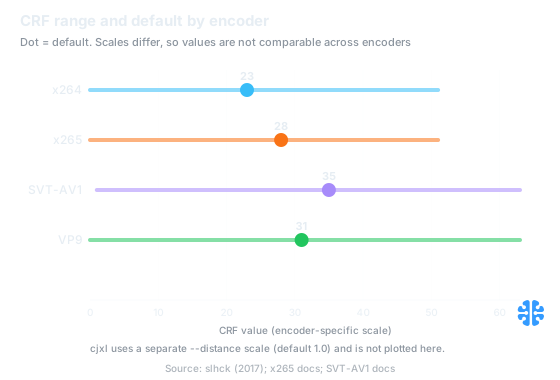
Defaults are x264 23, x265 28, SVT-AV1 35, and VP9 31, but the scales differ so the numbers are not comparable across encoders (slhck, 2017; x265 docs; SVT-AV1 docs).
One warning on comparing across encoders. A CRF number is only meaningful inside its own encoder, because the scales and internal quantizer mappings differ. cjxl distance 1.0, AVIF cq-level, and x264 CRF 23 are not equivalent quality settings, and the only honest way to compare them is a common perceptual metric like SSIMULACRA2. Cross-encoder integer comparison is a trap; the number lies the moment you cross a codec boundary.
Do still images have a CRF?
Yes, and it is the best-kept secret in image encoding. JPEG XL's cjxl exposes --distance, a perceptual quality target measured in just-noticeable-difference units, where 0.0 is mathematically lossless and 1.0 is visually lossless, with a recommended working range of 0.5 to 3.0 and lower meaning higher quality. This is the still-image analogue of CRF: you set a perceptual target, and the byte size is the output.
The distance model is the point, not any specific quality-to-distance number. Older blog posts that map, say, "quality 70 to distance 2.8" are version-dependent and unreliable; treat the distance scale itself as authoritative and ignore the specific integer mappings. What matters is the direction and the anchors: distance 1.0 is the visually-lossless target most pipelines want, and you tighten toward 0.5 for archival or loosen toward 3.0 to save bytes.
AVIF carries the same idea under a different name. avifenc exposes a quality setting and a cq-level (constant quantizer, the inverse of quality), which is the AV1 still-image analogue of CQP or CRF. Higher cq-level means more quantization and a smaller file. As with video, the cq-level integer is encoder-specific and does not translate to a cjxl distance or an x264 CRF.
The teams we see get this right stop shipping a global "quality 82" and start shipping a distance or a metric target. The moment you frame image encoding as "hit distance 1.0" instead of "set quality 82," the whole pipeline gets more honest, because distance is a perceptual promise and the quality slider is just a quantizer knob wearing a costume. The deeper version of this argument lives in content-adaptive per-image quality.
Citation capsule: JPEG XL's cjxl --distance is the still-image analogue of CRF, a perceptual target in just-noticeable-difference units where 0.0 is lossless and 1.0 is visually lossless. AVIF's cq-level plays the same role for AV1 stills. In both, byte size is the output of a quality target, not the input.The just-noticeable-difference units behind distance are unpacked in the just-noticeable-difference in image quality, and why a plain quality number misleads is the whole point of why quality 95 means nothing.
One table for every rate-control mode
Every rate-control mode is a different answer to "what do you hold fixed?" CRF and constant quality fix the perceptual target and let size float. Capped CRF fixes the target but adds a hard bitrate ceiling. CQP fixes a raw quantizer. Target-bitrate VBR and CBR fix the size or rate and let quality float. Naming what each one pins is the whole decision.
Mode | What it fixes | Video flags | Still analogue | Use when |
|---|---|---|---|---|
CRF / constant quality | Perceptual quality; size floats | x264/x265 | cjxl | VOD, archives, single files, all images |
Capped CRF | Quality target with a bitrate ceiling | x265 | rarely used for stills | ABR ladders, CDN budgets |
CQP | Fixed quantizer per frame type | SVT-AV1 | AVIF | Algorithm verification only |
Target bitrate (VBR / CBR) | Output size or rate; quality floats | SVT-AV1 | n/a | Hard bandwidth or channel caps |
Modes and flags from SVT-AV1 rate-control docs, x265 documentation, and slhck rate-control, 2017.
The SVT-AV1 flag scheme makes the family explicit. Its rate-control selector is --rc 0 for CRF or CQP, --rc 1 for VBR, and --rc 2 for CBR; CRF is --rc 0 --aq-mode 2 --qp N, while CQP is the same with --aq-mode 0 (SVT-AV1 rate-control docs). The only difference between CRF and CQP there is adaptive quantization, which is why CRF looks better at the same nominal setting.
Skip CQP for production. It is one-pass and generally not recommended, because the quantizer is set only by frame type and it exists mainly for algorithm verification, not for shipping quality (slhck rate-control, 2017). If you find yourself reaching for CQP outside a codec experiment, you almost certainly want CRF instead. The speed-preset dial that sits alongside these modes is covered in encoder speed presets and their tradeoffs.
When should you cap CRF instead?
When you need CRF's quality behavior but cannot let the bitrate spike, cap it. Capped CRF is a quality target with a hard ceiling: the encoder behaves like CRF until a scene would blow past your maximum bitrate, at which point the ceiling clamps it (Fora Soft, 2026). You get constant-quality efficiency on easy content and a predictable peak on hard content.
This is the right mode for adaptive-bitrate ladders and CDN budgets, where an unbounded CRF spike would break the buffer model. Plain CRF is ideal for VOD and images because nothing constrains the peak. But an ABR rung has to fit inside a bitrate envelope so the player can plan its buffer, and that is exactly what the cap provides without giving up CRF's per-scene savings.
The efficiency case is strong. Capped CRF saves roughly 20 to 40% bandwidth versus fixed CBR at matching quality on average titles (Streaming Learning Center). Netflix's own constant-quality work, using capped-CRF-style encoding, reports around 20% savings per-title and about 30% per-shot, though those figures are secondary and worth corroborating against Netflix's own engineering write-ups (Fora Soft citing Netflix, 2026).
The x265 recipe is two flags plus CRF. Capped CRF in x265 is CRF combined with VBV, for example --crf 26 --vbv-maxrate 5000 --vbv-bufsize 10000, where both VBV values must be non-zero and a common VOD default sets the buffer size to twice the maximum rate (x265 documentation; Fora Soft, 2026). Leave either VBV value at zero and the cap does nothing.
Citation capsule: Capped CRF, CRF plus a VBV ceiling such as --crf 26 --vbv-maxrate 5000 --vbv-bufsize 10000 in x265, saves roughly 20 to 40% bandwidth versus fixed CBR at matching quality on average titles, which is why ABR ladders prefer it over both plain CRF and CBR (Streaming Learning Center).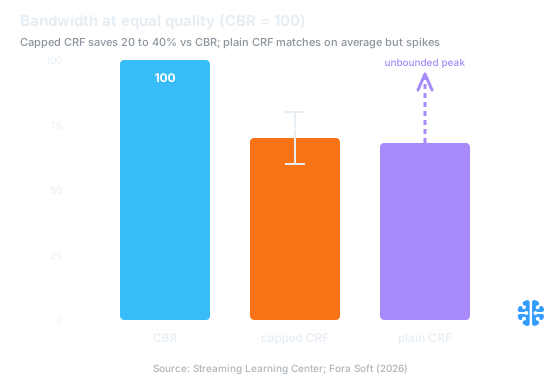
Capped CRF saves roughly 20 to 40% bandwidth versus CBR at matching quality, while keeping a predictable peak that plain CRF cannot guarantee (Streaming Learning Center; Fora Soft, 2026).
Why does the same CRF give a different file size every time?
Because that is the design, not a bug. At a fixed CRF, the file size depends on source complexity, so a talking-head clip and an action sequence encoded at the same CRF will produce very different sizes (x265 documentation). The encoder is holding quality constant and letting size vary, which is the entire premise of constant-quality encoding.
If you re-encode a clip after editing it and the size shifts, the complexity shifted with it. Add grain, motion, or fine texture and the same CRF costs more bytes because those regions genuinely need more bits to hold the quality target. Nothing is wrong. A size that moves with content is the visible signature of a quality target doing its job.
This is also why "target 5 MB" and "hold constant quality" cannot both bind on a single file. You get one or the other. If you truly need a fixed size, switch to target-bitrate VBR and accept that quality will float. If you need consistent quality, use CRF and let the size land where the content puts it. Trying to fix both at once is the request that has no answer. The measurement discipline that keeps these tradeoffs honest is why we insist on how we benchmark, and at Inverity the underlying principle is simple: a quality claim you cannot reproduce is not a measurement.
FAQ
CRF or bitrate, which should I set?
Set CRF, in almost every case. CRF fixes a perceptual quality target and lets the bitrate be the output (Fora Soft, 2026), which keeps quality consistent across easy and hard scenes. Only reach for a target bitrate when an external constraint, a hard bandwidth cap or a fixed-rate channel, forces you to fix size instead of quality.
What CRF should I start with for each encoder?
Sensible starting points are x264 CRF 23, x265 CRF 28, SVT-AV1 CRF 35, libvpx (VP9) 31, and cjxl distance 1.0 for images (slhck, 2017; x265 docs; SVT-AV1 docs). Remember the scales differ, so these numbers are not equivalent across encoders and cannot be compared directly.
What is capped CRF and when is it better?
Capped CRF is a quality target with a hard bitrate ceiling, which behaves like CRF until a scene would exceed your maximum (Fora Soft, 2026). It suits ABR ladders and CDN budgets, saving roughly 20 to 40% bandwidth versus CBR at matching quality (Streaming Learning Center), while keeping a predictable peak that plain CRF cannot guarantee.
Is CRF available for still images?
Yes. JPEG XL's cjxl --distance is a perceptual target in just-noticeable-difference units, where 0.0 is lossless and 1.0 is visually lossless, and AVIF's cq-level is the AV1 still-image analogue. Both let you set a quality target and take byte size as the output, exactly like CRF does for video. Treat distance 1.0 as your default target.
Why does the same CRF give a different file size each time?
By design. At a fixed CRF the size depends on source complexity, so more grain, motion, or fine texture costs more bytes to hold the same quality (x265 documentation). A file size that moves with content is the quality target working correctly. If you need a fixed size instead, switch to target-bitrate VBR and let quality float.