 Inverity
Encoder Speed Presets: What You Actually Trade Away
Date Published
TL;DR >- SVT-AV1 preset 6 runs about 20x faster than preset 2 at CRF 26 with near-identical quality (VMAF 99.565 vs 99.709) and the same 75 MB output (OTTVerse, 2024). The slowest presets buy you almost nothing.- On libaom, cpu-used 3 keeps 99.53% of the best-preset quality while spending only 6.4% of the encode time of cpu-used 0 (Streaming Learning Center, 2024).- For images, cjxl effort 9 took 106s versus 5.4s at effort 7 on a 64 MB file, roughly 151x slower for a 3% smaller result (Cloudinary, 2024).- The organizing rule is build-time versus on-the-fly. Slow presets belong in offline batch jobs, not in a request path.
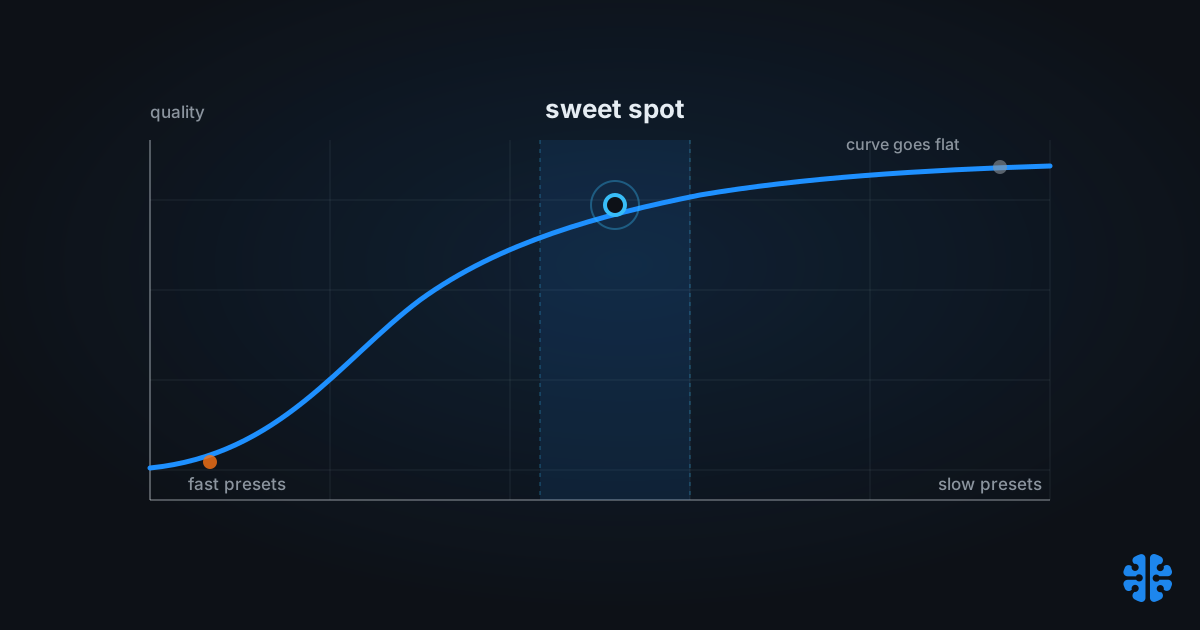
Preset dials get sold backwards. The pitch is usually "use the slowest preset your budget allows, because slower always means smaller." That advice treats the speed-quality curve as a straight line, and it is not. It is a curve that flattens hard at the slow end, where each extra minute of CPU buys a rounding error of savings. The interesting decisions live in the middle, and the honest question is not "how slow can I go" but "where does the curve stop paying me back."
This holds across video and still images, which nobody seems to say in one place. SVT-AV1, libaom, x264, and cjxl all expose a speed dial, and all four punish you for pinning it to the slowest setting. Below, we unify the two worlds under a single diminishing-returns thesis, name the specific settings where quality actually falls off a cliff, and give you one rule, build-time versus on-the-fly, to decide the rest.
What do encoder speed presets actually control?
A speed preset trades encoder search effort for wall-clock time; at a fixed quality target it mostly changes file size, not visual quality. Faster SVT-AV1 presets produced files about 19% larger at equal VMAF in OTTVerse testing (OTTVerse, 2024). You are buying bytes back with CPU, not buying fidelity.
Under the hood, the dial governs how exhaustively the encoder searches. It decides how many block partitionings to try, how far motion search reaches, how many prediction modes get evaluated, and which optional filters run. A slow preset explores more of that space and finds a cheaper way to encode the same picture. A fast preset gives up early and spends more bits to reach the same quality.
The naming is a mess across tools, which hides the shared idea. SVT-AV1 uses numeric presets where higher is faster. libaom uses cpu-used from 0 to 8, where 0 is slowest (VideoNerd, 2024). x264 uses word labels from placebo to ultrafast. cjxl uses an effort number from 1 to 10 with animal-name aliases, default 7, "squirrel" (libjxl cjxl manpage, 2024). Same concept, four vocabularies.
Citation capsule: Encoder speed presets trade search effort for time. At a fixed quality target, faster SVT-AV1 presets produced files roughly 19% larger at equal VMAF, meaning the dial changes bytes, not fidelity (OTTVerse, 2024).
Why the slow end is where returns collapse
The slowest presets are almost never worth it, because the speed-quality curve is steeply diminishing. On SVT-AV1, preset 3 delivers 98.30% of the maximum quality while shaving about 92% of the maximum encode time compared to preset 0 (Codec Wiki, SVT-AV1 v3.0, 2025). You give up under 2% of quality to run roughly twelve times faster.
The video and image data agree here, which is the point worth internalizing. On libaom, cpu-used 3 holds 99.53% average quality and 99.39% low-frame quality while using just 6.4% of the encode time of cpu-used 0 (Streaming Learning Center, 2024). On x264, the placebo preset is effectively identical to veryslow while taking three to five times as long, and veryslow itself buys only about 2 to 5% smaller files than slow for three to five times the runtime (x265 documentation and Streaming Learning Center, 2024).
The pattern is identical whether you are encoding a 4K film or a product photo. Somewhere around the 90th percentile of quality, the curve goes nearly flat, and every encoder charges you an order of magnitude more time to climb the last percent or two. This is why "use the slowest preset" is not conservative advice. It is expensive advice dressed as caution.
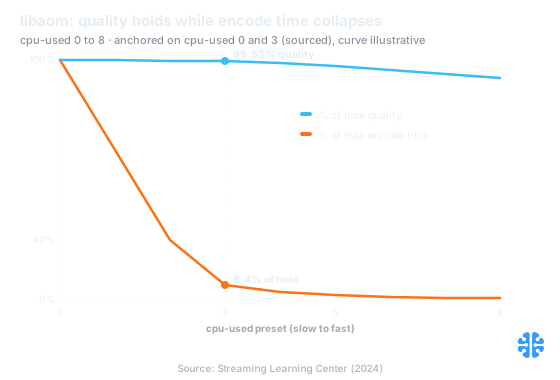
Quality barely moves as encode time falls off a cliff across libaom presets. Source: Streaming Learning Center (2024).
Here is the folklore caveat. The often-repeated x264 claim that ultrafast is "30x faster and 50% larger" than veryslow circulates widely but traces to community rules of thumb, not a controlled study (community benchmarks via x265 docs, 2024). Treat the magnitude as directional. The direction is not in dispute; the exact multiplier is.
SVT-AV1: how much does a faster preset cost you?
Very little, until you reach the extremes. At CRF 26, SVT-AV1 preset 6 encoded about 20x faster than preset 2 while landing near-identical quality, VMAF 99.565 against 99.709, and producing the same 75 MB file (OTTVerse, 2024). Twenty times the throughput for a quality difference you cannot see and a file size that did not move.
Push to the fast extreme and the time savings become almost comical. Preset 12 encoded 135x faster than preset 2 at CRF 38 (826.6s down to 6.1s) and 124x faster at CRF 26 (974s down to 8.05s) in the same testing (OTTVerse, 2024). That speed is not free, though. Remember the size penalty: faster presets ran about 19% larger and roughly 18% higher bitrate at equal VMAF (OTTVerse, 2024).
Preset (SVT-AV1) | Relative speed vs preset 2 | Quality (VMAF, CRF 26) | Practical role |
|---|---|---|---|
2 | 1x (baseline) | 99.709 | High-value archival, offline |
6 | ~20x faster | 99.565 | VOD sweet spot |
12 | ~124x faster | Lower, ~19% larger files | Real-time / live |
Speed and VMAF: OTTVerse, 2024. Preset behavior is version-sensitive; these figures reflect the tested SVT-AV1 build, so pin your encoder version before quoting them.
One firm warning on SVT-AV1 specifically. Preset numbering and behavior shift between releases; the meaning of a given number is not stable across major versions. Always record the exact SVT-AV1 version alongside any preset benchmark, or the number is unreproducible. For the quality-target mechanics behind CRF here, see our companion piece on CRF versus bitrate versus constrained quality.
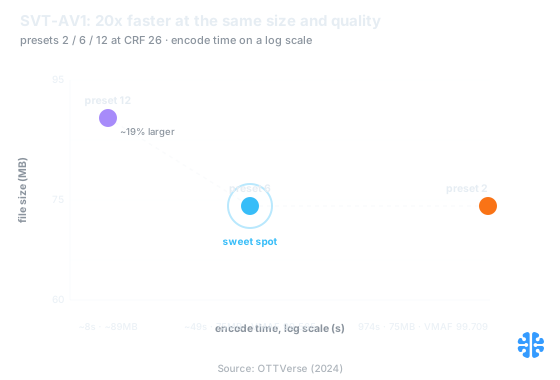
Preset 6 sits at the knee: near-identical quality and size to preset 2 at roughly 20x the throughput. Source: OTTVerse (2024).
The quality cliffs: aom cpu-used 5 and cjxl e9
Most preset changes are smooth, but two specific settings behave like cliffs rather than slopes. On libaom, cpu-used 5 is where the encoder starts disabling loop-restoration filtering, a quality-relevant tool, so the step from 4 to 5 is not just "a bit faster" (VideoNerd, 2024). It is a feature being switched off.
That distinction matters when you pick a "web-fast" AVIF preset. Crossing from cpu-used 4 to 5 changes which coding tools are even in play, so a benchmark that treats the range as uniformly graded misleads you. If your AVIF stills look softer than expected at a fast preset, this filtering change is a prime suspect. The perceptual side of that judgment is where metrics like SSIMULACRA2 and Butteraugli earn their keep, because VMAF alone will not always flag it.
The image-side cliff is cjxl effort 9. On a 64 MB image with 8 threads, effort 7 encoded in 5.4s to 33.22 MB, while effort 9 took 106s to reach 32.20 MB (Cloudinary, 2024). That is roughly 151x the encode time for about 3% smaller output. Beyond effort 9, the cjxl curve is essentially a wall: you pour in CPU and get back single-digit-percent scraps.
Citation capsule: On cjxl, effort 9 cost roughly 151x the encode time of effort 7 (106s versus 5.4s on a 64 MB image) to produce a file only about 3% smaller (Cloudinary, 2024). The slow end of the effort dial is a wall, not a ramp.
A note on cjxl's top labels. The effort range runs 1 to 10 by default, with effort 11, "tectonic_plate," reachable only via --allow_expert_options and lossless mode (libjxl cjxl manpage, 2024). Some alias names at the very top of the scale vary by libjxl version, so verify the exact label on your build rather than trusting a summary table.
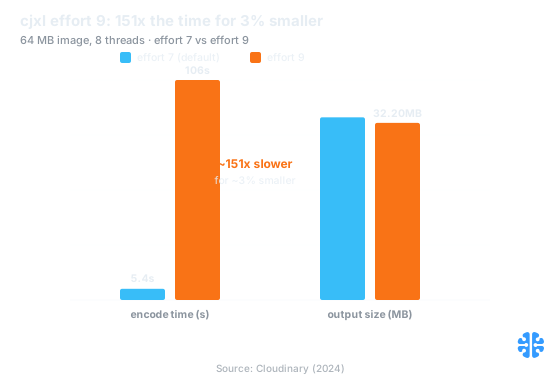
Effort 9 costs about 151x the encode time of effort 7 to shave roughly 3% off the file. Source: Cloudinary (2024).
Build-time versus on-the-fly is the rule that decides your preset
The single question that resolves most preset debates is where the encode runs: in an offline batch job, or in a live request path. That framing beats any per-encoder table, because it maps directly onto how much wall-clock time you can actually spend. It is the same build-time-versus-runtime split we treat as foundational in our complete guide to image compression.
Build-time encoding tolerates slow presets, because latency is invisible to the user. A nightly job re-encoding a catalog can afford SVT-AV1 preset 2 to 4 or libaom cpu-used 3, spending minutes per asset to shave real bytes off files served millions of times. The math favors patience: encode once, deliver forever.
On-the-fly encoding cannot. When a cache miss triggers an encode inside the request, every second is user-facing latency, so you live in the fast half of the dial: SVT-AV1 preset 8 to 12 for real-time video, cjxl effort 7 for images. In our pipeline work the most common misconfiguration we see is a slow offline-grade preset wired into a synchronous transform path, where it quietly inflates p99 latency for savings nobody can perceive. The fix is almost always to move the slow preset into a pre-generation step, not to tune the preset itself.
Library upgrades change this budget more than preset tweaks do. Moving libjxl 0.9 to 0.10 cut default-effort encode time from 160s to 30s single-threaded (5.3x) and 126s to 5.4s at 8 threads (23.3x), while dropping peak memory from 7.9 GB to 0.6 GB (Cloudinary, 2024). A version bump moved the whole curve. That is why pinning encoder versions is not pedantry; the same preset number means different things across releases.
Which preset should you pick?
Start from the request-path question, then pick the fastest preset that clears your quality bar. As a default, the practical sweet spots are SVT-AV1 presets 5 to 9 for most video, libaom cpu-used 4 to 5 as the rough analog of x264 medium, and cjxl effort 7 for images (Streaming Learning Center, 2024). Reserve the slowest presets for high-value, cache-forever assets only.
Scenario | Video preset | Image preset | Why |
|---|---|---|---|
Offline batch, cache-forever | SVT-AV1 2-4 / aom cpu-used 3 | cjxl effort 7-9 | Latency invisible; harvest the bytes |
VOD, large but finite catalog | SVT-AV1 5-6 | cjxl effort 7 | Near-max quality at ~20x the throughput |
On-the-fly / cache miss | SVT-AV1 8-12 | cjxl effort 7 | Every second is user latency |
Live / real-time | SVT-AV1 8-12 | n/a | Speed dominates; accept larger files |
Ranges synthesized from OTTVerse, 2024 and Streaming Learning Center, 2024. Pin your encoder versions before adopting these.
Do not chase placebo or effort 10. Both sit past the knee where the curve has gone flat, and both cost multiples of the runtime of the setting just below them for savings you will struggle to measure. The command-level flags that pair with these presets, and the tune trap that ruins them, are covered in our guide to tuning mozjpeg, libjxl, and libaom. Whether the savings are real at all is a measurement question, which is why we insist on judging output against why a quality of 95 means nothing and on measuring quality the way humans see it.
FAQ
Does a faster x264 preset lower quality or just make files bigger?
At a fixed CRF, a faster preset mainly produces a larger file at roughly the same visual quality, not a worse-looking one. The encoder searches less and spends more bits to reach the same target. The widely cited "30x faster, 50% larger" figure for ultrafast is a community rule of thumb, not a controlled study (x265 docs, 2024).
Which SVT-AV1 preset should I use for VOD versus live?
Use presets 2 to 6 for offline VOD, where preset 6 runs about 20x faster than preset 2 at near-identical quality (OTTVerse, 2024), and presets 8 to 12 for real-time or live encoding. Preset behavior shifts between SVT-AV1 versions, so validate the choice against the exact build you deploy.
Is cjxl effort 9 ever worth it over effort 7?
Rarely. On a 64 MB image, effort 9 took about 151x longer than effort 7 (106s versus 5.4s) to produce a file only around 3% smaller (Cloudinary, 2024). Effort 7 is the sensible default; reserve higher effort for archival stills where the encode happens once and the savings compound.
What is the AV1 equivalent of x264 "medium"?
Roughly SVT-AV1 preset 6 to 8 or libaom cpu-used 4 to 5, which sit in the practical sweet spot where quality is near maximum and encode time is reasonable (Streaming Learning Center, 2024). Exact parity depends on content and encoder version, so treat it as a starting point and confirm with your own quality metric.
Why not just always use the slowest preset?
Because the curve is flat at the slow end. libaom cpu-used 3 keeps 99.53% of the best-preset quality using only 6.4% of the encode time of cpu-used 0 (Streaming Learning Center, 2024), and x264 placebo is essentially identical to veryslow at three to five times the runtime (x265 docs, 2024). You pay an order of magnitude more for a rounding error.