 Inverity
Content-Adaptive Compression: Per-Image Quality Done Right
Date Published
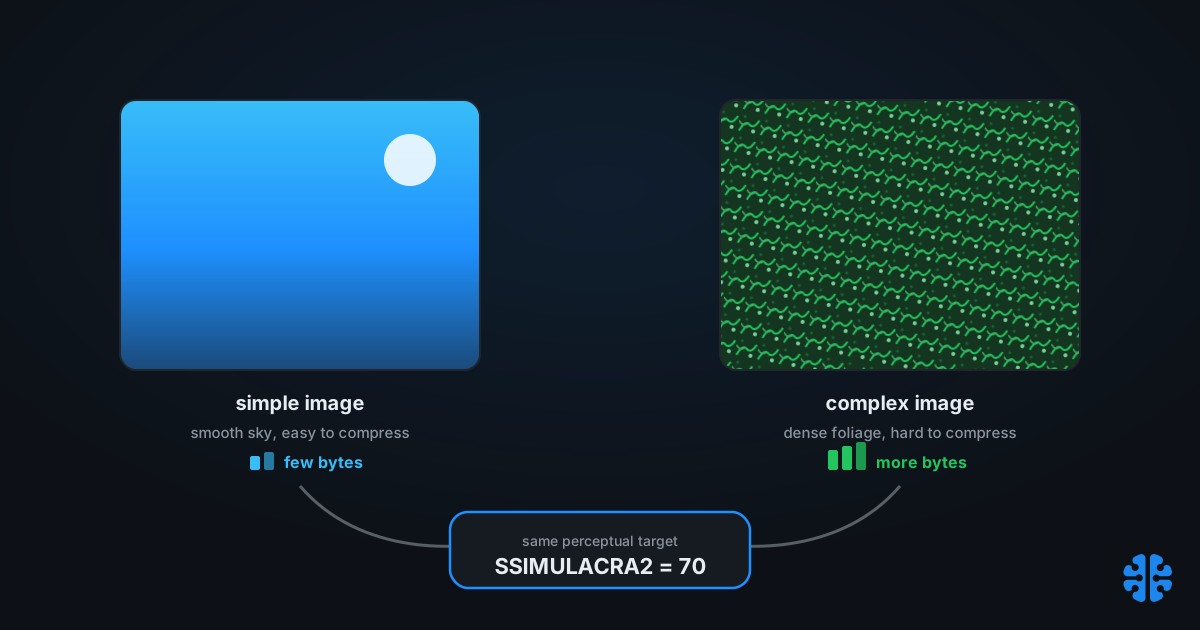
TL;DR >- A fixed quality number is a quantizer scale, not a perceptual target, so it overspends bytes on smooth images and starves complex ones (libjxl encode_effort doc, 2024).- Adaptive pipelines target a perceptual score instead. A practical default is SSIMULACRA2 70.0 with an asymmetric band of [67, 78] (ModPageSpeed 2.0, 2024).- The verify-then-re-encode loop defaults to at most 4 attempts, a plus-or-minus 5 quality step, stopping once the score lands in band (ModPageSpeed 2.0, 2024).- The honest cost is not just CPU. It is determinism: the same image can converge to a different result across encoder and metric versions.
Per-image quality gets pitched as a magic byte-saver, and that framing hides the real trade. Cloudinary's q_auto and similar features do cut bytes, sometimes dramatically, but the interesting story is not the savings. It is what you give up to get them: a single, reproducible quality setting that behaves identically every time you run it. Adaptive quality is worth it for many pipelines. It is not free, and the price is paid in determinism, not only in compute.
This post treats per-image quality vendor-neutrally, because the technique predates and outlives any one product. We will cover why a fixed quality wastes bytes, how a perceptual metric target like SSIMULACRA2 70 replaces it, how the verify-then-re-encode loop actually runs, and the reproducibility cost nobody likes to state plainly. The lineage is older than image tooling: this is per-title encoding from video, pointed at still images.
Why does a fixed quality setting waste bytes?
Because a JPEG quality number is a quantizer scale, not a measure of how the result looks. The same quality of 75 lands at very different perceptual qualities on different images, since fixed encoder settings produce image-dependent variance rather than consistent output (libjxl encode_effort doc, 2024). One setting, many outcomes.
The failure is directional and predictable. On smooth, simple content like skies and gradients, a fixed quality of 75 spends far more bits than the eye needs, because those regions were already easy to compress. On complex content like foliage, fabric texture, text, or sensor noise, the same setting starves the image and produces visible artifacts. You overpay where it does not matter and underpay where it does.
The root cause is a category error baked into every "quality" slider. The number controls the quantizer, which is a knob on the compression math, and it has no idea what the picture looks like afterward. Two images at quality 75 can differ by 15 or more points on a perceptual scale. That is why fixed quality is simultaneously wasteful and risky: the bytes you save on one image are the artifacts you ship on another.
The perceptual side of this, why the eye cares about structure and not pixel-wise error, is the whole subject of why a quality of 95 means nothing and of measuring quality the way humans see it. The short version: the slider lies, so stop targeting the slider.
What does content-adaptive per-image quality actually do?
It replaces a fixed quality number with a per-image search for the setting that hits a chosen perceptual quality. Cloudinary's q_auto, for example, auto-selects quality per image from the format and the image content rather than applying one global value (Cloudinary documentation, 2024). Each image gets the compression it individually needs.
The mechanism is a target-and-verify loop. Instead of "encode at quality 75," the pipeline says "encode until this image reaches perceptual quality X." Simple images converge to a low quality number and shed bytes; complex images converge higher and keep the detail. The output is uniform perceived quality across a library, which is the opposite of what a fixed setting gives you.
The savings can be real and large. Cloudinary published one example where q_auto took a single image from 526 KB to 242 KB, about a 54% reduction (Cloudinary, 2024). Treat that as an illustration, not a benchmark: it is one image, with no disclosed dataset or metric, so it shows the shape of the win rather than an expected average. Your mileage depends entirely on your content mix.
Citation capsule: Content-adaptive quality replaces a fixed setting with a per-image search for a target perceptual score. Cloudinary reported one q_auto example cutting an image from 526 KB to 242 KB, about 54%, though it is a single illustrative anecdote with no disclosed dataset or metric (Cloudinary, 2024).Pick a metric target: the case for SSIMULACRA2 70
The right control is a perceptual score, and SSIMULACRA2 is a strong default because a given score means roughly the same quality across formats. It scores on a scale near 0 to 100, higher is better, and a target score is broadly format-independent across JPEG, WebP, and AVIF (Codec Wiki, 2024). That portability is what lets one target govern a mixed-format pipeline.
A practical target is SSIMULACRA2 70.0 with a tolerance of 5, giving an asymmetric acceptance band of [67, 78] (ModPageSpeed 2.0, 2024). The asymmetry is deliberate and clever. Under-quality is penalized 0.6x and over-quality 1.6x, because the two errors are not equally bad.
Parameter | Default | Meaning |
|---|---|---|
Target score | SSIMULACRA2 70.0 | Perceptual quality goal |
Tolerance | plus/minus 5 | Acceptance window width |
Acceptance band | [67, 78] | Asymmetric, favors slightly-over |
Under-quality penalty | 0.6x | Under-shoot is user-visible |
Over-quality penalty | 1.6x | Over-shoot only wastes bytes |
All values: ModPageSpeed 2.0, 2024.
The reasoning behind the asymmetry is worth stating outright. Under-quality is user-visible, an artifact someone can see, while over-quality just wastes bytes (ModPageSpeed 2.0, 2024). A pipeline should therefore prefer to err slightly high, spending a few extra bytes rather than shipping a visible defect. The full metric family behind this choice, including how SSIMULACRA2 compares to Butteraugli, is covered in Butteraugli and SSIMULACRA2 explained.
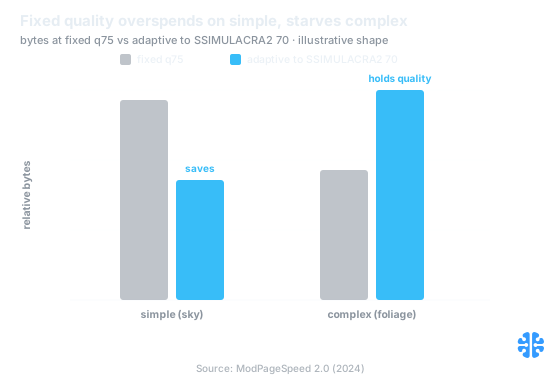
Adaptive quality moves bytes to where the eye needs them: fewer on the sky, more on the foliage. Source: ModPageSpeed 2.0 (2024).
How does the verify-then-re-encode loop work?
It encodes, scores the result against the target, and re-encodes with an adjusted quality until the score lands in the band. The reference implementation defaults to at most 4 attempts, a quality step of plus-or-minus 5, and a floor of quality 1 for JPEG or 0 for WebP and AVIF, stopping as soon as the score enters the acceptance band (ModPageSpeed 2.0, 2024). Bounded attempts keep the compute predictable.
Walk one image through it. Attempt one encodes at a starting quality and scores, say, 82, above the band, so the loop steps quality down. Attempt two scores 74, in band at [67, 78], and stops. A complex image might start below the band and step up instead. The plus-or-minus 5 step and the 4-attempt cap mean the loop converges fast or gives up gracefully, never spinning forever.
![Convergence line chart over up to 4 attempts: attempt 1 scores SSIMULACRA2 82 above the shaded 67, 78] band, attempt 2 steps down to 74 inside the band and the loop stops. The bounded loop steps quality down from 82 into the [67, 78] band by the second attempt, then stops. Source: ModPageSpeed 2.0 (2024).
![67, 78] band, attempt 2 steps down to 74 inside the band and the loop stops.](assets/content-adaptive-per-image-quality-chart-2.svg)
There is a cheaper alternative to brute-force re-encoding: predict the parameters. ModPageSpeed 2.0 ships a learned model that predicts the encode parameters needed to hit a target score, avoiding the re-encode loop entirely (ModPageSpeed, 2024). That trades exactness for speed. A prediction is approximate where the loop is exact, but it turns N encode passes into one. Fast in-loop scoring also helps: a fast SSIMULACRA2 implementation makes metric-in-the-loop verification cheap enough to run at scale.
Does adaptive compression ever make files bigger?
Yes, on complex images, and that is the feature working as intended. To hold a target perceptual quality on a hard-to-compress image, the encoder must spend more bits than a fixed low quality would, so the adaptive file can be larger than a naive fixed-quality encode. That is the pipeline refusing to ship a visible artifact.
This is exactly why the asymmetric band leans toward over-quality. On a foliage or text-heavy image, converging to SSIMULACRA2 70 may push the quality number, and the byte count, above what a blanket quality of 75 would have produced. The pipeline is honoring the quality contract, not the size target. The bytes go where the eye needs them.
The teams that get burned by this are the ones who set a hard per-image byte budget and an adaptive quality target at the same time, then act surprised when the two conflict. They cannot both bind. Either quality floats to hit a byte cap, or bytes float to hit a quality target. Adaptive quality chooses the second, on purpose, and the operational discipline that keeps it honest is the subject of why blanket compression hurts your CMS.
The honest cost is determinism, not just CPU
The real price of adaptive quality is reproducibility. A verify-then-re-encode loop or a learned predictor introduces a dependency on the exact encoder and metric versions, so the same input image can converge to a different quality, and different bytes, when those versions change. Fixed quality is boring and perfectly reproducible. Adaptive quality is smart and only conditionally reproducible.
There are two failure modes, and both are subtle. First, compute: up to 4 encode passes per image, or a model dependency to maintain, which at library scale is a real budget line. Second, and more insidious, non-determinism: bump libjxl, or update the SSIMULACRA2 implementation, and yesterday's converged output is not guaranteed to reproduce. For a system that promises verifiable, auditable output, that is the cost that matters, more than CPU.
Citation capsule: The core cost of content-adaptive quality is reproducibility, not compute. A re-encode loop runs up to 4 passes per image, and because it depends on encoder and metric versions, the same image can converge to different bytes across releases (ModPageSpeed 2.0, 2024).
This is precisely the seam Inverity works on: making per-image perceptual decisions that stay verifiable and reproducible, by pinning the metric and recording the decision rather than treating adaptive quality as an opaque black box. A claim about quality that you cannot reproduce is not a measurement; it is a hope. The broader argument sits in perceptual decisioning beyond compression and in our complete guide to image compression.
Per-image quality is per-title encoding, applied to images
Adaptive per-image quality is not new; it is the direct descendant of per-title encoding from video. The lineage is worth naming because it is already accepted practice in streaming, where each title, and later each shot, gets its own encoding recipe instead of one blanket bitrate ladder. Still images are just catching up to a technique video normalized years ago.
The parallel is exact. Per-title encoding asked "why give a cartoon and a gritty action film the same bitrate ladder?" Per-image quality asks "why give a flat logo and a dense street photo the same quality of 75?" Both answers are the same: measure the content, then spend bits where the content and the metric say they are needed. The quantizer-versus-target confusion that plagues image quality is the same one that made fixed bitrate ladders wasteful, and it connects directly to how CRF, bitrate, and constrained quality trade off in video, and to the encoder tuning and speed-preset choices that sit underneath any adaptive loop.
The maturity gap is really a determinism gap. Video learned to make per-title decisions reproducibly, with locked encoding ladders and documented recipes. Image pipelines that want the same byte savings have to solve the same reproducibility problem, or they trade a wasteful-but-predictable system for an efficient-but-unpredictable one. The savings are worth chasing. Pretending they are free is not.
FAQ
What is q_auto doing under the hood?
It selects a per-image quality from the format and the image content, rather than applying one fixed quantizer to everything (Cloudinary, 2024). In effect it targets a perceptual quality per image, spending fewer bytes on simple content and more on complex content. Cloudinary's published 526 KB to 242 KB example is illustrative of the shape, not a benchmark average.
What SSIMULACRA2 score should I target?
A practical default is 70.0 with a tolerance of 5, giving an asymmetric acceptance band of [67, 78] (ModPageSpeed 2.0, 2024). The band leans toward slightly-over-quality because under-quality is user-visible while over-quality only wastes bytes. Because SSIMULACRA2 is roughly format-independent, one target can govern JPEG, WebP, and AVIF together.
Does adaptive quality ever make files bigger?
Yes, on complex images, and that is the point. To hold a target perceptual quality on hard-to-compress content like foliage or text, the encoder must spend more bits than a fixed low quality would (ModPageSpeed 2.0, 2024). The larger file is the pipeline refusing to ship a visible artifact, honoring quality over a byte target.
Is per-image quality deterministic?
Not necessarily. Because a re-encode loop or learned predictor depends on the exact encoder and metric versions, the same image can converge to different bytes when those versions change (ModPageSpeed 2.0, 2024). Fixed quality is fully reproducible; adaptive quality is only conditionally so. Pinning versions and recording each decision is how you keep it auditable.
Is adaptive quality worth the compute?
It depends on scale and whether you can do the work at build time. A re-encode loop runs up to 4 passes per image, but learned prediction cuts that to roughly one by predicting parameters directly (ModPageSpeed, 2024). For large libraries encoded offline, the byte savings usually justify the cost. For synchronous request paths, prefer the learned or single-pass approach.