 Inverity
Lossless JPEG Transcoding With JPEG XL: Save 20% Safely
Date Published
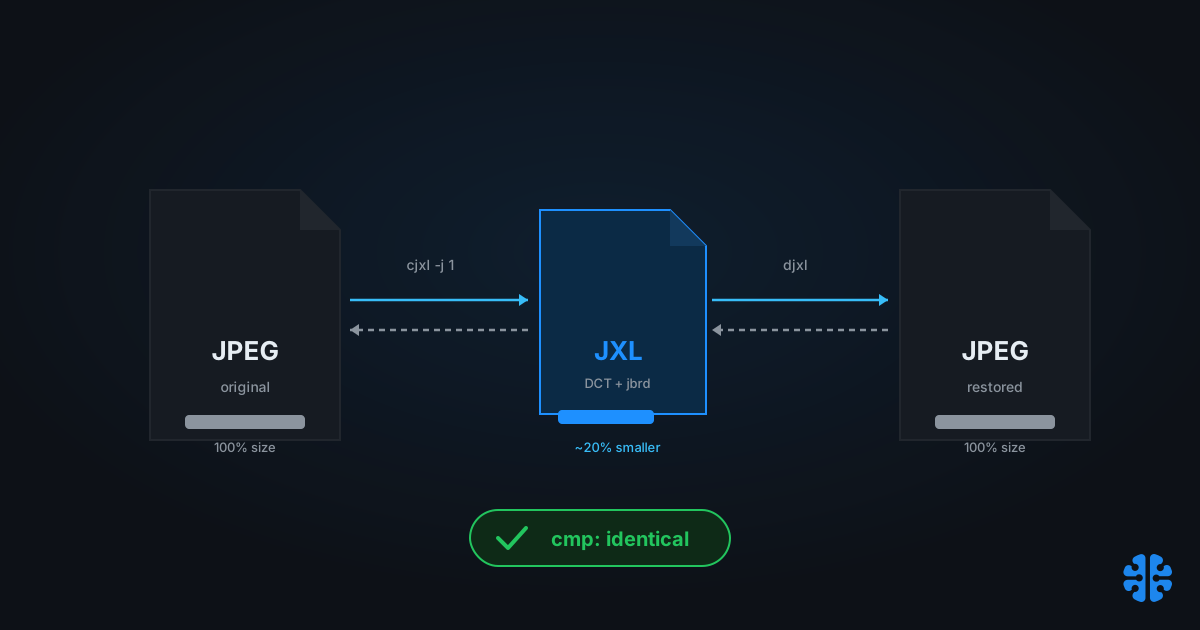
TL;DR >- Lossless JPEG recompression with JPEG XL saves about 20% on existing images and is described by the encoder authors as "completely risk-free" (JPEG XL system paper, arXiv 2506.05987, 2025).- An independent test of more than 400,000 images measured a 22% average reduction (mina86.com, 2025).- That beats general-purpose compression badly: zipping a JPEG typically recovers only 1-3% (JPEG XL system paper, arXiv 2506.05987, 2025).- Transcoding recreates the original JPEG bit-for-bit, because JXL can store ajbrdreconstruction payload guaranteeing exact reconstruction (mina86.com, 2025).- The command iscjxl -j 1 -e 10 -d 0 in.jpg out.jxl; verify withdjxlthencmp(mina86.com, 2025).
Most advice about shrinking a JPEG archive starts from the wrong question: which lossy re-encode gives the best size-to-quality ratio. For a working delivery library that can be a fair question. For an archive of record, a master library, or anything an auditor might inspect, it is the wrong one, because every lossy re-encode is an irreversible alteration you now have to defend. There is a different move that most roundups bury: repack the JPEG losslessly so you can regenerate the original bytes on demand.
JPEG XL does exactly that. It re-entropy-codes the DCT coefficients already inside your JPEGs, without touching a single pixel, and can reconstruct the source file bit-for-bit. You get roughly a fifth of the storage back and keep a provable "no alteration" guarantee. This post leads with the migration and audit-safety case, then gives the verification recipe you can run at scale.
Why lead with archive safety instead of file size?
Because on a records archive, reversibility is worth more than the last few percent of size. JPEG XL's lossless transcode saves about 20% while recreating the original JPEG bit-for-bit, which means the operation passes "no alteration" requirements that any lossy re-encode fails by definition (mina86.com, 2025). You reduce storage and keep the original provably intact.
Think about what an irreversible bulk re-encode actually commits you to. Once you lossy-transcode a million source JPEGs and delete the originals, you cannot answer "was this image altered?" with anything better than "we trusted the encoder." For marketing assets that might be acceptable. For legal records, medical-adjacent imagery, insurance documentation, or scientific archives, it is not.
The industry frames JXL transcoding as a compression feature. It is really a records-integrity feature that happens to save space. The reversibility is the product; the 20% is the discount for adopting it. Almost nobody leads with that, which is why teams with genuine alteration constraints overlook the one modern format built for their problem.
Citation capsule: JPEG XL can losslessly repack an existing JPEG, saving roughly 20% of storage while recreating the source file bit-for-bit, an operation the encoder authors call "completely risk-free" because the original JPEG can be regenerated byte-for-byte at any time (JPEG XL system paper, arXiv 2506.05987, 2025).
This reversibility is the same property we examine in what invertibility means for image optimization, and it anchors our complete guide to image compression.
How much space does JPEG XL transcoding actually save?
About 20% typically, and up to roughly 22% on large photographic corpora. The encoder authors report about 20% average savings from lossless recompression of existing JPEGs (JPEG XL system paper, arXiv 2506.05987, 2025), and an independent test of more than 400,000 images measured a 22% average reduction, matching that lineage (mina86.com, 2025). Both figures come from re-entropy-coding, not quality loss.
The contrast with general-purpose compression is stark. Zipping or gzipping a JPEG recovers only 1-3%, because JPEG's payload is already entropy-coded and a generic compressor finds little left to squeeze (JPEG XL system paper, arXiv 2506.05987, 2025). JXL wins by understanding the DCT structure a zip tool treats as opaque bytes.
Method | Typical savings on a JPEG | Reversible to original bytes? |
|---|---|---|
Zip / gzip the JPEG | 1-3% | Yes |
JPEG XL lossless transcode ( | ~20% (up to 22% on large photo archives) | Yes, bit-for-bit |
Lossy re-encode (new JPEG/WebP/AVIF) | Varies (lossy) | No |
Sources: JPEG XL system paper, arXiv 2506.05987, 2025; mina86.com, 2025.
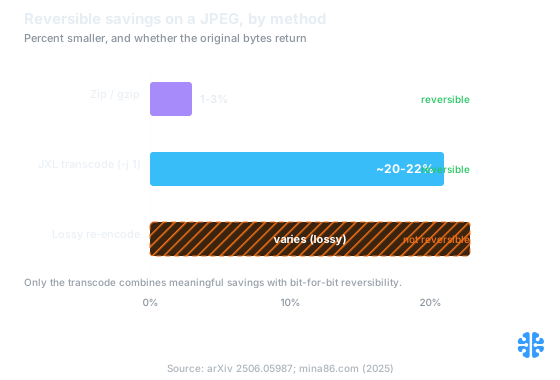
Only the JPEG XL transcode pairs meaningful savings with bit-for-bit reversibility; zipping recovers almost nothing. Source: arXiv 2506.05987; mina86.com (2025).
Run the storage math on a real archive. A 10 TB JPEG library reclaims roughly 2 TB at the 20% figure, permanently, with zero loss of the ability to hand back an auditor the exact original file. On multi-TB archives that recurs every year in storage and backup cost, and unlike a lossy pass it carries no integrity risk.
What makes the transcode bit-exact and reversible?
JPEG XL preserves the original by re-coding the existing DCT coefficients and storing an optional reconstruction payload, not by re-rendering pixels. The transcode recreates the original JPEG bit-for-bit because JXL can carry a jbrd (JPEG bitstream reconstruction data) payload that guarantees exact reconstruction of the source file (mina86.com, 2025). No pixels are decoded, quantized, or re-quantized.
This is the core distinction from ordinary format conversion. A normal "convert to JXL" pass decodes the JPEG to pixels and re-encodes them, which is irreversible: you cannot get the exact original JPEG back, only a visually similar file. The -j 1 transcode instead lifts the entropy-coded coefficients, repacks them with JXL's stronger entropy coder, and records enough header and structure metadata to rebuild the byte-identical .jpg.
The technique has a long pedigree. It descends from Brunsli, the JPEG recompression work by Szabadka and Alakuijala, which fed into Pik in 2017, became standalone in 2019, and was absorbed into JPEG XL (JPEG XL system paper, arXiv 2506.05987, 2025). The modern JPEG encoder jpegli continues in the same family as a sibling of libjxl (libjxl README). This is mature engineering, not a new experiment.
Citation capsule: JPEG XL's lossless JPEG transcode re-entropy-codes the existing DCT coefficients rather than re-rendering pixels, and stores an optional jbrd reconstruction payload so the original JPEG is recreated bit-for-bit. The technique descends from Brunsli JPEG recompression via Pik (mina86.com, 2025; arXiv 2506.05987, 2025).
Because it never re-renders pixels, the transcode also avoids the generation loss that stacks up across repeated lossy saves, a failure mode we dissect in recompression and generation loss.
The verification recipe: proving bit-exactness at scale
You do not have to trust the claim; you can prove it per file with three commands. Transcode with cjxl -j 1, restore with djxl, then compare the restored file against the original with cmp. If cmp reports no difference, reconstruction is byte-identical (mina86.com, 2025). That turns "risk-free" from a marketing adjective into a checked property.
The reference sequence:
```bash
1. Lossless JPEG transcode (-j 1 = repack DCT coefficients, -d 0 = lossless)
cjxl -j 1 -e 10 -d 0 in.jpg out.jxl
2. Reconstruct the original JPEG from the JXL
djxl out.jxl restored.jpg
3. Prove bit-for-bit equality (silent = identical)
cmp in.jpg restored.jpg
```
At archive scale, wrap that loop and record a checksum manifest. Hash every source JPEG before transcoding, hash every reconstructed JPEG after a test restore, and store both. A matching manifest is defensible evidence that the migration altered nothing, which is exactly the artifact an audit or records retention review wants to see.
When we have run reversible migrations, the checksum manifest, not the space saved, is what unblocks sign-off from records and compliance owners. Producing it costs almost nothing on top of the transcode, and it converts a scary-sounding bulk operation into a verifiable one. Keep the originals until the manifest is validated, then reclaim the space with confidence.
One caution: -j 1 is what preserves the original bytes. Plain cjxl in.jpg out.jxl without -j 1 may take the pixel-encoding path, which is not reversible to the source JPEG. Always confirm the flag, and always spot-check with cmp.
When should you not use lossless JPEG transcoding?
Skip it when your target consumers cannot decode JPEG XL and reversibility is not a requirement. JXL browser support is limited and inconsistent as of 2026, so a public delivery tier still needs a fallback format (libjxl README). Transcoding shines for cold storage, masters, and archives you control, not for the hot path to every browser.
It also does not help if your JPEGs are not the asset of record. If you already hold higher-quality source files, archive those losslessly instead of the derived JPEGs. And if you genuinely need maximum size reduction for delivery and can accept alteration, a lossy re-encode to AVIF or WebP will beat the 20% transcode, at the cost of the reversibility that was the whole point here.
Check current decode support on caniuse before serving JXL directly. For the broader lossless landscape, our companion piece lossless image compression formats compared puts this transcode in context alongside PNG and WebP lossless.
FAQ
Does JPEG XL re-compress my JPEG lossily?
No, not with -j 1. That mode repackages the existing DCT coefficients and leaves every pixel untouched (mina86.com, 2025). The roughly 20% saving comes from a stronger entropy coder applied to the same coefficients, not from discarding image detail. You can regenerate the original JPEG bit-for-bit at any time.
Can I get the exact original JPEG back?
Yes, bit-for-bit. Run djxl out.jxl restored.jpg to reconstruct, then cmp in.jpg restored.jpg to prove equality; silence means identical (mina86.com, 2025). JXL stores an optional jbrd reconstruction payload that guarantees exact recreation of the source file, which is what makes the migration audit-safe.
How much storage will I actually save?
About 20% typically, and up to roughly 22% on large photographic archives (JPEG XL system paper, arXiv 2506.05987, 2025; mina86.com, 2025). Compare that to 1-3% from zipping the same JPEGs. On a 10 TB library the transcode reclaims roughly 2 TB with no loss of reversibility.
How is this different from just converting to JXL?
A plain conversion decodes to pixels and re-encodes, which is not reversible to the original JPEG. Only the -j 1 transcode preserves the source bytes, because it repacks coefficients and stores reconstruction data rather than re-rendering (mina86.com, 2025). Pixel-path encoding with -d 0 on a source is lossless to the pixels, not to the original file.
Where does the 20% saving come from if quality is unchanged?
From better entropy coding of the identical DCT coefficients. The technique descends from Brunsli JPEG recompression through Pik and into JPEG XL, all of which re-code JPEG's existing data more efficiently than JPEG's own Huffman stage (JPEG XL system paper, arXiv 2506.05987, 2025). No quality is reduced; the coefficients are unchanged.