 Inverity
Recompression and Generation Loss: The Silent Image Tax
Date Published
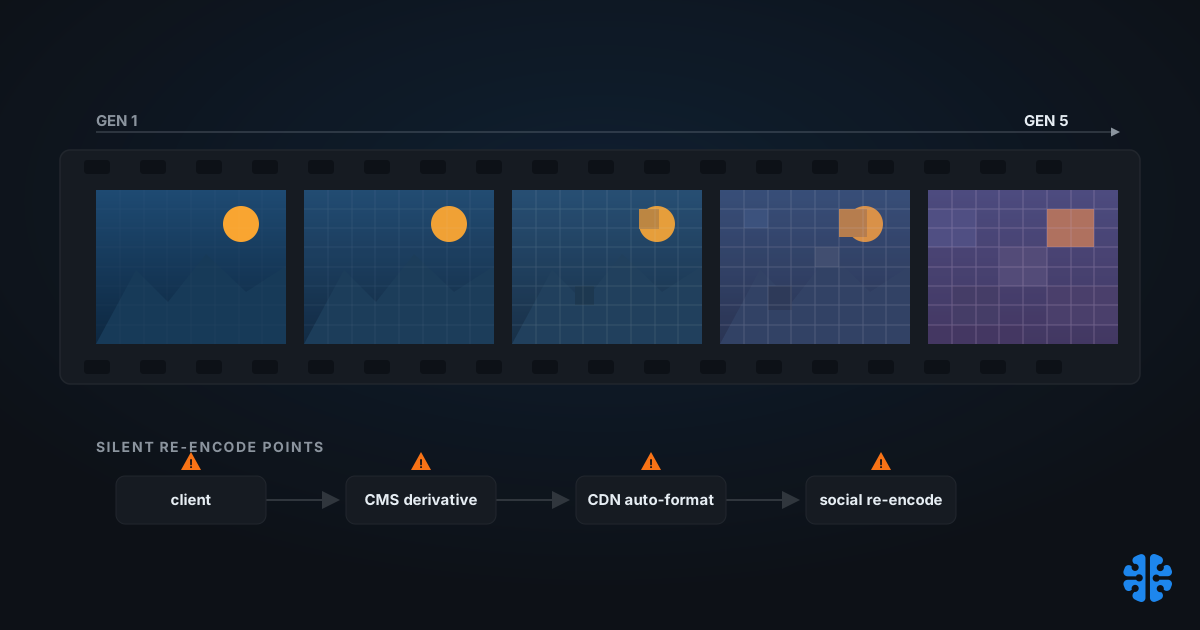
Copying a JPEG a thousand times changes nothing. The bytes are identical, so the picture is identical. What quietly wrecks your images is not copying, it is re-encoding: every time a lossy file is decoded and saved again, information leaves and never comes back, even when you bump the quality slider higher than the original (Cloudinary). The trouble is that a modern media stack re-encodes constantly, in places nobody put on a diagram. This piece maps those hidden re-encode points and gives you a reference architecture that has exactly one lossy step in it.
TL;DR
- Generation loss is cumulative degradation across successive lossy transcodes. A copy loses nothing; a decode-then-re-encode always discards information, even at a higher quality setting (Cloudinary).
- The repeating lossy step is quantization. Entropy coding is lossless, so it is not what accumulates the damage (arXiv 2312.02705, 2023).
- Re-saving at the same quality and quant table is roughly stable. Damage spikes when you lower quality or resize between saves, which re-grids the 8x8 blocks (pixelsham, 2026).
- Chaining formats, JPEG to lossy WebP to lossy AVIF and back, collapses toward "magenta soup" faster than staying in one lossy format (PetaPixel, 2016).
- Social platforms silently re-encode uploads at low quality, adding a generation of loss you did not request (Cloudinary).
What is generation loss, actually?
Generation loss is the cumulative quality decay that stacks up across successive lossy encode cycles, the digital cousin of photocopying a photocopy. Each decode-and-re-encode pass discards perceptual detail, and the losses compound. Crucially, this happens even when the second save uses a higher quality setting than the first (Cloudinary).
The canonical proof is brutal and simple. Resave a JPEG a few hundred times and you get a smeared, blocky ruin; PetaPixel's widely cited demonstration ran an image through roughly 500 re-saves and watched it degrade into noise (PetaPixel, 2016). Wikipedia's definition names the same mechanism: lossy formats accumulate error on every decode-and-re-encode cycle, while lossless copies do not (Wikipedia).
Here's the distinction that trips teams up. Moving a file, backing it up, or serving the same bytes to a million users costs zero quality. The file only degrades when something opens it, changes the pixels or the encoding, and writes a new lossy file. Your job is not to avoid copies. It is to count the re-encodes.
Generation loss is cumulative degradation across successive lossy encodes. Copying a file loses nothing, but each decode-and-re-encode discards perceptual detail, even at a higher quality setting than the original, which is why a JPEG resaved roughly 500 times degrades into noise (Cloudinary; PetaPixel, 2016).
For the full picture of how lossy formats trade detail for size, see our complete guide to image compression.
Why does quantization, not copying, cause the damage?
The lossy step that repeats every generation is quantization. A JPEG encode runs three stages in sequence: decode the incoming pixels, quantize the frequency coefficients, then entropy-code the result. Entropy coding is mathematically lossless, so it never throws detail away. Quantization is where the encoder rounds coefficients toward zero, and rounding is not reversible (arXiv 2312.02705, 2023).
The re-quantization cycle
Think of one re-encode as decode, re-quantize, re-entropy-code. When you decode a JPEG, you recover approximate pixels, not the original ones. Quantize those approximate pixels again and you round already-rounded values, pushing more coefficients to zero. Do it repeatedly and detail bleeds out one rounding step at a time. The entropy stage just packs the survivors efficiently; it is not the villain.
Why same-quality re-saves are nearly idempotent
There is a saving grace worth knowing. If every save uses the same quality and the same quantization table, the coefficients tend to land on values they already occupy, so re-quantizing changes little. One study of repeated JPEG compression found that at low bitrates, PSNR barely moves across many re-saves, with measurable decay appearing mainly at higher bitrates above roughly 2.0 bits per pixel (arXiv 2312.02705, 2023). Practical testing agrees that same-table re-saves are relatively stable; the damage spikes when you lower quality or resize between saves (pixelsham, 2026).
The block-misalignment amplifier
Resizing between saves is the accelerant. JPEG works on a fixed grid of 8x8 blocks. Resize or crop the image and the next encode lays down a fresh grid whose block boundaries no longer align with the old ones, forcing the encoder to re-quantize across seams that did not exist before (ImageCompressor.com). That re-gridding is why a pipeline that resizes at each stage degrades far faster than one that re-saves at native dimensions.
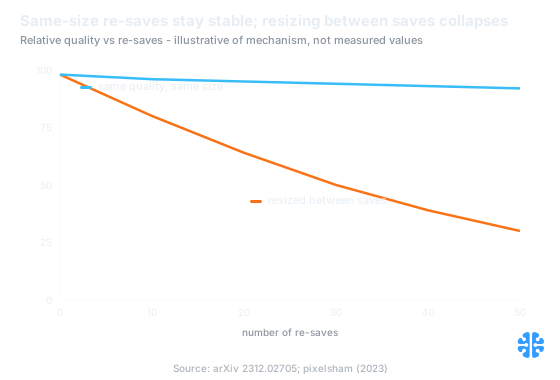
Same-quality re-saves hold; resizing between saves re-grids the 8x8 blocks and compounds loss. Source: arXiv 2312.02705; pixelsham (2023).
If you want the deeper mechanism, our explainer on lossless JPEG transcoding to JPEG XL shows how to move JPEGs into a modern container without a fresh lossy pass.
A map of the silent re-encode points in a modern stack
Most teams believe they compress an image once. In practice a single hero photo can pick up three or four lossy generations before a visitor ever sees it, because each layer of the stack helpfully "optimizes" on its own. The map below is the first thing to draw when image quality mysteriously drops in production.
A typical journey looks like this. The client compresses on upload. The CMS or DAM generates derivatives and thumbnails. The CDN auto-converts to WebP or AVIF at the edge. Then a marketer shares the delivered image to a social platform, which re-encodes it again at its own low quality. Four handoffs, and at least three of them can be a lossy re-encode.
Stage | What re-encodes | Lossy by default? | How to make it safe |
|---|---|---|---|
Client upload | Browser or app shrinks before send | Often | Send the original, or one controlled shrink to a high-quality master |
CMS / DAM derivative | Thumbnailer regenerates sizes | Usually | Derive from the lossless master, not from a prior JPEG |
CDN auto-format | Edge converts to WebP / AVIF | Yes | Feed it the master; let this be the single delivery pass |
Social re-encode | Platform re-compresses on upload | Yes, at low quality | Cannot control; export from the master, not the delivered file |
The social step deserves special attention because it is the one users notice and blame you for. Platforms such as Facebook and Twitter re-encode uploads at low quality, adding a hidden generation of loss (Cloudinary). You cannot stop it, but you can avoid feeding it an already-degraded file.
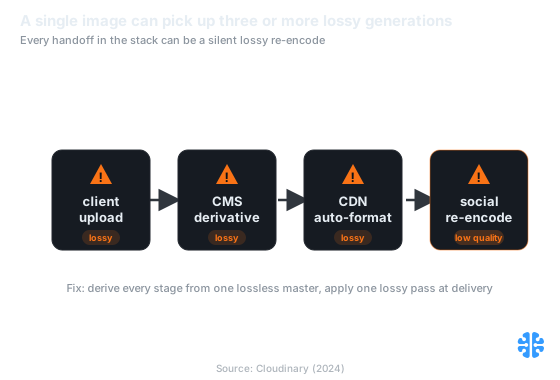
Each handoff can silently re-encode, so a single image often stacks three or more lossy generations. Source: Cloudinary (2024).
A single image often accumulates three or more lossy generations before display: client upload shrink, CMS derivative, CDN auto-format, then a social platform that silently re-encodes uploads at low quality (Cloudinary). Counting re-encodes, not copies, is the audit that catches silent quality loss.
For how these handoffs fit together end to end, we walk the whole path in media pipeline: upload to delivery explained.
Why is format-hopping worse than staying in one format?
Format-hopping compounds loss faster than repeated saves in a single format, because each new codec quantizes on its own model of what to discard. When you chain JPEG to lossy WebP to lossy AVIF and back, every hop applies a different transform and a different quantization grid, so the artifacts of one codec become "real" detail the next codec faithfully preserves and then re-mangles.
The visual endpoint is memorable. Jon Sneyers ran a 500-times recompression loop that hopped between lossy formats, and the image collapsed into what observers call "magenta soup," a saturated smear with almost no original structure left (PetaPixel, 2016). Staying in one lossy format with a fixed quality table is not free, but it degrades far more gracefully than translating between codecs on every pass.
There is a subtle reason this bites teams in 2026 specifically. CDNs now auto-negotiate AVIF or WebP per browser, which is genuinely good for delivery. It turns bad only when the input to that edge conversion is itself a delivered, already-lossy file rather than the master. Auto-format is a feature; auto-format of an auto-formatted image is a bug.
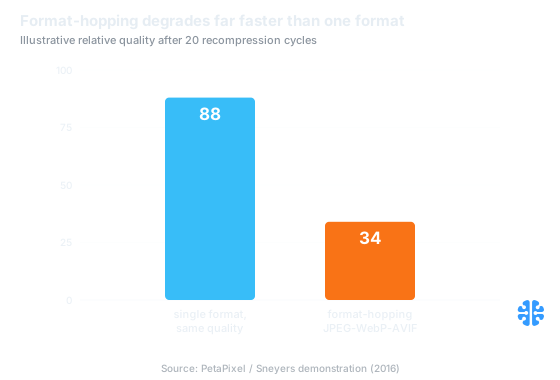
Format-hopping degrades toward "magenta soup" faster than staying in a single lossy format. Source: PetaPixel / Sneyers (2016).
The reference fix: one lossless master, one lossy delivery step
The architecture that ends generation loss is not a tool, it is a rule: keep a lossless or highest-quality master, and apply exactly one lossy step at the delivery edge. Every derivative, every size, every format is generated from that master, never from another derivative. This is the single most reliable quality decision most teams can make, and it costs storage, not engineering heroics.
Concretely, store the original upload untouched, or transcode it once to a lossless container. Generate all delivery variants directly from that master: the CMS thumbnail, the responsive srcset sizes, and the CDN's AVIF or WebP all read the master, not each other. When a marketer needs a social image, they export from the master too, so the platform's inevitable re-encode starts from pristine input. One master, one lossy pass, zero stacking.
**** In audits we run on stalled media pipelines, the most common root cause of "our images look soft" is not the encoder settings at all. It is a derivative built from a derivative: the CDN re-compressing a thumbnail the CMS already compressed from an upload the client already shrank. Fixing the settings does nothing. Rewiring every stage to read the master fixes it in one change.
**** The counterintuitive part is that "optimize everywhere" is the anti-pattern. Each layer optimizing independently guarantees stacked lossy passes. The disciplined stack optimizes in exactly one place and treats every other stage as a pass-through of the master.
This rule also decides where the single lossy step should live, which is a genuine tradeoff between client, server, and build time. We break that decision down in client vs server vs build-time compression, and we show how to hold the resulting size targets in compression budgets that hold. For user-generated content, where you do not control the upload, the UGC pipeline compression approach adapts the same master-first rule. And because a bad re-encode can ship to production, a fast rollback capability is the safety net that lets you undo a generation-loss regression.
FAQ
Does re-saving a JPEG at the same quality lose more each time?
Barely, if nothing else changes. Same quality and same quantization table means coefficients re-round onto values they already hold, so decay is small. One study found PSNR nearly flat across many low-bitrate re-saves (arXiv 2312.02705, 2023). Lowering quality or resizing between saves is what compounds the damage.
Does converting JPEG to WebP or AVIF add a generation of loss?
Yes, if the conversion is lossy. Any decode-then-lossy-re-encode discards information, even into a more efficient format (Cloudinary). One such conversion from a clean master is fine and expected. The problem is chaining conversions, where format-hopping compounds artifacts faster than staying in one format.
Why does my image look worse on Instagram or Facebook even at max export?
Because the platform re-encodes your upload at its own low quality, adding a generation of loss you did not choose (Cloudinary). You cannot disable it. You can only make its input as clean as possible by exporting from your lossless master rather than from an already-compressed delivered file.
How many re-saves before generation loss becomes visible?
It depends entirely on what happens between saves. Same size and same quality can survive dozens of re-saves with little visible change (pixelsham, 2026). Resize or lower quality each time and visible artifacts can appear within a handful of generations because the 8x8 block grid keeps shifting.
What is the right way to store originals so my pipeline does not degrade them?
Keep one lossless or highest-quality master and generate every derivative directly from it, never from another derivative. Apply exactly one lossy step, at delivery. This "master plus single delivery transform" pattern is the architectural fix for generation loss and the foundation of a clean media pipeline.
Count re-encodes, not copies
Generation loss is not a mystery and it is not inevitable. It is the predictable result of letting several layers of a stack each quantize the same image in turn. Copies are free. Re-encodes are the tax, and quantization is the line item that repeats. Draw the map, find the silent re-encode points, and collapse them to one.
The rule that survives every codec, every CDN, and every social platform is the same: one master, one lossy pass. At Inverity we treat that as a verifiable property of a pipeline, not a hope, which means measuring the actual number of lossy generations an image accumulates from upload to delivery rather than trusting that each stage behaved. Fewer generations, at proven quality, is the whole game. Next, decide where that single lossy step belongs with our guide to client vs server vs build-time compression.