 Inverity
Chroma Subsampling Explained: 4:4:4 vs 4:2:2 vs 4:2:0
Date Published
TL;DR >- Chroma subsampling keeps luma at full resolution and reduces color resolution: 4:2:2 needs about 66.7% of 4:4:4's data, and 4:2:0 needs about 50% (RTINGS).- Per pixel at 8-bit, that is 24 bits per pixel for 4:4:4, 16 for 4:2:2, and 12 for 4:2:0 (RTINGS).- It works because the eye resolves brightness detail far better than color, so most TV and film ships 4:2:0 with near-invisible loss, especially at 4K (Haivision).- It fails on text and UI: 4:2:0 distorts sub-pixel-rendered text and sharp edges, and red is the worst case, turning red text blocky or blurry next to white (Dexon Systems; KTC).- Even with zero compression, small color changes produce large artifacts under 4:2:0, because subsampling itself is lossy on chroma edges (Wikipedia, Chroma subsampling).
Chroma subsampling is the compression step people apply without knowing they applied it. It is on by default in most JPEG, WebP, and video encoders, it saves real bytes, and on photographs you will never see it. Then someone exports a screenshot or a red-on-white logo, the edges dissolve, and nobody can explain why the "high quality" export looks worse than the source.
The explanation is not mysterious, and neither is the fix. This post gives you the byte math, the vision science that makes subsampling safe on photos and dangerous on UI, the specific red-text failure, and a single decision matrix mapping content type to a subsampling scheme and an encoder flag. For the broader context, see our complete guide to image compression. Here we settle chroma once.
The numbers in 4:2:0, decoded
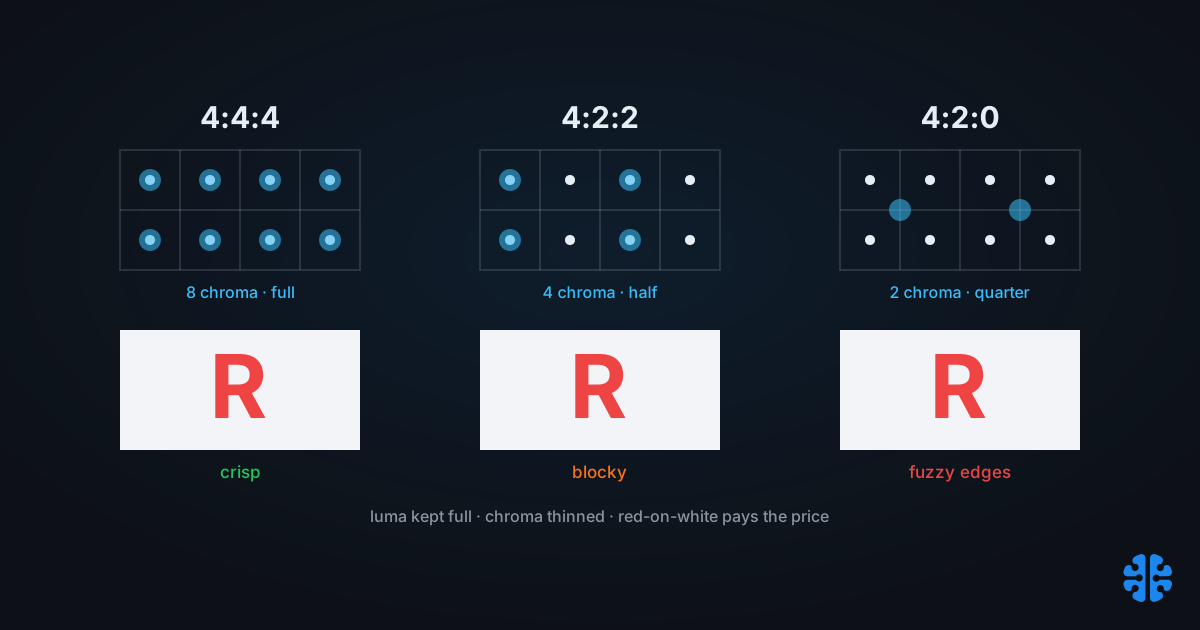
The J:a:b notation describes how chroma is sampled over a 4-pixel-wide, 2-pixel-tall region. 4:4:4 keeps full chroma resolution; 4:2:2 halves chroma horizontally; 4:2:0 halves chroma both horizontally and vertically (Wikipedia, Chroma subsampling). Luma stays full resolution in all three.
Read the digits literally. The first number, 4, is the width of the reference block. The second is how many chroma samples appear in the top row of that block, and the third is how many appear in the bottom row. So 4:2:2 has two chroma samples per row on both rows, while 4:2:0 has two on the top row and zero fresh samples on the bottom, reusing the row above. That last scheme stores a quarter of the chroma samples of 4:4:4: two chroma samples per scanline, on every other line (DisplayNinja).
The key idea, which the rest of this post depends on, is that only color is thrown away. Brightness, the luma channel, is always kept at full resolution (Wikipedia, Chroma subsampling). That is why sharpness and brightness edges survive while color edges soften.
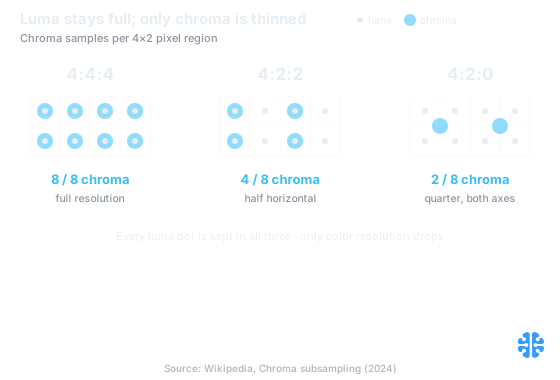
Luma is sampled in all eight pixels of every grid; chroma drops from 8 to 4 to 2 samples across 4:4:4, 4:2:2 and 4:2:0 (Wikipedia, Chroma subsampling; DisplayNinja).
How much smaller is chroma subsampling?
Roughly a third smaller for 4:2:2 and half for 4:2:0, before any DCT compression even runs. 4:2:2 needs about 66.7% of 4:4:4's data and 4:2:0 needs about 50% (RTINGS). In per-pixel terms at 8-bit depth, that is 24 bits per pixel for 4:4:4, 16 for 4:2:2, and 12 for 4:2:0.
The math is worth seeing laid out, because it is the whole economic case for subsampling.
Scheme | Chroma stored | Bits per pixel (8-bit) | Share of 4:4:4 data |
|---|---|---|---|
4:4:4 | Full resolution | 24 | 100% |
4:2:2 | Half horizontal | 16 | 66.7% |
4:2:0 | Quarter (half both axes) | 12 | 50% |
Source: RTINGS; DisplayNinja.
Two things stand out. First, this saving is independent of and stacks with the quantization compression covered in how JPEG compression works. Subsampling shrinks the input before the DCT ever sees it. Second, the saving is entirely on color, so on content where color detail carries meaning, that "free" 50% is not free at all. The bytes come off a channel that sometimes matters a great deal.
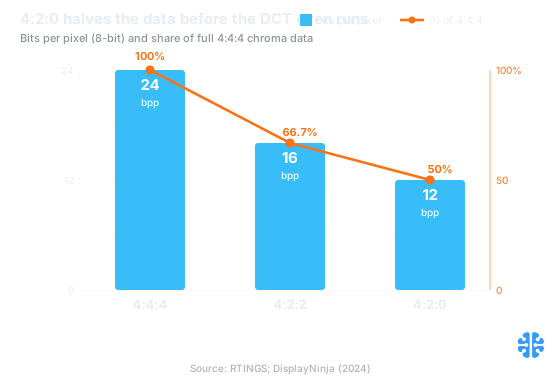
At 8-bit depth, 4:4:4 is 24 bits per pixel (100% of the data), 4:2:2 is 16 (66.7%) and 4:2:0 is 12 (50%) (RTINGS; DisplayNinja).
Why does throwing away color work?
Because human vision resolves brightness detail far better than color detail, so halved color resolution is usually invisible. Most TV and film uses 4:2:0 with near-invisible loss, and the effect is even harder to spot at 4K (Haivision). Your eye simply does not have the color acuity to notice the missing samples.
This is the same physiology that drives coarser chroma quantization, which we cover in how lossy compression decides what to discard. Luminance sensitivity is high and detailed; chromatic sensitivity is low-pass and coarse. Subsampling spends that asymmetry directly: keep every luma sample, because the eye is exacting about brightness edges, and discard color samples, because the eye is forgiving about color edges.
But "usually invisible" carries a hidden condition: the color has to change gradually. When color changes sharply, across a hard chroma edge, the missing samples stop being invisible. Even with no compression at all, small color changes produce large artifacts under 4:2:0, because the subsampling step is itself lossy on chroma edges (Wikipedia, Chroma subsampling). That condition is exactly where UI, text, and branding live.
Why does my red logo look fuzzy after export?
Because red on a light background is the worst case for chroma subsampling. Red text turns blocky at 4:2:2 and blurry at 4:2:0, and red next to white can erase letter edges entirely (KTC). A red brand mark on white is precisely the sharp chroma edge subsampling handles worst.
Here is the mechanism. Red text on white is a high-frequency chroma edge with relatively little luma contrast, because red and white can sit close in brightness. Subsampling protects luma and sacrifices chroma, so the very signal that defines a red letter's shape is the one being halved or quartered. GUIs make this constant: they rely on thin lines and small colored text, and 4:2:0 distorts sub-pixel-rendered text and sharp edges (Dexon Systems). The result is a logo that looked crisp in the design file and mushy after a "high quality" JPEG export.
This is the failure teams misdiagnose as a quality-factor problem and try to fix by cranking quality, which does almost nothing, because the damage happened at the subsampling stage, not the quantization stage. We wrote compress images without losing brand integrity partly because of this exact trap. The fix is not higher quality. It is 4:4:4, or a lossless format for synthetic content.
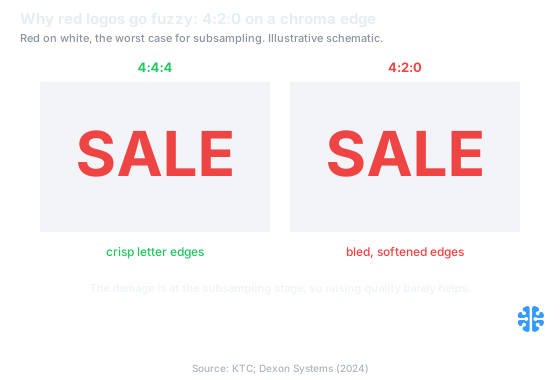
Illustrative schematic: red on white is the worst case, staying crisp at 4:4:4 but bleeding and softening at 4:2:0 (KTC; Dexon Systems).
The chroma subsampling decision matrix
The right scheme is a function of content type, and the mapping is stable enough to memorize. 4:4:4 for screenshots, UI, text, and mastering; 4:2:2 for professional video and chroma-key work; 4:2:0 for photographic delivery, which is the default in JPEG, WebP, H.264, HEVC, and AVIF (Wikipedia, Chroma subsampling). Match the scheme to the content and the failures disappear.
Content type | Recommended scheme | Encoder flag / approach |
|---|---|---|
Photography, general web delivery | 4:2:0 | Default; no action needed |
Screenshots, UI, dashboards | 4:4:4, or lossless PNG | |
Red or saturated brand text on light | 4:4:4 | Force full chroma; consider PNG/SVG |
Gradients and flat brand color | 4:4:4 or lossless | Avoid 4:2:0 chroma-edge artifacts |
Screen recordings, code, terminals | 4:4:4 | Encode video at 4:4:4 where supported |
Professional video, chroma key | 4:2:2 | Camera/encoder 4:2:2 profile |
Scheme guidance: Wikipedia, Chroma subsampling; Dexon Systems.
The pattern is simple once you see it. Photographic content, with its gradual color changes, tolerates 4:2:0 beautifully. Synthetic content, with hard chroma edges and thin colored features, demands 4:4:4 or a lossless format that never subsamples at all. For the synthetic side, compressing synthetic images, charts, and UI and compressing screenshots and PNGs go deeper. Applying a single blanket scheme across both is how blanket compression hurts your CMS.
What every encoder does by default, and how to override it
Most still-image and video encoders default to 4:2:0, and you usually have to opt out. Standard JPEG typically applies 4:2:0 below quality 100 and switches toward 4:4:4 only near quality 100, while exposing an explicit chroma qualifier to override the choice (Cloudinary). So a JPEG saved at quality 90 is very likely subsampled, whatever the quality number implies.
The defaults trip people up because "quality 90" sounds like it should preserve everything, yet the encoder has already thrown away three-quarters of the color resolution before quantizing. The override is a separate control. In most JPEG tooling it is a sampling factor such as 1x1 for 4:4:4, and video encoders expose profile-level chroma format settings. The cleaner move for pure synthetic content is to skip the question entirely: subsampling applies to stills too, JPEG and WebP support it, but PNG is lossless and does not subsample, which makes it the safe default for screenshots and UI (Wikipedia, Chroma subsampling).
One more subtlety worth knowing. The exact siting of 4:2:0 chroma samples differs between standards, with JPEG and MPEG-1 using a "center" siting and MPEG-2 using "co-sited" positions, and that difference is a real source of subtle color shifts when files move between pipelines (Wikipedia, Chroma subsampling). It rarely matters for web delivery, but it explains occasional inexplicable tints after a format conversion.
FAQ
What do the numbers in 4:2:0 mean?
They describe chroma sampling over a 4-wide, 2-tall pixel region. The first digit is the block width, the second is chroma samples in the top row, the third is chroma samples in the bottom row. So 4:2:0 halves color both horizontally and vertically while keeping luma full resolution (Wikipedia, Chroma subsampling).
How much smaller is 4:2:0 than 4:4:4?
About half. 4:2:0 needs roughly 50% of 4:4:4's data and 4:2:2 needs about 66.7% (RTINGS). In per-pixel terms at 8-bit depth, 4:4:4 is 24 bits per pixel, 4:2:2 is 16, and 4:2:0 is 12. The saving comes entirely from color, since luma is never reduced.
Why does my red text or logo look fuzzy after export?
Because red on white is the worst case for chroma subsampling. Red text turns blocky at 4:2:2 and blurry at 4:2:0, and red beside white can erase letter edges (KTC). The damage is at the subsampling stage, not quantization, so raising quality barely helps. Use 4:4:4 or a lossless format.
Should I save screenshots and UI as PNG or 4:4:4 JPEG?
Prefer PNG for pure UI and screenshots. PNG is lossless and never subsamples chroma, which preserves thin lines and small colored text (Wikipedia, Chroma subsampling). A 4:4:4 JPEG avoids the subsampling artifact but still quantizes, so text edges can ring. For synthetic content, lossless is the more predictable choice.
What subsampling do JPEG, WebP, and AVIF use by default?
Typically 4:2:0. Standard JPEG applies 4:2:0 below quality 100 and moves toward 4:4:4 only near 100 (Cloudinary), and 4:2:0 is the delivery default across JPEG, WebP, H.264, HEVC, and AVIF (Wikipedia, Chroma subsampling). To force full chroma, set the sampling factor to 1x1 or the encoder's 4:4:4 option.
Match the scheme to the content
Chroma subsampling is one of the highest-leverage settings in image delivery and one of the least understood. On photographs, 4:2:0 halves your data for loss your eye cannot find, and you should take that win by default. On text, UI, gradients, and especially red branding, the same setting quietly destroys the edges that make the image legible, and no amount of extra quality buys them back.
So the rule is not "always subsample" or "never subsample." It is: know what the image is made of, then choose. Photographic content gets 4:2:0; synthetic content gets 4:4:4 or a lossless format that never subsamples. At Inverity, we treat chroma format as a per-image decision tied to content type, not a global default, because a single blanket setting is guaranteed to be wrong for half of any real library. Read the content, pick the scheme, and the fuzzy-logo tickets stop.