 Inverity
Tuning mozjpeg, libjxl, and libaom for the Web in 2026
Date Published
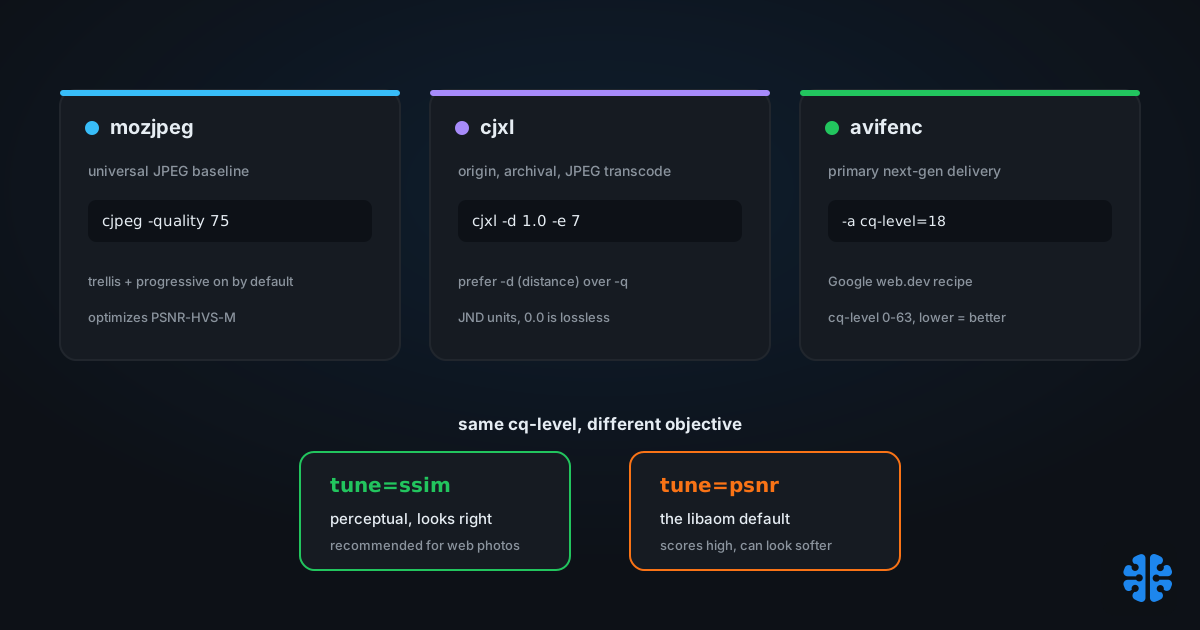
TL;DR >- Google's web.dev AVIF recipe is--min 0 --max 63 -a end-usage=q -a cq-level=18 -a tune=ssim, and it reports AVIF delivering over 50% savings versus JPEG (web.dev, 2024).- The single biggest web pitfall istune=psnr. libaom defaults to it, and it can inflate PSNR while looking worse to the eye; usetune=ssimfor photos (libavif manpage, 2024).- For cjxl, prefer-d(distance, in JND units, 0.0 to 25.0) over-q; the web sweet spot is-d 1.0to1.5at-e 7(cjxl manpage, 2024).- mozjpeg defaults to quality 75 with progressive, Huffman optimization, and trellis quantization already on (Mozilla Hacks, 2014).
Encoder tuning guides tend to bury the one thing that matters under a wall of flags. They list every knob mozjpeg, cjxl, and avifenc expose, and never tell you that most of the defaults are already right and one specific setting can quietly wreck your images. That setting is the quality metric the encoder optimizes for, and picking the wrong one makes your files score better while looking worse.
This is a command-level guide, not a theory piece. You will get copy-paste web defaults for all three encoders, the tune=ssim versus tune=psnr trap explained with what it actually does, and a decision tree for choosing between them based on browser support and where the encode runs. Everything here assumes you want good-looking images at web sizes, not archival lossless or scientific fidelity.
Which encoder should you actually use in 2026?
Pick by browser reach and where the encode runs, not by raw compression ratio. mozjpeg is the universal-compatibility baseline with zero decode risk. libaom-backed AVIF is the best broadly-supported next-gen format, working in Chrome, Firefox, and Safari 16+, at the cost of slow encoding (web.dev, 2024). libjxl gives the best quality per byte but has limited browser support.
The three tools are not competitors so much as a layered strategy. Ship AVIF as your primary modern format via content negotiation, keep a mozjpeg-encoded JPEG as the universal fallback, and hold JPEG XL at the origin or archive for its lossless JPEG transcode. That last property, bit-exact reversible transcoding, is why libjxl earns a place even where browsers cannot yet decode it.
Encoder | Best role | Browser reach | Encode cost | Ship it |
|---|---|---|---|---|
mozjpeg | Universal JPEG baseline / fallback | Everywhere | Cheap | On-the-fly OK |
libaom (AVIF) | Primary next-gen delivery | Chrome, FF, Safari 16+ | Slow | Build-time preferred |
libjxl (JXL) | Origin, archival, JPEG transcode | Safari 17+ partial | Moderate | Progressive enhancement |
Roles and support synthesized from web.dev, 2024 and the cjxl manpage, 2024.
Citation capsule: For 2026 web delivery, ship AVIF as the primary next-gen format (Chrome, Firefox, Safari 16+), keep a mozjpeg JPEG fallback for universal reach, and hold JPEG XL at origin for lossless JPEG transcode (web.dev, 2024).
The full format-versus-adoption picture, including where JPEG XL stands in Chrome, lives in our complete guide to image compression. This post stays at the command line.
mozjpeg: the copy-paste web defaults
mozjpeg does most of the work before you touch a flag. Its cjpeg defaults to quality 75 with progressive scan, Huffman-table optimization, and trellis quantization all enabled (Mozilla Hacks, 2014). Those are the features that make mozjpeg beat a stock libjpeg encode, and they are on by default. For most web photos, -quality 75 to 80 is the whole recipe.
```
cjpeg -quality 75 -outfile out.jpg in.png
```
The knob worth understanding is trellis quantization, which decides bit allocation by balancing rate against distortion. It is governed by two lambda scales: scale1 sets the rate penalty (default 14.75) and scale2 sets distortion sensitivity (default 16.5) (mozjpeg issue #111, 2015). You almost never touch these directly. They matter because they encode a specific opinion about the quality-versus-size trade, and that opinion is tuned for a particular metric, which is the trap the next section is about.
In practice the most common mozjpeg mistake we see is not a flag at all; it is people re-encoding already-lossy JPEGs and stacking generation loss on top of mozjpeg's defaults. mozjpeg cannot recover detail that a previous encode threw away. If you can reach the original source, always encode from that, not from a delivered JPEG. The mechanics of that decay are their own topic, covered under recompression and generation loss.
To disable trellis for a speed comparison, use -notrellis, but there is rarely a reason to on the web. Leave the defaults and spend your attention on quality and the tune metric instead.
libjxl: prefer distance over quality
For cjxl, reach for -d before -q. The distance flag ranges from 0.0 to 25.0 in JND (just-noticeable-difference) units, where lower means higher quality and -d 0.0 is mathematically lossless (cjxl manpage, 2024). Distance targets perceptual difference directly, which is a more honest control than a 0-to-100 quality number that means different things in different encoders.
```
cjxl in.png out.jxl -d 1.0 -e 7
```
The web sweet spot is roughly -d 1.0 to 1.5 at effort -e 7, the default. A distance of 1.0 targets a difference near the threshold of visibility, which is usually where you want web delivery to sit. The effort range runs 1 to 10, default 7, and as we cover in encoder speed presets and what you trade, pushing effort past 7 buys almost nothing for most images.
libjxl has one feature no other encoder matches: lossless JPEG transcoding. Passing an existing JPEG through cjxl with --lossless_jpeg=1 re-packs it into the JXL container bit-exactly, typically around 20% smaller, and you can transcode back to the original JPEG bytes. That reversibility changes the risk math for migrating a legacy JPEG archive, because you are not destroying anything. The relationship between JND units and human perception is exactly what just-noticeable-difference measurement and measuring quality the way humans see it get into.
Note that -q 100 and -d 0.0 both request lossless, so do not mix a high -q with a distance flag and expect predictable results. Pick one control. On the web, that control should be -d.
libaom and AVIF: what settings does Google recommend?
Google's web.dev guide gives an explicit avifenc recipe: --min 0 --max 63 -a end-usage=q -a cq-level=18 -a tune=ssim, adding --minalpha 0 --maxalpha 63 when the image has an alpha channel (web.dev, 2024). On that setup web.dev reports AVIF delivering over 50% savings versus JPEG, citing its own and Netflix testing (web.dev, 2024).
```
avifenc --min 0 --max 63 -a end-usage=q -a cq-level=18 -a tune=ssim in.png out.avif
```
The controls decode as follows. cq-level runs 0 to 63 where lower is higher quality, and it requires end-usage=cq or end-usage=q to take effect (libavif manpage, 2024). The -q/--qcolor scale runs 0 to 100 where 100 is lossless, an alternative to cq-level. Speed is -s/--speed, range 0 to 10, default 6, and --jobs 8 runs roughly 5x faster by parallelizing (libavif manpage, 2024).
For images with transparency, tune each plane separately rather than accepting one global quality. Per-plane syntax like -a color:cq-level=18 -a alpha:cq-level=10 lets you spend fewer bits on the alpha mask than on the visible color, since alpha rarely needs the same fidelity. The savings figure above assumes the tune=ssim in that recipe, which is not the encoder default, and that difference is the whole next section.
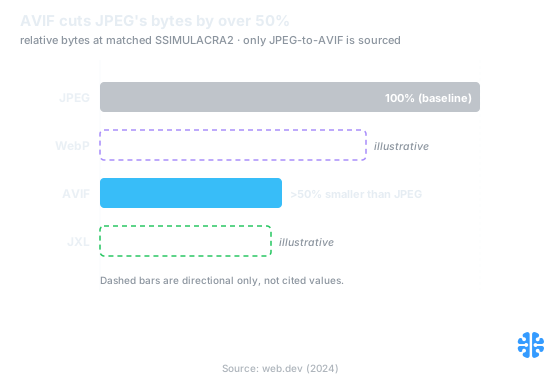
AVIF is the only sourced comparison here, cutting over half of JPEG's bytes at matched quality. Source: web.dev (2024).
The tune=ssim versus tune=psnr trap
This is the setting that separates a good AVIF encode from one that scores well and looks soft. libaom's tune option defaults to psnr, but for web photography web.dev and the libavif docs both recommend tune=ssim (libavif manpage, 2024). PSNR-tuned encoding can inflate the PSNR number while producing an image that looks worse to a human.
The reason is that tune changes what the encoder is trying to minimize. tune=psnr optimizes for pixel-wise mean squared error, which rewards getting every pixel numerically close but ignores how the eye groups detail, edges, and texture. tune=ssim optimizes for structural similarity, which tracks perceived quality more faithfully. Same cq-level, different objective, visibly different result.
Citation capsule: libaom'stunedefaults topsnr, but web.dev recommendstune=ssimfor web photos because PSNR optimization can inflate the metric while degrading perceived quality (libavif manpage, 2024). The default is the wrong choice for human viewers.
The mozjpeg side of this is subtler and worth flagging honestly. Discussion in the mozjpeg tracker indicates it optimizes for PSNR-HVS-M by default, with -tune-ssim, -tune-psnr, and -tune-ms-ssim swapping the lambda scales and quantization-table index (mozjpeg issue #64, 2014). That default comes from a GitHub-issue thread rather than headline documentation, so verify it against your specific build before relying on it. The practical lesson survives the caveat: on any encoder, know which metric it optimizes, because the default is not always the perceptual one.
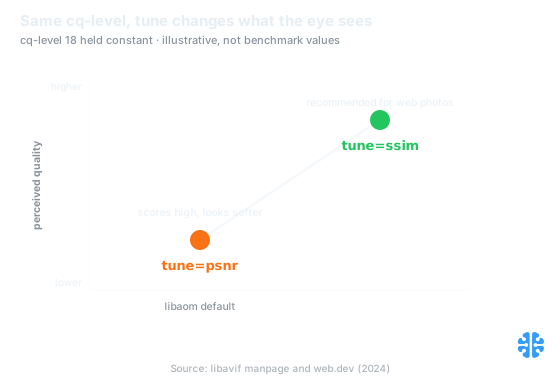
At the same cq-level, the tune objective, not the quality number, decides how the image reads to the eye. Source: libavif manpage and web.dev (2024).
This is also why a headline quality number is nearly meaningless on its own, a point we make at length in why a quality of 95 means nothing. A quality of 95 tuned for PSNR is not the same image as a quality of 95 tuned for SSIM.
How do you wire this into a pipeline?
Split the work by where latency lands: build-time for slow encoders, on-the-fly for cheap ones. AVIF via libaom at quality-competitive settings is slow enough that it belongs in a pre-generation step, while mozjpeg is cheap enough to run inside a request. That build-time-versus-on-the-fly split is the organizing rule from encoder speed presets, applied to format choice.
A workable 2026 pipeline looks like this. Pre-generate AVIF variants offline with the web.dev recipe and a moderate speed, serving them by Accept-header negotiation. Encode the mozjpeg JPEG fallback on-the-fly, since it is fast and universally decodable. Hold JPEG XL at the origin, either as lossless transcodes of your JPEG archive or as high-fidelity masters, and enable delivery when browser support crosses your threshold.
Layer | Encoder | Command core | When it runs |
|---|---|---|---|
Primary next-gen | libaom / avifenc | | Build-time |
Universal fallback | mozjpeg | | On-the-fly |
Origin / archive | libjxl / cjxl | | Build-time |
Command cores from web.dev, 2024 and the cjxl manpage, 2024.
One caution ties the whole guide together. A fixed quality flag does not guarantee a fixed perceived quality across different images, which is why the next step beyond good defaults is per-image adaptive quality, covered in content-adaptive per-image quality. Good static defaults get you most of the way. Closing the last gap means measuring each image, the theme behind perceptual decisioning beyond compression. Pin your encoder versions while you do it, because these flags and defaults shift between releases.
FAQ
What quality should I use for mozjpeg on the web?
Start at the default quality 75, and stay in the 70 to 80 range for most photographs. mozjpeg already enables progressive scan, Huffman optimization, and trellis quantization by default (Mozilla Hacks, 2014), so you rarely need extra flags. If your build supports it, -tune-ssim biases the encode toward perceived quality rather than raw PSNR.
Should I use cjxl -q or -d?
Prefer -d, the distance flag, which works in JND units from 0.0 to 25.0 where lower is higher quality and 0.0 is lossless (cjxl manpage, 2024). Distance targets perceptual difference directly, so -d 1.0 aims near the threshold of visibility. Mixing -q and -d gives unpredictable results, so choose one control and standardize on it.
What avifenc settings does Google recommend?
web.dev's recipe is --min 0 --max 63 -a end-usage=q -a cq-level=18 -a tune=ssim, plus --minalpha 0 --maxalpha 63 for alpha channels, at the default speed 6 (web.dev, 2024). On that configuration web.dev reports AVIF delivering over 50% savings versus JPEG. The tune=ssim part is critical, because it is not the libaom default.
tune=psnr or tune=ssim for photos?
Use tune=ssim for photographic web content. libaom defaults to tune=psnr, which optimizes pixel-wise error and can inflate the PSNR score while the image looks worse to the eye (libavif manpage, 2024). SSIM tracks structural, perceived quality more faithfully, which is what human viewers actually judge.
Which format should I ship in 2026?
Ship AVIF as the primary next-gen format for broad browser support, keep a mozjpeg JPEG as the universal fallback, and hold JPEG XL at the origin for its lossless JPEG transcode (web.dev, 2024). Serve by Accept-header negotiation so adding or dropping a format is a config change, not a content migration.