 Inverity
Compressing UGC: The Untrusted Image Ingest Pipeline
Date Published
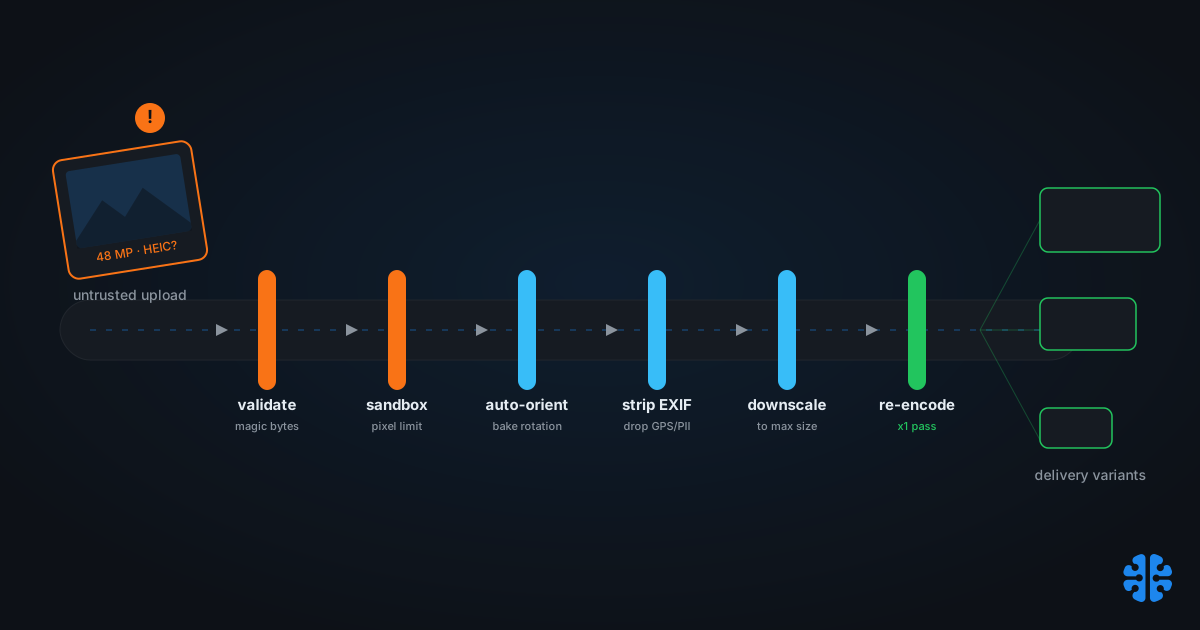
TL;DR >- Phone cameras upload 12-48 megapixel images while the median web image is about 0.058 MP, roughly 240x240 (Web Almanac 2024, Media). Ingest must aggressively downscale, or you store and serve hundreds of times the pixels anyone will see.- A malicious PNG header can claim 30,000x30,000 pixels and force a multi-gigabyte allocation before a single pixel decodes (Pandastack security writeup). Pillow's default guard trips at 128 megapixels (Pillow docs).- HEIC has been the default iPhone format since iOS 11 in 2017 and runs about 50% smaller than JPEG (Cloudinary). Transcode it at ingest or your pipeline silently rejects a huge share of real uploads.- The fix is one reference pipeline: validate, sandbox, auto-orient, strip EXIF, downscale, then re-encode exactly once. Chaining lossy passes is what visibly damages images after only a few cycles.
Your own catalog is a solved problem. You control the source files, the color space, the resolution, and the format. User-generated content is the opposite of that, and treating it like your catalog is how ingest pipelines break in production.
The defining trait of UGC is unknown provenance. Every upload arrives with a history you did not write: already compressed by a phone, rotated by an accelerometer, wrapped in a format your decoder may not speak, tagged with the uploader's GPS coordinates, and occasionally crafted specifically to crash you. You cannot trust the extension, the dimensions, or the bytes. This post is the unified reference pipeline for ingesting untrusted images safely and compressing them once, and it sits under our complete guide to image compression.
What makes UGC compression different from your own catalog?
Unknown provenance changes every assumption. A catalog image starts life as a clean, high-resolution master you authored. A UGC image arrives already compressed, possibly mis-oriented, in an unpredictable format, and sometimes hostile. The gap in raw size alone is enormous: phone uploads run 12-48 MP while the median web image is about 0.058 MP (Web Almanac 2024, Media).
That size gap is the first mandate: downscale hard at ingest. Storing a 48 MP original to serve a 240-pixel thumbnail wastes storage on the way in and bandwidth on the way out. But downscaling is the easy part. The harder truths are that the file is already lossy, so any re-encode is a second-generation copy, and that some fraction of uploads are not photographs at all but payloads engineered to exhaust memory.
UGC also degrades your metadata quality. Only about 55% of web images carry non-blank alt text, and UGC is a major contributor to that gap (Web Almanac 2024, Media). Ingest is the one moment you can normalize, moderate, and enrich before an image spreads across your product. Miss it and you inherit every upstream defect permanently.
Citation capsule: User-generated images arrive with unknown provenance: already compressed, often 12-48 megapixels against a 0.058 MP median web image (Web Almanac 2024, Media), sometimes mis-oriented or hostile. Unlike a controlled catalog, UGC must be validated, normalized, and downscaled at ingest before it can be safely compressed and served.
The untrusted-image-ingest reference pipeline
Run every upload through one fixed sequence, in this order: validate, sandbox, auto-orient, strip EXIF, downscale, single-pass re-encode, then generate delivery variants. Order matters. Auto-orienting after you downscale, or stripping EXIF before you read the orientation tag, produces sideways or wrongly-cropped output. The pipeline is a pipeline precisely because each stage depends on the last.
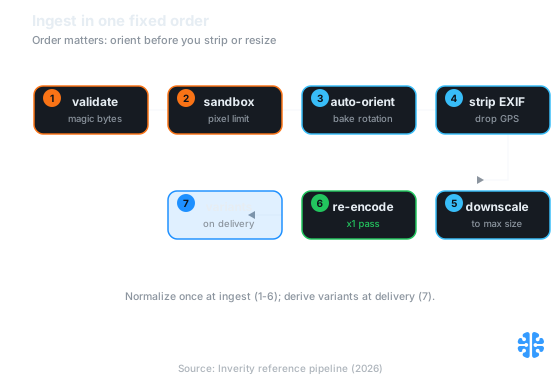
The fixed ingest order: normalize once through stages 1 to 6, then derive delivery variants at stage 7 (Source: Inverity reference pipeline, 2026).
Stage | Action | Why it is here |
|---|---|---|
| Verify real MIME by magic bytes, not extension; reject unknown types | The extension lies; moderation and format routing depend on the true type |
| Decode in an isolated process with memory, area, and time limits | Decoders are a historic remote-code and denial-of-service surface |
| Bake the EXIF rotation into pixels, then reset the tag to 1 | Fixes sideways phone photos before any crop or resize reads dimensions |
| Remove remaining metadata, including GPS and device PII | Protects uploader privacy and shrinks the file |
| Resize to your largest needed dimension | 12-48 MP uploads must not be stored or served at native size |
| A single lossy pass to your delivery format | Chaining passes compounds generation loss |
| Generate responsive sizes and formats from the normalized master | Right-sized delivery without re-touching the original upload |
The discipline that ties it together: normalize once at ingest to produce one clean working master, then derive delivery variants from that master. Do not re-run the lossy steps per variant. This is the same ingest-then-derive shape as our upload-to-delivery pipeline and the staging approach in optimizing a million images without breaking your site. The catalog-scale cousin of this problem lives in e-commerce catalog compression at scale.
How do you stop a malicious upload from crashing your server?
Guard the decoder, because that is where the danger lives. A malicious PNG header can claim 30,000x30,000 pixels, forcing a multi-gigabyte memory allocation before a single pixel is decoded (Pandastack security writeup). This is a decompression bomb: a tiny file that expands catastrophically. Extension checks and file-size limits do not catch it, because the file on disk is small.
Three layers stop it. First, enforce a maximum-pixel guard. Pillow ships one by default at 128 megapixels, roughly 0.5 GB of RGBA, warning at the limit and erroring at twice it (Pillow docs). Set yours lower to match real uploads; a 48 MP phone photo is well under 128 MP, so a legitimate upload never trips a sane limit.
Second, cap resources at the decoder. With ImageMagick, set -limit area, -limit memory, -limit map, -limit disk, and -limit time so a hostile file hits a wall instead of your RAM. Validate the decoded dimensions, not the claimed header dimensions, and reject anything that expands beyond your policy.
The subtle point most upload tutorials miss: you must validate the decoded image, not the header. A decompression bomb lies in its header on purpose. If your check reads the declared 30,000x30,000 and trusts it, you have already lost, because trusting the header is what triggers the allocation. The only safe dimensions are the ones your decoder actually produces, inside a sandbox that can be killed.
Third, decode untrusted media in an isolated process or container. Image decoders have a long history of memory-safety bugs; a sandbox turns a decoder exploit from a server compromise into a killed worker. Pair it with real MIME validation by magic bytes, since a .jpg extension on a crafted file tells you nothing about what the decoder will try to run.
Why do phone photos show up sideways?
Because the pixels are stored one way and a metadata tag says to rotate them. EXIF orientation has 8 possible states, and orientations 6 and 8, the portrait-phone rotations, are the most common cause of sideways images because browsers historically ignored the tag (Tuomas Siipola). The photo looks fine in the phone gallery and wrong on your site.
The fix is a one-liner, and it belongs early in the pipeline. In Pillow it is ImageOps.exif_transpose; in ImageMagick it is -auto-orient (orientation reference). Either bakes the rotation into the actual pixels. After that, reset the orientation tag to 1, or strip it, so nothing downstream rotates a second time.
Sequence is the trap here. If you strip EXIF before you auto-orient, you delete the rotation instruction and lock in the wrong orientation forever. Auto-orient first, then strip. And do it before you downscale or crop, because a crop computed against un-rotated dimensions cuts the wrong edge. This is why the reference pipeline fixes orientation at stage 3, ahead of both EXIF stripping and resizing.
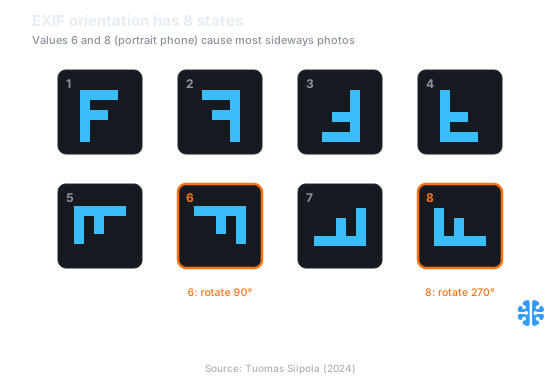
EXIF orientation has 8 states; the portrait-phone values 6 and 8 cause most sideways uploads (Source: Tuomas Siipola, 2024).
Will re-compressing an already-compressed upload look worse?
Yes, if you chain lossy passes; no, if you re-encode exactly once. Every UGC upload is already lossy, compressed by the phone before it ever reached you. Each additional lossy save is another photocopy of a photocopy, and generation loss becomes visibly damaging after only about 3 to 5 re-save cycles (Cloudinary).
The rule is one lossy pass, ever. Decode the upload, auto-orient, downscale, and re-encode once to your delivery format. Do not re-compress the already-compressed variant to make derivatives; derive every size from the single normalized master instead. If you must retain an editable working copy, keep it lossless so future crops or re-processing do not stack another generation of damage. The full mechanism is in the sibling piece recompression and generation loss.
Two side effects worth naming. A re-encode inherits the uploader's chroma subsampling, so saturated colors can bleed further on each pass, the effect we detail in chroma subsampling explained. And transparency needs care: flattening a PNG with alpha into a lossy format destroys the mask, so route alpha assets to a format that keeps it, per compressing transparency and alpha channels.
Citation capsule: Every UGC image is already lossy from the uploading device, so each additional re-save compounds generation loss, which turns visibly damaging after roughly 3-5 cycles (Cloudinary). Safe pipelines decode, auto-orient, downscale, and re-encode exactly once, deriving all delivery variants from that single normalized master.
Handling HEIC and mixed formats at ingest
Transcode HEIC at ingest, or you silently reject a large share of real uploads. HEIC has been the default iPhone photo format since iOS 11 in 2017 and runs about 50% smaller than JPEG at similar quality (Cloudinary). If your pipeline only understands JPEG and PNG, a huge fraction of mobile uploads either fail or arrive as unexpected bytes.
The mechanism is straightforward. Decode HEIC with libheif, exposed through libraries like sharp, or let a CDN that auto-transcodes handle it at the edge. The key is to normalize the format at ingest, decoding HEIC at the front of the pipeline and emitting a web format at the single re-encode step, so everything downstream, variants, moderation, delivery, deals in one predictable format. Teams that skip this usually discover it as a spike of "upload failed" reports from iPhone users while Android uploads look fine, which is a confusing bug to chase until you check the format mix.
Mixed formats are the norm for UGC, not the exception, so validate the real type by magic bytes and route each format through the same normalization. HEIC, JPEG, PNG, WebP, and the occasional GIF all converge to one delivery format after ingest. That convergence is what lets the rest of your system stop caring where an image came from.
Where to compress: ingest, delivery, or both
Both, and the split is deliberate. Normalize and validate once at ingest to produce a clean master, then generate delivery variants on demand. This is the best shape for UGC specifically, because ingest is where you fix provenance problems and delivery is where you right-size for each device.
Ingest-time work is the one-time normalization: validate, sandbox, orient, strip, downscale, transcode, and produce a single trustworthy master. Delivery-time work is the recurring, cache-friendly job: responsive sizes and modern formats generated from that master, never from the raw upload. Splitting the two means you pay the expensive security and normalization cost once per image, not once per view.
Moderation belongs at ingest too. Verify the real MIME by magic bytes, run content checks, and enrich metadata before an image is ever stored or shown. At Inverity, we treat this ingest boundary as the place to make quality and safety provable rather than assumed: normalize once, measure that the normalization held, then serve derivatives with confidence. The reference pipeline above is vendor-neutral, and any team accepting a single untrusted upload already needs every stage of it.
FAQ
How do I handle HEIC uploads from iPhones on my server?
Transcode at ingest. HEIC has been the default iPhone format since iOS 11 in 2017 and is about 50% smaller than JPEG (Cloudinary). Decode it with libheif, via a library like sharp, or use a CDN that auto-transcodes. Normalize to one delivery format so downstream variants and moderation never depend on the source format.
Will re-compressing an already-JPEG upload look worse?
Only if you compress it more than once. UGC arrives already lossy, and generation loss becomes visibly damaging after roughly 3-5 re-save cycles (Cloudinary). Decode, orient, downscale, and re-encode exactly once, then derive every variant from that single master rather than re-compressing an already-compressed copy.
Why do some uploaded photos show up rotated?
An EXIF orientation tag. Orientation has 8 states, and the portrait-phone values 6 and 8 are the common sideways cause because browsers historically ignored the tag (Tuomas Siipola). Auto-orient at ingest with ImageOps.exif_transpose or -auto-orient, bake the rotation into pixels, then reset the tag to 1.
How do I stop an image bomb from crashing my server?
Guard the decoder. A crafted PNG header can claim 30,000x30,000 pixels and force a multi-gigabyte allocation before decoding (Pandastack). Enforce a max-pixel limit, Pillow defaults to 128 MP (Pillow docs), cap decoder memory and time, validate decoded dimensions, and decode in a sandbox.
Should I compress at upload or when the image is served?
Both, split by job. At upload, normalize once: validate, orient, strip EXIF, downscale, and re-encode to a master. At delivery, generate responsive sizes and modern formats from that master on demand. This pays the expensive security and normalization cost once per image while keeping right-sized, cache-friendly output per request.