 Inverity
E-commerce Catalog Compression: The Cost Model at Scale
Date Published
TL;DR >- Images are the single largest resource type by bytes on the median desktop page, about 1,054 KB, and the median page ships 18 of them (Web Almanac 2024, Media). At catalog scale, that weight is a recurring bill, not a one-time upload.- A single catalog of 1M product images at 4 sizes, 3 formats, and 2 DPR variants can fan out to roughly 24M stored objects. Storage is cheap and one-time; egress bandwidth is the recurring cost that dominates at scale.- AVIF cuts roughly 50% off JPEG and 20-30% off WebP at matched quality (ctrl.blog), but encodes about 3x slower than WebP and 8x slower than JPEG (SpeedVitals).- Apparel color drifts for two separate reasons: chroma subsampling blurs saturated edges, and a dropped ICC profile shifts every hue. Fixing one without the other still ships the wrong red.
Most e-commerce image advice is written for a single product page. Pick a hero, set a byte budget, defer the gallery, done. That advice is correct, and we have written it ourselves. But it describes one page, not the machine that feeds ten thousand of them.
A catalog is a different animal. When you multiply one good per-page decision by a million SKUs, four render sizes, three formats, and two device-pixel ratios, the arithmetic changes what "optimized" even means. The dominant cost stops being any single image and becomes the pipeline: how many derivatives you generate, where you store them, and how many gigabytes you push to shoppers every month. This post is the catalog-scale layer beneath our per-PDP conversion playbook, and part of our complete guide to image compression.
Why does catalog compression become a cost problem at scale?
Because the unit of cost changes. On one page, the cost is milliseconds of load time. Across a catalog, images are the single largest resource type by bytes, about 1,054 KB on the median desktop page across 18 images (Web Almanac 2024, Media). Multiply that by catalog traffic and the recurring bill is bandwidth, not storage.
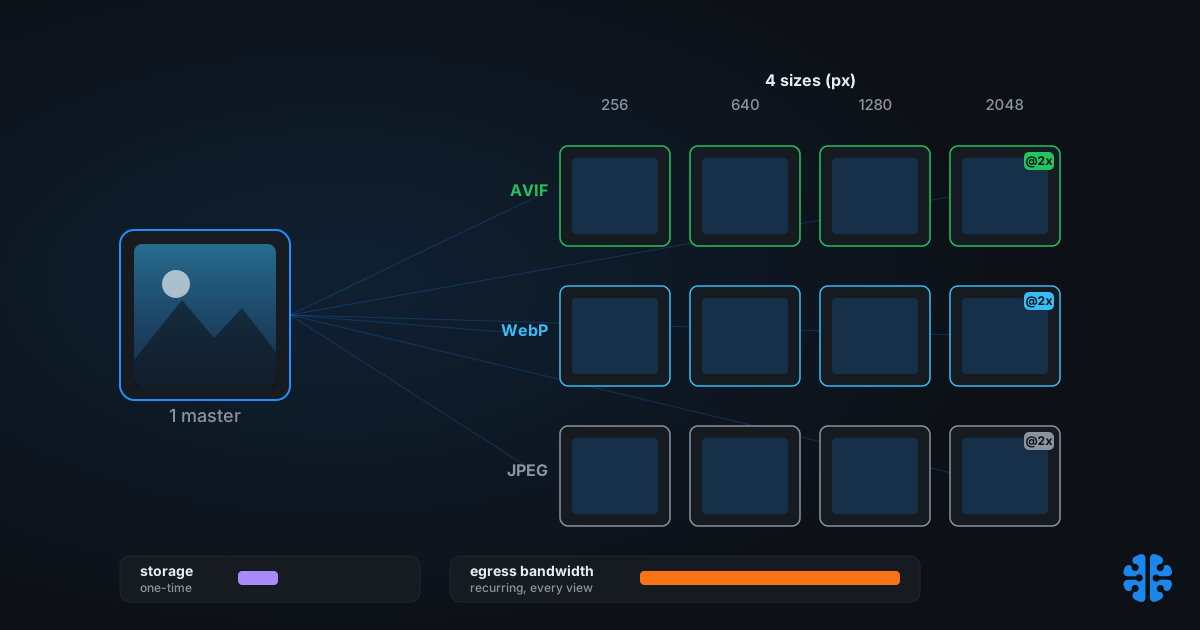
Here is where the derivative math bites. Take a modest catalog of 1M product images. Serve four responsive sizes, so shoppers on small phones do not download desktop pixels. Offer three formats for negotiation: AVIF, WebP, and a JPEG fallback. Add two device-pixel-ratio variants for retina displays. That is 1M x 4 x 3 x 2, roughly 24M stored objects for a 1M-image catalog.
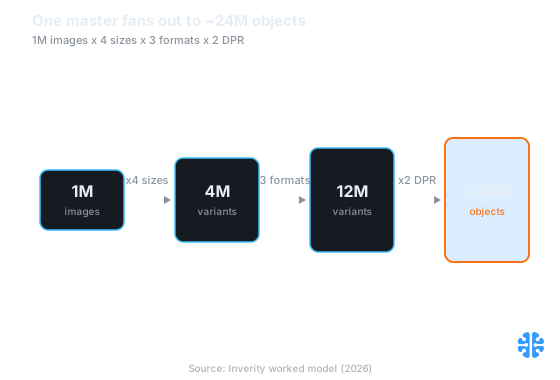
One master image fans out to roughly 24M stored objects across a 1M-image catalog (Source: Inverity worked model, 2026).
Twenty-four million objects sounds alarming, and for storage it barely matters. Object storage is cheap and you pay for it once per variant. The number that actually recurs is egress: every GB a shopper downloads is billed again on the next shopper. That asymmetry, cheap one-time storage against expensive repeated bandwidth, is the hinge the entire cost model turns on.
Citation capsule: Images are the single largest resource type by bytes on the median desktop page, about 1,054 KB across 18 images (Web Almanac 2024, Media). At catalog scale, a 1M-image library generating 4 sizes, 3 formats, and 2 DPR variants can reach roughly 24M stored objects, shifting the dominant cost from one-time storage to recurring egress bandwidth.
The storage-vs-bandwidth-vs-quality triangle
Catalog compression is a three-way trade where you optimize two corners and pay for the third. The three corners are storage (how many bytes you keep), bandwidth (how many bytes you ship), and quality (how good each image looks). You cannot maximize all three at once, and pretending otherwise is how pipelines get expensive.
Work the numbers with a rough, illustrative example. The percentages below are sourced; the pricing is a worked assumption, not a published figure, so treat it as a model you refill with your own CDN rates.
Strategy | Stored objects (1M catalog) | Relative egress per view | Quality | Where the cost lands |
|---|---|---|---|---|
One large JPEG master, served raw | 1M | Highest (baseline 100%) | High but wasteful | Bandwidth, every single view |
Pre-generate every size/format/DPR | ~24M | Lowest (small right-sized bytes) | High, matched per device | Storage + encode compute, once |
Store masters, transform on the fly | ~1M + cache | Low after warm cache | High | Compute on cache miss, recurring |
The reason pre-generated small variants beat one large master is direct: storage is a one-time cost per object, while bandwidth is charged on every request. A shopper who downloads a right-sized 40 KB AVIF instead of a 300 KB JPEG saves 260 KB not once but on every impression, forever. Format choice compounds it. AVIF runs about 50% smaller than JPEG at matched quality (ctrl.blog), so the same view costs half the egress.
The quality corner is the one teams sacrifice by accident. Push compression too hard to shave bandwidth and you ship artifacts that cost returns, the true expense we cover in the sibling piece the true cost of over-compression. Speed still pays, though: a 0.1s mobile load improvement lifted retail conversions 8.4% and average order value 9.2% (Deloitte/Google, "Milliseconds Make Millions", 2020). The goal is to buy that speed with format efficiency, not with visible damage.
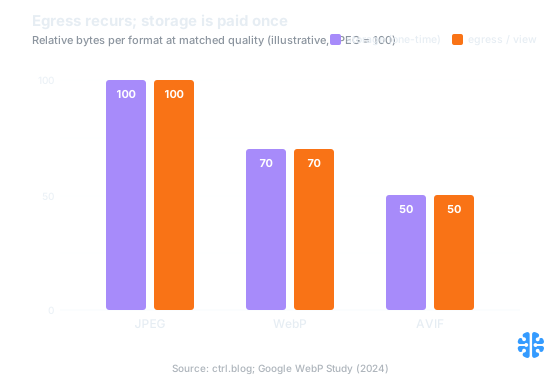
The same file is stored once but sent on every view, so egress dominates at scale (Source: ctrl.blog; Google WebP Study, 2024).
Which formats should a catalog standardize on?
Serve AVIF and WebP with a JPEG fallback through content negotiation, and keep flat art lossless. The web has not converged on a single format: on mobile requests JPEG is 32.4%, PNG 28.4%, GIF 16.8%, WebP 12%, and AVIF just 1.0%, though AVIF quadrupled since 2022 (Web Almanac 2024, Media). Fallbacks are still mandatory.
The efficiency gap justifies the extra formats. Measured by bits per pixel, where lower is more compressed, the median WebP image runs 1.3 bpp and AVIF 1.4 bpp against JPEG at 2.0 and PNG at 3.8 (Web Almanac 2024, Media). Google's own study puts WebP lossy 25-34% below comparable JPEG at equal SSIM, and WebP lossless 26% below PNG (Google WebP Study).
Asset type | Primary format | Fallback | Lossy or lossless | Why |
|---|---|---|---|---|
Photographic product shots | AVIF | WebP, then JPEG | Lossy | Continuous tone compresses well; AVIF ~50% under JPEG |
Logos, line art, flat graphics | WebP lossless | PNG | Lossless | Hard edges and flat fills break under lossy encoding |
Saturated or patterned apparel | AVIF or 4:4:4 JPEG | WebP | Lossy, full chroma | Avoids color bleeding on saturated edges (see below) |
Zoom/detail crops | AVIF | WebP | Lossy, high quality | Exists to survive scrutiny; do not over-compress |
Standardizing does not mean one format for everything. It means one decision rule applied per asset class, then encoded once at ingest. AVIF's cost is real, about 3x slower to encode than WebP and 8x slower than JPEG (SpeedVitals), but a catalog encodes each image once and serves it millions of times, so the compute amortizes to near zero per view.
One delivery note. Only 9.3% of pages use the <picture> element and 42% use srcset (Web Almanac 2024, Media), which means most sites negotiate format at the CDN rather than in markup. Either works; pick one and apply it catalog-wide so no SKU falls back to an unoptimized default.
How do you re-encode a live catalog without breaking it?
Re-encode from the highest-quality master, stage it behind negotiation, and A/B a subset before touching everything. The most common self-inflicted wound is re-encoding an already-served JPEG, which stacks a second lossy pass on the first and compounds generation loss, the damage detailed in recompression and generation loss. Always source from the master, never the shipped file.
The temptation at scale is to run one giant batch job over your live delivery bucket, because that is where all the files already sit. That is exactly the bucket you must not touch. The files there are already lossy, already resized, already stripped. Re-encoding them bakes every prior compromise into the new format permanently. The master library is the only safe input, even when it is slower to reach.
Here is a runbook that has held up for us across large migrations. We have watched teams skip the A/B step to move faster and then spend a week rolling back a hue shift that touched every SKU.
- Freeze the masters as immutable. Originals are the source of truth. Nothing in the pipeline writes back to them.
- Encode into a new variant namespace. Generate AVIF/WebP/JPEG derivatives into fresh paths, leaving current live files untouched.
- Validate decoded output, not just file size. Confirm dimensions, color profile, and a perceptual quality gate per image before promotion.
- A/B a representative subset. Route a slice of traffic to the new variants across your worst-case categories (saturated apparel, fine textures) and watch conversion and return signals.
- Roll out behind CDN negotiation. Promote gradually; keep the old variants warm so rollback is a routing change, not a re-encode.
- Retire old variants only after a full clean window. Storage is cheap, so there is no rush to delete the safety net.
That sequence maps onto the same discipline in optimizing a million images without breaking your site and the end-to-end upload-to-delivery pipeline. The through-line: staged, reversible, master-sourced.
Citation capsule: Re-encoding already-served JPEGs stacks a second lossy pass on the first, compounding generation loss that becomes visibly damaging after only a few cycles (Cloudinary). Safe catalog re-encodes source from immutable masters, validate decoded output, and A/B a saturated-apparel subset before promoting variants behind CDN content negotiation.
Why do red and patterned garments look wrong after compression?
Two independent failures, and most teams only fix one. The first is chroma subsampling. The second is a lost ICC color profile. They produce similar complaints, "the dress looks wrong online", but they are different bugs with different fixes, and shipping a correction for one while ignoring the other still delivers the wrong color.
Start with chroma subsampling. JPEG and other lossy codecs store brightness at full resolution but throw away color detail, typically at 4:2:0. On saturated edges, a red hem against white, an intricate print, that discarded chroma shows up as color bleeding. Forcing full 4:4:4 chroma fixes the bleed but makes the JPEG about 25% larger than 4:2:0 (RTINGS). For saturated or patterned garments, that trade is worth it, or switch to AVIF, which handles saturated edges better at lower cost. We break the mechanism down in chroma subsampling explained.
In our internal review of apparel catalogs, the "wrong color" complaints that survived a chroma fix almost always traced to the second cause: a stripped or missing ICC profile. Subsampling blurs edges; a dropped profile shifts the entire hue. A file authored in a wide-gamut space and served without its profile gets interpreted as sRGB by the browser, and every color slides. This is the more common cause of the flagship "the dress looks wrong" ticket, and it is invisible to any test that only checks file size.
The fix is unglamorous. Preserve the ICC profile through the pipeline, or convert to sRGB and assign the sRGB profile explicitly so the browser has no room to guess. Do not simply strip the profile to save a kilobyte; on saturated brand colors that kilobyte is the difference between the product and a lie. Alpha-heavy assets like logos have their own preservation rules, covered in compressing transparency and alpha channels.
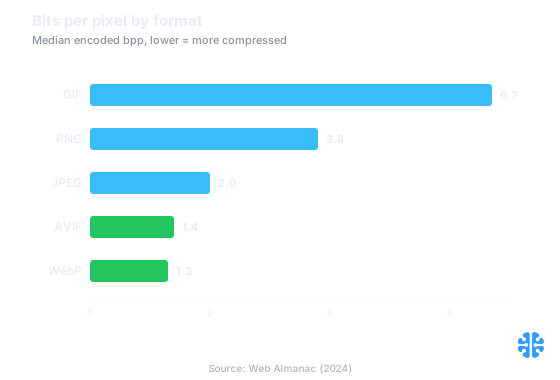
Median compression efficiency by format, where lower bits per pixel means more compression (Source: Web Almanac, 2024).
What this means for your catalog pipeline
The catalog view rearranges every priority. The expensive resource is not any image; it is the recurring egress of a million images times four sizes times three formats times two DPRs. Optimize for that: pre-generate right-sized variants so shoppers never download bytes they cannot see, negotiate AVIF and WebP with a JPEG fallback, and encode once at ingest so AVIF's cost amortizes to nothing per view.
Then protect quality where it earns money. Source every re-encode from immutable masters, stage it behind negotiation, and A/B saturated categories before rollout. Fix apparel color twice, once for chroma subsampling and once for the ICC profile, because fixing either alone still ships the wrong red. At Inverity, we treat that pairing, right-sized bytes plus provably preserved color, as a measurement problem rather than a guess: encode, then prove the quality and the color held. The framework is vendor-neutral, and the median 1,054 KB of image weight per page says most catalogs have room to reclaim.
FAQ
Should we standardize on AVIF or keep JPEG and WebP fallbacks?
Keep fallbacks. AVIF is only 1.0% of mobile image requests even after quadrupling since 2022 (Web Almanac 2024, Media). Serve AVIF first for its ~50% saving over JPEG (ctrl.blog), fall back to WebP, then JPEG, via content negotiation. Standardize the decision rule, not a single output format.
Is it safe to re-encode an existing catalog?
Yes, if you source from masters. Never re-encode already-served JPEGs; that stacks a second lossy pass and compounds generation loss (Cloudinary). Encode into a new variant namespace, validate decoded dimensions and color, A/B a saturated-apparel subset, then roll out behind negotiation with the old variants kept warm for rollback.
Should we pre-generate every variant or transform on the fly?
Both are valid; the trade is storage against compute. Pre-generating up to ~24M objects for a 1M catalog minimizes recurring egress but costs encode time once. On-the-fly transforms keep object counts near 1M plus cache but recur CPU on every cache miss. AVIF's 3x-8x encode cost (SpeedVitals) makes pre-generation the safer default for stable catalogs.
Why do red or patterned garments look off after compression?
Two separate causes. Chroma subsampling at 4:2:0 blurs saturated color edges; forcing 4:4:4 fixes it but adds ~25% to the JPEG (RTINGS). A dropped ICC profile shifts every hue. Fix both: use 4:4:4 or AVIF for saturated goods, and preserve or assign the sRGB profile explicitly.
What is the right setting for zoom images without bloating page weight?
Keep the high-resolution zoom variant lossy but lightly compressed, and load it on demand rather than at page load. Zoom exists to survive scrutiny, so it tolerates far less compression than a thumbnail. Excluding it from the initial payload keeps eager weight inside the median image budget while still serving full detail when a shopper asks.