 Inverity
Client vs Server vs Build-Time: Where to Compress Images
Date Published
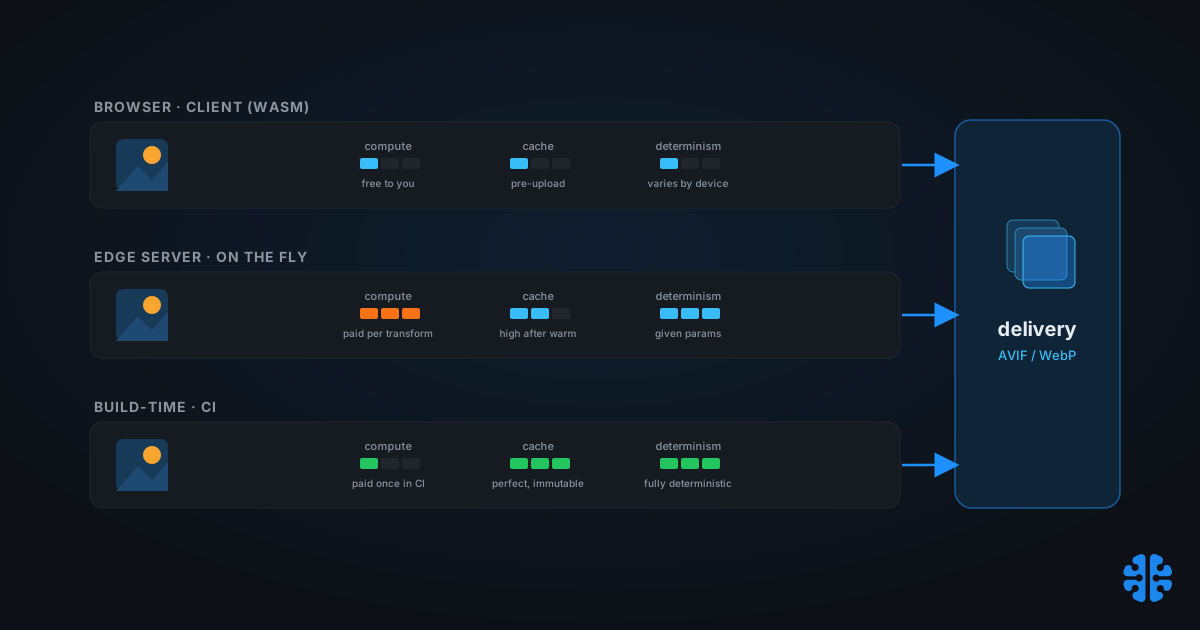
Most compression debates argue about the encoder: MozJPEG versus AVIF, quality 75 versus 82. That argument matters, but it hides a bigger one. The same encoder produces the same bytes whether it runs in a visitor's browser, on your server at request time, or once during a build. What changes is who pays the compute bill, whether the result caches, how fresh it stays, and whether two runs produce identical output. Those four properties, not the codec, decide the architecture. This piece ranks all three locations side by side and then shows why the strongest stacks use all of them.
TL;DR
- Squoosh proved full native codecs, MozJPEG, OxiPNG, WebP, AVIF, and JXL, run entirely in-browser through WebAssembly and Web Workers, at zero server cost to you (web.dev, 2021).
- Next.js optimizes images on demand at request time, not at build, caches the results, and requires sharp to do it (Next.js docs).
- True build-time optimization needs an add-on such as next-image-export-optimizer that runs sharp after a static export (GitHub, 2020).
- CDN on-the-fly services transform via URL parameters and auto-select AVIF or WebP per browser, then cache the result at the edge (Cloudinary docs).
- The decision heuristic: a finite known set favors build-time, unbounded user crops favor on-the-fly, and privacy or cost-offload favors the client. Real stacks combine them.
The three places compression can happen
Compression can run in exactly three places, and each trades the same four properties differently: compute cost, cacheability, freshness, and determinism. The browser spends the user's CPU for free to you. A server or CDN spends money per transform but serves any size on demand. A build spends CI time once and never again. Everything downstream follows from that split.
Notice what these three have in common: the codec is interchangeable. sharp, the libvips-based library that has become the de facto Node compressor and that Next.js uses for dimension detection and blur placeholders, can run at build time or request time with identical settings (Next.js docs). The WebAssembly codecs from Squoosh run the same encoders in a browser tab. So the question is never "which encoder," it is "where should this encoder run, and who absorbs its costs."
Rhetorical but serious: if two locations produce byte-identical output, why would you pick one over the other? Because the bill, the cache behavior, and the freshness are wildly different. Let's take each location in turn.
Client-side compression: who is it actually for?
Client-side compression runs the encoder in the visitor's browser, which means the compute is free to you and the raw file may never leave the device. Squoosh demonstrated the ceiling here: full native codecs, MozJPEG, OxiPNG, WebP, AVIF, and JXL, compiled to WebAssembly and driven by Web Workers, all executing locally with no server round trip (web.dev, 2021).
The performance objection is weaker than it used to be. WebAssembly codecs run far faster than the old JavaScript ports, fast enough that even a heavy encoder like AVIF is viable in the browser (Transloadit). That makes client-side a natural fit for user-generated content, where shrinking a 12 MP phone photo before upload saves your bandwidth and the user's, and for privacy-sensitive flows where the original should not touch your servers.
Two cautions. First, cost varies wildly by device: the same encode that is instant on a laptop can stall a budget phone, and you do not control which the user brings. Second, Squoosh itself is no longer actively maintained. It still works, but it lacks batch processing, size budgets, HEIC input, and presets (Asset Melt). Teams building on this pattern in 2026 tend to reach for jSquash, the browser-ready WASM codecs extracted from Squoosh, which run in both the client and edge workers (jSquash).
Squoosh proved that full native image codecs, MozJPEG, WebP, AVIF, and JXL, run entirely in-browser via WebAssembly and Web Workers at zero server cost, and WebAssembly makes even AVIF encoding viable client-side, which suits user-generated content and privacy-sensitive uploads where the original should never reach your servers (web.dev, 2021; Transloadit).
Client pre-shrinking is central to handling messy uploads, which we cover in UGC pipeline compression.
Server-side and on-the-fly: when does it justify the cost?
Server-side, or on-the-fly, compression transforms images at request time and is the only option that serves any size or format from a single source URL. Next.js embodies the pattern: it optimizes images on demand rather than at build, caches the output on disk, requires sharp, and automatically emits AVIF or WebP plus srcset, lazy loading, and blur placeholders (Next.js docs).
CDN services generalize this to the edge. Cloudinary, imgix, and ImageKit transform through URL parameters, auto-select AVIF or WebP based on the requesting browser, and cache the result near the user (Cloudinary docs). Cloudflare does the same, generating AVIF on the fly through its Image Resizing product (Cloudflare). The appeal is freshness: change a URL parameter and you have a new variant instantly, with no rebuild.
The cost model is the catch, and it needs an honest caveat. You pay per transform, and the first request for any variant pays a latency penalty while the edge generates it. Subsequent requests for the same variant are edge-cache hits and effectively free. We have not found a published cache-hit-ratio figure for the major providers, so treat the economics qualitatively: the first hit funds the transform, warm cache serves the rest. On-the-fly is deterministic given fixed parameters and codec version, but a codec upgrade can silently change output, which matters if you depend on byte stability.
For deeper mechanics on the delivery side, our complete guide to image compression covers how format auto-negotiation works.
Build-time compression: why is it the cheapest per request?
Build-time compression runs the encoder once during CI and ships immutable, pre-optimized files, so every request thereafter costs nothing to transform. It is the cheapest per-request option by a wide margin because the compute happens exactly once, before any user arrives, and the results are perfectly cacheable as static immutable assets.
The friction is that many frameworks do not do it by default. Next.js, despite its image tooling, optimizes at request time; getting true build-time output from a static export requires an add-on such as next-image-export-optimizer, which runs sharp after the export completes (GitHub, 2020). Once wired up, the tradeoff is stark and predictable: output is fully deterministic, cache behavior is perfect, and freshness is low, because changing an image means rebuilding.
That freshness cost is the whole story. Build-time shines when the image set is finite and known ahead of time: a static marketing site, a documentation portal, a product catalog with a fixed roster. It falls apart when users upload arbitrary images or request crops you did not anticipate, because you cannot pre-generate a variant for a request that does not exist yet. Match the location to the shape of your inputs.
The vendor-neutral decision matrix
Here is the spine of the decision, all three locations scored on the four properties that actually differ. No vendor ranking, no favorite: just where each cost lands.
Where | Compute cost | Cache | Freshness | Determinism | Best for |
|---|---|---|---|---|---|
Client (browser WASM) | User's CPU, free to you; slow on low-end devices | Pre-upload | High | Varies per device | UGC, pre-upload shrink, privacy |
Server / on-the-fly (CDN, sharp at the edge) | Paid per transform; first-hit latency | High after warm | Highest, any size or format from one URL | Deterministic given params and codec version | Many variants, unknown crops |
Build-time (static export plus sharp) | Paid once at CI; zero at request time | Perfect, static immutable | Low, rebuild to change | Fully deterministic | Known finite set, static sites |
Sources: web.dev (2021), Next.js docs, Cloudinary docs, GitHub (2020).
The heuristic reads straight off the table. Finite and known ahead of time, choose build-time. Unbounded or user-driven crops, choose on-the-fly. Need to offload compute cost or keep originals private, push work to the client. Most teams do not fit one row cleanly, which is the point of the next section.
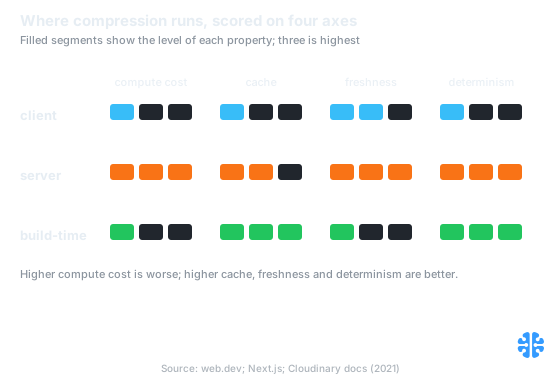
Client is cheap but device-variable, server is fresh but paid per transform, build-time is deterministic but low on freshness. Source: web.dev; Next.js; Cloudinary docs (2021).
Where compression runs decides its economics more than which codec runs. Client-side spends the user's CPU for free but varies by device; on-the-fly serves any variant from one URL but bills per transform; build-time is cheapest per request but low on freshness (web.dev, 2021; Next.js docs). Match the location to the shape of your inputs.
Why the best stacks combine all three
The strongest real-world pipelines do not pick one location; they chain all three, each doing the job it is best at, with exactly one lossy step. A client pre-shrinks the upload to a sane master. The server stores that master untouched. Build-time or on-the-fly then produces the delivery variants. The discipline is that only one of those stages applies lossy compression, so the image never accumulates generation loss.
A concrete reference pipeline looks like this. On upload, the browser uses jSquash to shrink a phone photo to a high-quality master, saving everyone bandwidth. That master lands in storage as the single source of truth. For a static catalog, a build step runs sharp to pre-generate the known sizes; for user-driven crops, an on-the-fly edge transform fills the gaps. Every variant derives from the master, never from another variant.
**** The mistake teams make is treating the three locations as competitors to choose between. They are complementary stages with different cost profiles, and the real design question is not "which one" but "which stage owns the single lossy pass." Get that wrong and you re-compress at two locations, which is generation loss by another name.
**** In practice, the most common double-compression bug we see is a CMS that optimizes on upload sitting behind a CDN that optimizes again on delivery. Neither team knew the other was compressing. The fix is boring and effective: designate one stage as the compressor and make every other stage a pass-through of the master.
That single-lossy-step rule is exactly the generation-loss fix, which we detail in recompression and generation loss. To keep the sizes those stages produce within target, pair this with compression budgets that hold, and to see the whole path in context, read media pipeline: upload to delivery explained. Once you know where compression runs, you can put a number on what it returns; our measuring compression ROI piece does the math. And because any of these stages can ship a regression, a fast rollback path is what makes the pipeline safe to change.
FAQ
Should I compress in the browser before upload or on the server?
Both, for different reasons. Client-side shrinking before upload saves bandwidth and keeps originals private, and WebAssembly makes even AVIF viable in the browser (Transloadit). Server-side then generates delivery variants from the stored master. Apply the lossy step once, at whichever stage you designate, not at both.
Is Squoosh safe to build on if it is no longer maintained?
The app still works but lacks batch processing, size budgets, HEIC support, and presets, and is not actively maintained (Asset Melt). For production, most teams build on jSquash, the browser-ready WASM codecs extracted from Squoosh, which run in both the client and edge workers (jSquash) rather than depending on the Squoosh app itself.
Does Next.js optimize images at build time or request time?
Request time. Next.js optimizes on demand, caches the output, and requires sharp (Next.js docs). True build-time optimization needs an add-on such as next-image-export-optimizer that runs sharp after a static export (GitHub, 2020). Know which you are getting before you reason about cost.
When is a CDN worth it versus pre-generating with sharp?
Use a CDN when you cannot enumerate the variants ahead of time, such as user-driven crops or unknown sizes, because it serves any format from one URL and caches at the edge (Cloudinary docs). Pre-generate with sharp when the set is finite and known, since build-time output costs nothing per request.
How do I avoid double-compressing when both my CMS and CDN optimize?
Designate one stage as the compressor and make the other a pass-through of the master. Double compression is a hidden generation-loss bug, common when a CMS optimizes on upload and a CDN optimizes again on delivery. Feed both from a single lossless master and apply exactly one lossy pass.
The location is the architecture
Pick the encoder last. Pick the location first. Whether compression runs in a browser tab, at a CDN edge, or once in CI determines who pays, what caches, how fresh the output stays, and whether two runs match. Those are the properties that make or break a media pipeline, and they are invisible if you only argue about codecs and quality sliders.
The mature answer is rarely a single location. It is client pre-shrink for uploads, a stored master as the source of truth, and build-time or on-the-fly for delivery, with one lossy step and no accidental second one. At Inverity we treat the placement of that single lossy step as a design decision to verify, not assume, because a pipeline that compresses in two places is paying twice and losing quality for the privilege. Put a dollar figure on the result next, with measuring compression ROI.