 Inverity
Compression Budgets That Hold: Per-Image Byte Limits
Date Published
TL;DR >- The median page shipped 911 KB of images on mobile in 2025, about 42% of total page weight and the single largest resource (Web Almanac 2025). If you want to be fast, you have to beat that number, not match it.- Image weight barely moved year over year, from 900 KB in 2024 to 911 KB in 2025 on mobile (Web Almanac 2024, 2025). Budgets that only advise, without a gate, drift straight back to the median.- The distribution is wildly uneven: mobile image weight ran p25 263 KB, p50 900 KB, p75 2,517 KB, p90 5,905 KB in 2024 (Web Almanac 2024). A single page number hides which images are the problem.- The fix: per-role byte budgets (hero, inline, thumbnail), a committed budget.json, and a CI gate that blocks the pull request. Advisory budgets do not hold; enforced ones do.Most performance budgets are New Year's resolutions written in JSON. A team sets a tidy image ceiling, feels responsible, and then watches page weight creep back to the median over two quarters of shipped features. The budget was never wrong. It just had no teeth. Nobody was ever stopped from merging the pull request that broke it.
A budget that holds needs two things this post is built around. First, it has to be grounded in real distribution data, so the numbers are defensible rather than plucked from a round-number reflex. Second, it has to be enforced by a machine that can block a merge, because a budget humans can quietly ignore is not a budget. It is a suggestion. We will derive the numbers from Web Almanac percentiles and then wire the gate that makes them stick.
What's a reasonable image budget per page in 2026?
Set your page image budget below the median, and treat the median as the line to beat, not meet. The median page shipped 911 KB of images on mobile and 1,058 KB on desktop in 2025, roughly 42% and 44% of total page weight and the largest single resource type (Web Almanac 2025). Matching the median just makes you average.
Anchor to the distribution, not a vibe. In 2024, mobile image weight broke down as p25 263 KB, p50 900 KB, p75 2,517 KB, and p90 5,905 KB (Web Almanac 2024). The gap between p50 and p90 is enormous, which tells you the heavy pages are heavy by a lot, and that a realistic target sits nearer the p25 to p50 band than the median that includes them. A page budget around 500 to 900 KB of images is ambitious but grounded, with 500 KB being the example ceiling in Lighthouse's own budget docs (web.dev).
One number worth internalizing: this barely changes year to year. Mobile image weight went from 900 KB in 2024 to 911 KB in 2025 (Web Almanac 2024, 2025), essentially flat. The web is not getting lighter on its own. Any improvement you want, you have to enforce.
Percentile (mobile, 2024) | Image weight |
|---|---|
p25 | 263 KB |
p50 (median) | 900 KB |
p75 | 2,517 KB |
p90 | 5,905 KB |
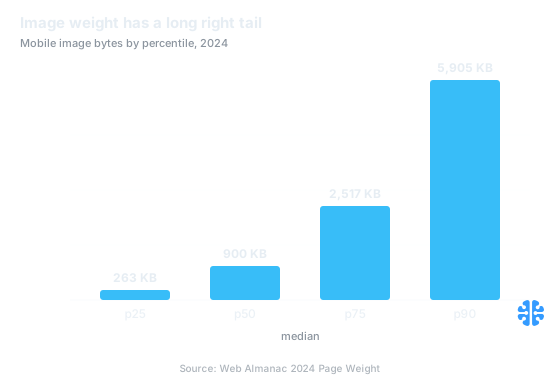
The gap from p50 to p90 shows a long right tail: heavy pages are heavy by a lot (Source: Web Almanac 2024 Page Weight).
Byte budgets by image role: hero, inline, thumbnail
A page-level budget is too coarse to defend, so break it down by what each image does. The median tells you the whole page ships around 911 KB of images (Web Almanac 2025), but that lump sum hides the real decisions. A hero, a body-inline diagram, and a thumbnail have different jobs, different display sizes, and therefore different byte budgets. One ceiling for all three is how budgets get gamed.
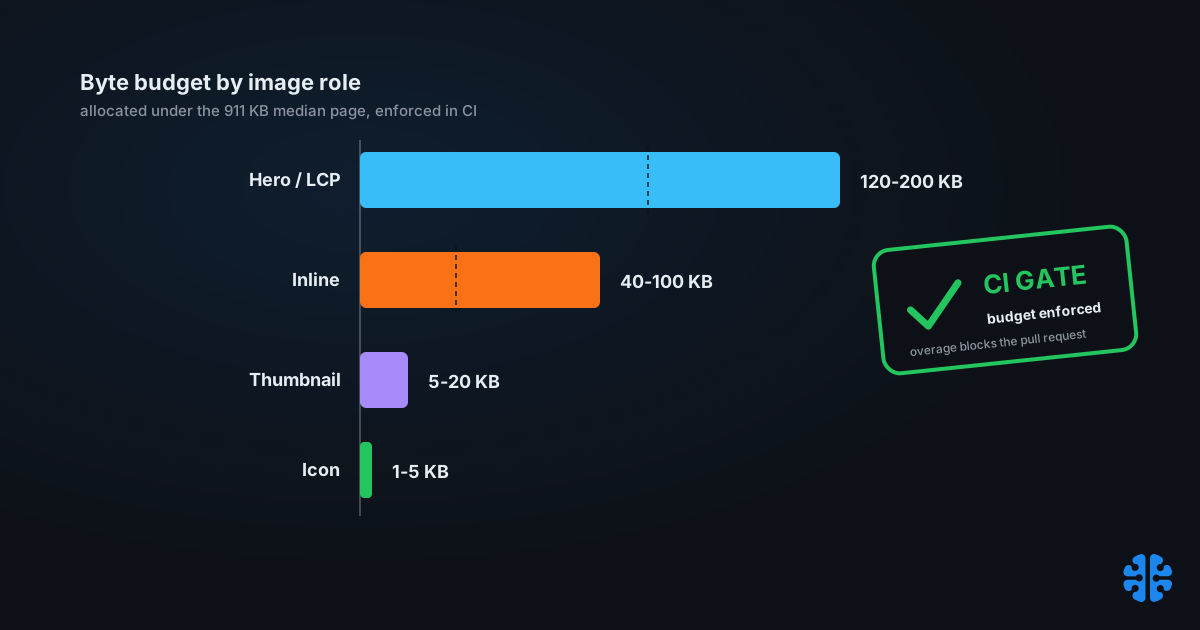
Roles make the budget both stricter and fairer. A thumbnail rendered at 120 pixels has no business weighing what a full-width hero weighs, and holding both to the same number either starves the hero or lets the thumbnail bloat. Per-role budgets let you spend where perception happens and clamp down where it does not. The table below allocates a page budget of roughly 600 KB across roles, keeping the whole page comfortably under the 911 KB median.
Image role | Typical display | Recommended byte budget | Notes |
|---|---|---|---|
Hero / LCP element | Full viewport width | 120-200 KB | Usually your LCP; the biggest single lever |
Inline content image | Column width | 40-100 KB each | Diagrams, screenshots, body photos |
Thumbnail / avatar | 80-200 px | 5-20 KB each | Aggressive compression tolerated |
Icon / UI sprite | Under 64 px | 1-5 KB | Prefer SVG where possible |
Decorative background | Varies | 30-80 KB | Or CSS gradient, zero bytes |
These splits are our recommended allocations, not published statistics; the page total they sum to is anchored to the Web Almanac median. Set the exact numbers to your own design, then defend them per role. And resist one compression setting across roles: a thumbnail survives heavy compression, a hero does not, which is the per-image argument we make in content-adaptive per-image quality. The cost of getting the hero wrong is covered in the true cost of over-compression.
Citation capsule: The median page shipped 911 KB of images on mobile in 2025, about 42% of total page weight and the largest resource type (Web Almanac 2025). Splitting that budget by image role, hero versus inline versus thumbnail, prevents the coarse page-level number from hiding which images actually break it.
Why do compression budgets drift?
Budgets drift because three forces push weight up while nothing pushes back. The first is format regression: a team assumes AVIF savings that never materialize. Across the web, JPG and PNG each still account for about 26% of images, WebP about 11%, and AVIF only about 0.7% in 2025 (Web Almanac 2025 Media). A budget that assumes next-gen formats meets a reality that mostly still ships JPEG and PNG.
The second force is injection you do not control. Marketing tags, third-party widgets, and CMS uploads add images after your careful budget was set, often full-resolution PNGs dropped straight from a design tool. The person adding them is not looking at your budget, and frequently cannot see it. Every uncontrolled upload path is a hole in the budget, which is the exact problem behind why blanket compression hurts your CMS.
The third force is the decisive one: no gate. An advisory budget, a number in a doc or a dashboard nobody has to obey, loses every argument to a shipping deadline. Because image weight is essentially flat year over year, from 900 KB to 911 KB on mobile (Web Almanac 2024, 2025), we can say plainly that the industry's advisory budgets are not working. Drift is the default state. Only enforcement changes it.
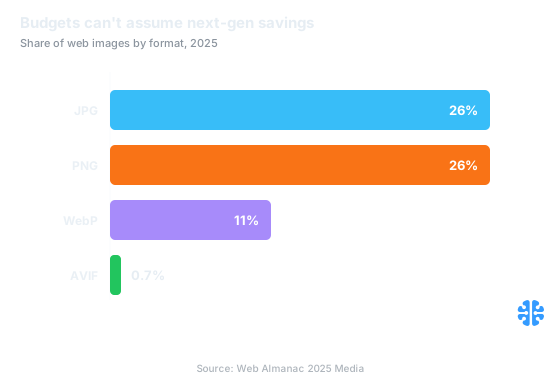
Most images still ship as JPEG or PNG, so budgets cannot assume next-gen savings (Source: Web Almanac 2025 Media).
How do you enforce a budget so it holds?
You make the budget block a merge, not just print a warning. The mechanism already exists: Lighthouse reads a native budget.json that supports three budget types, timing, resource counts, and resource sizes, so you can declare resourceSizes: image capped at, say, 500 KB (web.dev). You run lighthouse <url> --budget-path=budget.json and every overage is flagged against your declared ceiling.
The enforcement lives in CI, where a bot can veto. web.dev is explicit about the pattern: the Lighthouse Bot can prevent a pull request from being merged, and with bundlesize, if the test fails, that pull request is not merged (web.dev). That single property, the failed check blocks the merge, is the entire difference between a budget that holds and one that drifts. Webpack ships a related default: a 250 KB asset and entrypoint size hint that warns when a bundle grows past it (web.dev).
The rule of thumb is simple. If a human has to remember to check the budget, it will drift. If a machine refuses the merge, it holds. Put the gate on the pull request, not on a nightly report nobody reads, and treat a budget overage exactly like a failing test.
A budget.json and CI gate you can commit today
Ship the budget as code so it is versioned, reviewed, and enforced like everything else. A minimal budget.json sets a resource-size ceiling for images and a timing ceiling for the paint that image drives:
```json
[
{
"path": "/*",
"resourceSizes": [
{ "resourceType": "image", "budget": 500 },
{ "resourceType": "total", "budget": 900 }
],
"timings": [
{ "metric": "largest-contentful-paint", "budget": 2500 }
]
}
]
```
Then wire the gate. Run lighthouse <url> --budget-path=budget.json in CI, or add Lighthouse CI as a required status check so an overage fails the run (web.dev). For static assets, add bundlesize or the webpack size hint so an oversized image blocks the pull request rather than warning after release (web.dev). Commit the file, mark the check required, and the budget now defends itself.
The per-role numbers from earlier belong in your review checklist and your image pipeline, while budget.json enforces the page and resource totals the tooling can measure directly. Together they cover both the coarse page ceiling and the per-image decisions behind it. To connect this spending to outcomes, see measuring compression ROI, and to prevent the slow decay of re-encoded assets over time, recompression and generation loss. The full framework sits in our complete guide to image compression.
How does an image budget relate to LCP?
Closely, because your LCP element is usually an image. On most content pages the Largest Contentful Paint element is the hero image, so an image byte budget is, in practice, an LCP budget. A hero held to 120-200 KB paints far sooner than the median 911 KB of images competing for the connection (Web Almanac 2025), which is exactly why the hero gets the tightest per-role scrutiny.
This is why the budget.json above pairs an image size ceiling with a 2,500 ms LCP timing budget, the threshold for a "good" LCP. The two constrain the same physical event from different angles: bytes on the wire and time to paint. When the hero budget slips, LCP slips with it, so guarding the byte budget guards the Core Web Vital your users actually feel. We connect the byte-to-paint chain in Core Web Vitals for images and argue the broader case in why file size is the wrong metric when taken alone.
At Inverity, we treat the perceptual quality floor and the byte budget as two halves of one enforceable contract, so a build can fail for shipping an image that is too heavy or too degraded. The tooling above is vendor-neutral, though. Any team can commit a budget.json and a CI gate this week, and given a decade of flat image weight, most teams should.
FAQ
What's a reasonable image byte budget per page in 2026?
Aim below the 2025 median of 911 KB of images on mobile (Web Almanac 2025), since matching the median makes you average. A page ceiling around 500 to 900 KB is grounded and ambitious, with 500 KB being Lighthouse's own documented example. Split that total by image role rather than enforcing one flat number.
How do I enforce a budget in CI so it isn't ignored?
Commit a budget.json and make the check required, so an overage blocks the pull request. web.dev is explicit: a failed bundlesize test means the PR is not merged, and the Lighthouse Bot can prevent a merge (web.dev). A budget that only warns will drift; a budget that blocks a merge holds.
What's the difference between a timing and a resource-size budget?
A budget.json supports both plus resource counts (web.dev). A resource-size budget caps bytes, for example images under 500 KB. A timing budget caps a metric, for example LCP under 2,500 ms. Use size budgets to control payload and timing budgets to control the experience; the two reinforce each other.
Why does page weight keep creeping up after I set a budget?
Three drift forces: assumed next-gen format savings that never land, given AVIF is still only about 0.7% of images (Web Almanac 2025 Media); uncontrolled uploads from marketing tags and CMS paths; and no CI gate. Image weight is flat year over year, so without enforcement, drift back to the median is the default outcome.
How does an image budget relate to Core Web Vitals and LCP?
The LCP element is usually the hero image, so an image byte budget effectively becomes an LCP budget. Keeping the hero small helps it paint under the 2,500 ms "good" LCP threshold, well ahead of the median 911 KB of page imagery (Web Almanac 2025). Guarding hero bytes directly guards the metric users feel.